Page 1 of 1
How to interpret TOS6 Hypercache
Posted: 11 Dec 2024, 02:55
by mrslother
I created a hypercache on my M.2 drive and am a bit confused on how to interpret the results.
For context:
- NAS: U4-423
- TOS: 6.0.555
- RAM: 32G
- Storage: TRAID of 48T
- M.2: 2T
In Control Panel --> Storage Manager --> Hyper Cache it shows one cache with the following:
Code: Select all
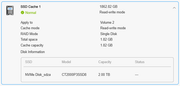
	SSD Cache 1: 1862.82 GB
	Normal: Read-write mode
	Apply to: Volume 2
	Cache Mode: read-write mode
	RAID Mode: Signle Disk
	Total space: 1.82 GB
	Cache capacity 1.82 GB
	Disk Info: SSD=NVMe Disk_sdza, Model=xxxxxx, Capacity= 2.00TB, Status =---
How do I interpret this? Is "Cache 1" 1.8T in size or is it 1.8GB? Should I assume the total space & cache capacity units are wrong?
Re: How to interpret TOS6 Hypercache
Posted: 11 Dec 2024, 03:43
by bugacha
I have same output - I dont understand why Status is not showing
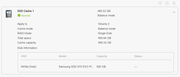
@TM team can you please explain how to find out whether this is used at all ?
Re: How to interpret TOS6 Hypercache
Posted: 11 Dec 2024, 19:13
by TMtina
mrslother wrote: ↑11 Dec 2024, 02:55
I created a hypercache on my M.2 drive and am a bit confused on how to interpret the results.
For context:
- NAS: U4-423
- TOS: 6.0.555
- RAM: 32G
- Storage: TRAID of 48T
- M.2: 2T
In Control Panel --> Storage Manager --> Hyper Cache it shows one cache with the following:
Code: Select all
	SSD Cache 1: 1862.82 GB
	Normal: Read-write mode
	Apply to: Volume 2
	Cache Mode: read-write mode
	RAID Mode: Signle Disk
	Total space: 1.82 GB
	Cache capacity 1.82 GB
	Disk Info: SSD=NVMe Disk_sdza, Model=xxxxxx, Capacity= 2.00TB, Status =---
How do I interpret this? Is "Cache 1" 1.8T in size or is it 1.8GB? Should I assume the total space & cache capacity units are wrong?
Can you provide the relevant screenshots?
Re: How to interpret TOS6 Hypercache
Posted: 12 Dec 2024, 04:26
by mrslother
TMtina wrote: ↑11 Dec 2024, 19:13
Can you provide the relevant screenshots?
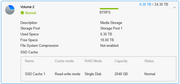
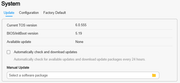
I assume by relevant screenshots you mean these. Please advise otherwise:
Re: How to interpret TOS6 Hypercache
Posted: 12 Dec 2024, 09:45
by TMtina
mrslother wrote: ↑12 Dec 2024, 04:26
TMtina wrote: ↑11 Dec 2024, 19:13
Can you provide the relevant screenshots?
I assume by relevant screenshots you mean these. Please advise otherwise:
This may be an issue with the page display. We will verify it.
Re: How to interpret TOS6 Hypercache
Posted: 14 Dec 2024, 07:41
by mrslother
TMtina wrote: ↑12 Dec 2024, 09:45
This may be an issue with the page display. We will verify it.
Tina, were you able to verify this? Should I relax and not worry about this?
Re: How to interpret TOS6 Hypercache
Posted: 06 Jan 2025, 21:41
by rfbjr
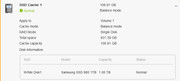
Can some just explain how the hyper cache size is calculated? Do I have any control of it's size?
I do plan on getting a smaller M.2 drive as the 1tb is being wasted.
Thanks!
F4-223 (4g ram) (TOS 6.0.577)
21.80TB Raid 5
Re: How to interpret TOS6 Hypercache
Posted: 07 Jan 2025, 04:27
by mrslother
rfbjr wrote: ↑06 Jan 2025, 21:41
Can some just explain how the hyper cache size is calculated? Do I have any control of it's size?
I do plan on getting a smaller M.2 drive as the 1tb is being wasted.
Thanks!
F4-223 (4g ram) (TOS 6.0.577)
21.80TB Raid 5
Somewhere I read that the hypercache size was based on how much RAM you have. Initially my u4-423 had only 4G of RAM and the cache was created with only a few hundred Gig in size, even though the storage volume was 24T and my M.2 was 2T. After upgrading to 32G RAM I recreated the cache and it is now a full 1T in size.
Re: How to interpret TOS6 Hypercache
Posted: 07 Jan 2025, 05:28
by rfbjr
mrslother wrote: ↑07 Jan 2025, 04:27
rfbjr wrote: ↑06 Jan 2025, 21:41
Can some just explain how the hyper cache size is calculated? Do I have any control of it's size?
I do plan on getting a smaller M.2 drive as the 1tb is being wasted.
Thanks!
F4-223 (4g ram) (TOS 6.0.577)
21.80TB Raid 5
Somewhere I read that the hypercache size was based on how much RAM you have. Initially my u4-423 had only 4G of RAM and the cache was created with only a few hundred Gig in size, even though the storage volume was 24T and my M.2 was 2T. After upgrading to 32G RAM I recreated the cache and it is now a full 1T in size.
I will check that out, thanks!
Re: How to interpret TOS6 Hypercache
Posted: 12 Jan 2025, 19:24
by rfbjr
So with 4gig ram I got ~100gig Hyper Cache. Added a 16gig stick in my F4-223 so 20gig ram total now and the Hyper Cache is the full 1TB (~980gig).
I'm sure there is logic in the above but I can't figure it out and honestly doesn't matter. I'm no longer wasting most of the 1TB stick.