How to interpret TOS6 Hypercache

RAID, Volume, storage pool, hard drive, USB, SSD cache and iSCSI LUN
Locked
User avatar
mrslother
Posts: 48
Joined: 06 Jul 2023, 04:20
United States of America

How to interpret TOS6 Hypercache

Post by mrslother »

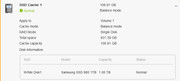
I created a hypercache on my M.2 drive and am a bit confused on how to interpret the results.
For context:
  • NAS: U4-423
  • TOS: 6.0.555
  • RAM: 32G
  • Storage: TRAID of 48T
  • M.2: 2T

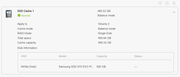
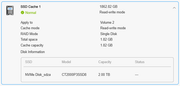
In Control Panel --> Storage Manager --> Hyper Cache it shows one cache with the following:

Code: Select all

	SSD Cache 1: 1862.82 GB
	Normal: Read-write mode
	Apply to: Volume 2
	Cache Mode: read-write mode
	RAID Mode: Signle Disk
	Total space: 1.82 GB
	Cache capacity 1.82 GB
	Disk Info: SSD=NVMe Disk_sdza, Model=xxxxxx, Capacity= 2.00TB, Status =---
How do I interpret this? Is "Cache 1" 1.8T in size or is it 1.8GB? Should I assume the total space & cache capacity units are wrong?
User avatar
bugacha
Posts: 59
Joined: 09 Nov 2024, 16:25
Algeria

Re: How to interpret TOS6 Hypercache

Post by bugacha »

I have same output - I dont understand why Status is not showing

Image

@TM team can you please explain how to find out whether this is used at all ?
User avatar
TMtina
TM Support
Posts: 245
Joined: 01 Nov 2022, 18:00

Re: How to interpret TOS6 Hypercache

Post by TMtina »

mrslother wrote: 11 Dec 2024, 02:55 I created a hypercache on my M.2 drive and am a bit confused on how to interpret the results.
For context:
  • NAS: U4-423
  • TOS: 6.0.555
  • RAM: 32G
  • Storage: TRAID of 48T
  • M.2: 2T

In Control Panel --> Storage Manager --> Hyper Cache it shows one cache with the following:

Code: Select all

	SSD Cache 1: 1862.82 GB
	Normal: Read-write mode
	Apply to: Volume 2
	Cache Mode: read-write mode
	RAID Mode: Signle Disk
	Total space: 1.82 GB
	Cache capacity 1.82 GB
	Disk Info: SSD=NVMe Disk_sdza, Model=xxxxxx, Capacity= 2.00TB, Status =---
How do I interpret this? Is "Cache 1" 1.8T in size or is it 1.8GB? Should I assume the total space & cache capacity units are wrong?
Can you provide the relevant screenshots?
To contact our team, please send email to following addresses, remember to replace (at) with @:

Technical team: support(at)terra-master.com(for technical support)
Service team: service(at)terra-master.com(for purchasing, return, replacement, RMA service)
User avatar
mrslother
Posts: 48
Joined: 06 Jul 2023, 04:20
United States of America

Re: How to interpret TOS6 Hypercache

Post by mrslother »

TMtina wrote: 11 Dec 2024, 19:13 Can you provide the relevant screenshots?
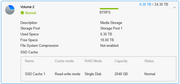
I assume by relevant screenshots you mean these. Please advise otherwise:


Image

Image

Image
User avatar
TMtina
TM Support
Posts: 245
Joined: 01 Nov 2022, 18:00

Re: How to interpret TOS6 Hypercache

Post by TMtina »

mrslother wrote: 12 Dec 2024, 04:26
TMtina wrote: 11 Dec 2024, 19:13 Can you provide the relevant screenshots?
I assume by relevant screenshots you mean these. Please advise otherwise:


Image

Image

Image
This may be an issue with the page display. We will verify it.
To contact our team, please send email to following addresses, remember to replace (at) with @:

Technical team: support(at)terra-master.com(for technical support)
Service team: service(at)terra-master.com(for purchasing, return, replacement, RMA service)
User avatar
mrslother
Posts: 48
Joined: 06 Jul 2023, 04:20
United States of America

Re: How to interpret TOS6 Hypercache

Post by mrslother »

TMtina wrote: 12 Dec 2024, 09:45 This may be an issue with the page display. We will verify it.
Tina, were you able to verify this? Should I relax and not worry about this?
User avatar
rfbjr
Silver Member
Posts: 400
Joined: 16 May 2024, 23:43
United States of America

Re: How to interpret TOS6 Hypercache

Post by rfbjr »

Can some just explain how the hyper cache size is calculated? Do I have any control of it's size?
I do plan on getting a smaller M.2 drive as the 1tb is being wasted.
Thanks!

F4-223 (4g ram) (TOS 6.0.577)
21.80TB Raid 5

Image
F6-424 & F4-425 Plus at 7.0.0777
F4-424 Pro also at 7.0.0777
D4-320
User avatar
mrslother
Posts: 48
Joined: 06 Jul 2023, 04:20
United States of America

Re: How to interpret TOS6 Hypercache

Post by mrslother »

rfbjr wrote: 06 Jan 2025, 21:41 Can some just explain how the hyper cache size is calculated? Do I have any control of it's size?
I do plan on getting a smaller M.2 drive as the 1tb is being wasted.
Thanks!

F4-223 (4g ram) (TOS 6.0.577)
21.80TB Raid 5

Image
Somewhere I read that the hypercache size was based on how much RAM you have. Initially my u4-423 had only 4G of RAM and the cache was created with only a few hundred Gig in size, even though the storage volume was 24T and my M.2 was 2T. After upgrading to 32G RAM I recreated the cache and it is now a full 1T in size.
User avatar
rfbjr
Silver Member
Posts: 400
Joined: 16 May 2024, 23:43
United States of America

Re: How to interpret TOS6 Hypercache

Post by rfbjr »

mrslother wrote: 07 Jan 2025, 04:27
rfbjr wrote: 06 Jan 2025, 21:41 Can some just explain how the hyper cache size is calculated? Do I have any control of it's size?
I do plan on getting a smaller M.2 drive as the 1tb is being wasted.
Thanks!

F4-223 (4g ram) (TOS 6.0.577)
21.80TB Raid 5

Image
Somewhere I read that the hypercache size was based on how much RAM you have. Initially my u4-423 had only 4G of RAM and the cache was created with only a few hundred Gig in size, even though the storage volume was 24T and my M.2 was 2T. After upgrading to 32G RAM I recreated the cache and it is now a full 1T in size.
I will check that out, thanks!
F6-424 & F4-425 Plus at 7.0.0777
F4-424 Pro also at 7.0.0777
D4-320
User avatar
rfbjr
Silver Member
Posts: 400
Joined: 16 May 2024, 23:43
United States of America

Re: How to interpret TOS6 Hypercache

Post by rfbjr »

So with 4gig ram I got ~100gig Hyper Cache. Added a 16gig stick in my F4-223 so 20gig ram total now and the Hyper Cache is the full 1TB (~980gig).
I'm sure there is logic in the above but I can't figure it out and honestly doesn't matter. I'm no longer wasting most of the 1TB stick.
F6-424 & F4-425 Plus at 7.0.0777
F4-424 Pro also at 7.0.0777
D4-320
Locked

Return to “Storage”