

Hi,
I'm using the Terramaster TD2 for years . After I havent been using it for 3 months now I connected it again but on my Mac it doesent show up as an external drive.
I tried to restart both Mac and drive as well as to change ports on both devices .
The Terramaster is running and both leds are green .
While I was not using it I havet done any upgrade to my OS .
Do anybody know how can I connect to it again ?
TD2 doesn't show any more


Re: TD2 doesn't show any more
Hi.
Are you using a DAS device with Thunderbolt interface? What is its model number?
Please try restarting the computer and using it for a period of time to observe if there are any similar issues.
Or replace the interface and use it for a period of time to observe if there are any similar issues.
Or replace the computer and use it for a period of time to observe if there are any similar issues.
It is also possible that there is a compatibility issue with the hard drive. Please try replacing it with a hard drive listed in the compatibility list, use it for a period of time, and observe if there are any similar issues.
https://www.terra-master.com/global/compatibility/
It is also possible that there is a file system error. Please try using system tools to fix it and then use it for a period of time to observe if there are any similar issues.
Or backup the data, then reformat it and use it for a period of time to observe if there are any similar issues. (It is recommended to use NTFS for Windows and APFS for Mac)
Re: TD2 doesn't show any more
HI,
the S/N is 200301872 , TD2 thunderbolt3
yes Thunderbolt interface .
I was using it for years without any connecting issue since now , so it couldn't be a compatibility issue.
If its a system error I cant solve it as I cannot access the device , at least not from this computer
the S/N is 200301872 , TD2 thunderbolt3
yes Thunderbolt interface .
I was using it for years without any connecting issue since now , so it couldn't be a compatibility issue.
If its a system error I cant solve it as I cannot access the device , at least not from this computer
Re: TD2 doesn't show any more
This may help you temporarily, press and hold the TD2 power button until the TD2 shuts down, then click the power button again. It will then reappear in "My Computer" and Disk Management. To help pinpoint the problem, you can export the debug logs from the Logs - System Logs - Advanced section and send them to our technical support email. Thank you for ...
Re: TD2 doesn't show any more
I already tried , and now once again , the TD2 is running normally but it doesn't appear at all ...

Re: TD2 doesn't show any more
You can check whether it appears in the computer's disk management. If it appears, then you need to check whether the hard drive or hard disk partition used is faulty; if it does not appear in the disk management, then you can try to replace the computer and replace the Thunderbolt interface.
To contact our team, please send email to following addresses, remember to replace (at) with @
Technical team: support(at)terra-master.com (for technical support)
Service team: service(at)terra-master.com (for purchasing, return, replacement, RMA service)
Technical team: support(at)terra-master.com (for technical support)
Service team: service(at)terra-master.com (for purchasing, return, replacement, RMA service)
Re: TD2 doesn't show any more
The disk is not shown in the computer management. I already replaced the thunderbolt interface .I have installed a software Ride manager pro that do not start , may this be the reason why I cant use the TD2?
I can uninstall it but I dont hav the install folder any more
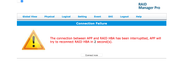
I can uninstall it but I dont hav the install folder any more
Re: TD2 doesn't show any more
Hello! RAID Mnanger Pro is not intended for use with TD2 devices.
TD2 devices are hardware devices without related software support.
If you want to create RAID mode, please use the TD2 device hardware RAID knob debugging.
To contact our team, please send email to following addresses, remember to replace (at) with @
Technical team: support(at)terra-master.com (for technical support)
Service team: service(at)terra-master.com (for purchasing, return, replacement, RMA service)
Technical team: support(at)terra-master.com (for technical support)
Service team: service(at)terra-master.com (for purchasing, return, replacement, RMA service)
Re: TD2 doesn't show any more
To be honest I dont remember I've been using the ride manager , I just found it installed on my computer .
Anyway the computer do not recognise the external storage , maybe the problem is the system file on the hard disk , I dont see any other option
Anyway the computer do not recognise the external storage , maybe the problem is the system file on the hard disk , I dont see any other option
Re: TD2 doesn't show any more
I strted each of the 2 HDD separately using an external SATA cable .Both disks are working ,so it seems the problem is when they are mounted on the TD2 device . Any idea how to fix it?