Page 1 of 2
Zidoo Z9X and F4-424
Posted: 07 Dec 2024, 08:24
by HD335
I've been using my Z9X medial player for a year and half now and love it. It does everything I want it and easily. My collection of digital files is growing and using a bunch of portable drives isn't the solution I'd like so I started to research into getting a NAS setup.
I ended up buying a Terramaster F4-424 4 bay NAS and two 16tb Seagate IronWolf Pro CMR 3.5 Inch SATA 6Gb/s 7200 RPM 256MB Cache for RAID. Setup went easily and the Zidoo sees the SMB and I successfully moved files over to to be played on the Zidoo through the NAS. Low bitrate files and highly compressed files play fine, however any time I'm trying to play a higher resolution file, lets just say 20gb for a movie, every time the I hear the hard drives working, the video stutters. I had it connected via ethernet to the Zidoo, and then switched it to HDMI. Both still have the stuttering issue whenever the hard rive is actively making the noise when it's reading the disk.
I figure it can't be that the Seagate hard drives aren't able to keep up as those portable hard drive have a lower rpm speed. The connection via ethernet or HDMI is more than adequate for data transmission. Is this something to do with how the RAID is setup? I used Terramasters' default setup of TRAID where it appears to be a 1:1 mirror. I wonder if the way the redundancy is setup is causing additional hard drive and I should start over and use JBOD or RAID 1.
Re: Zidoo Z9X and F4-424
Posted: 07 Dec 2024, 11:22
by RyanYang
For detailed information about TRAID, you can refer to the following link:
viewtopic.php?t=3191.
You can also check the hard drive performance by going to the hard disk module in the TOS control panel and selecting 'Benchmark' in the top right corner. Which cache mode have you chosen?
Re: Zidoo Z9X and F4-424
Posted: 07 Dec 2024, 15:18
by TMroy
The issue you described is not related to the type of array. There are various reasons for low data throughput, including the response speed of the disks and the quality of the network connection between multiple devices. You can use a speed test tool on your computer to check if your network and disks are functioning properly.
Re: Zidoo Z9X and F4-424
Posted: 08 Dec 2024, 13:20
by HD335
TMRyan wrote: ↑07 Dec 2024, 11:22
For detailed information about TRAID, you can refer to the following link:
viewtopic.php?t=3191.
You can also check the hard drive performance by going to the hard disk module in the TOS control panel and selecting 'Benchmark' in the top right corner. Which cache mode have you chosen?
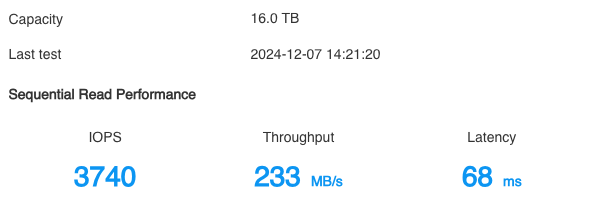
I used the TOS benchmark test and these are the results for each 16tb drive. I do not know how to adjust the cache mode, I assume the drive is utilizing 256mb. When I setup the NAS, I used the default setup.
HARD DRIVE 1
 HARD DRIVE 2
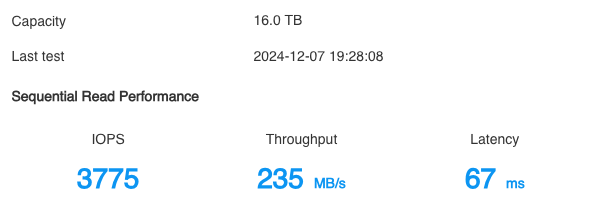 image free upload
TMroy wrote: ↑07 Dec 2024, 15:18
The issue you described is not related to the type of array. There are various reasons for low data throughput, including the response speed of the disks and the quality of the network connection between multiple devices. You can use a speed test tool on your computer to check if your network and disks are functioning properly.
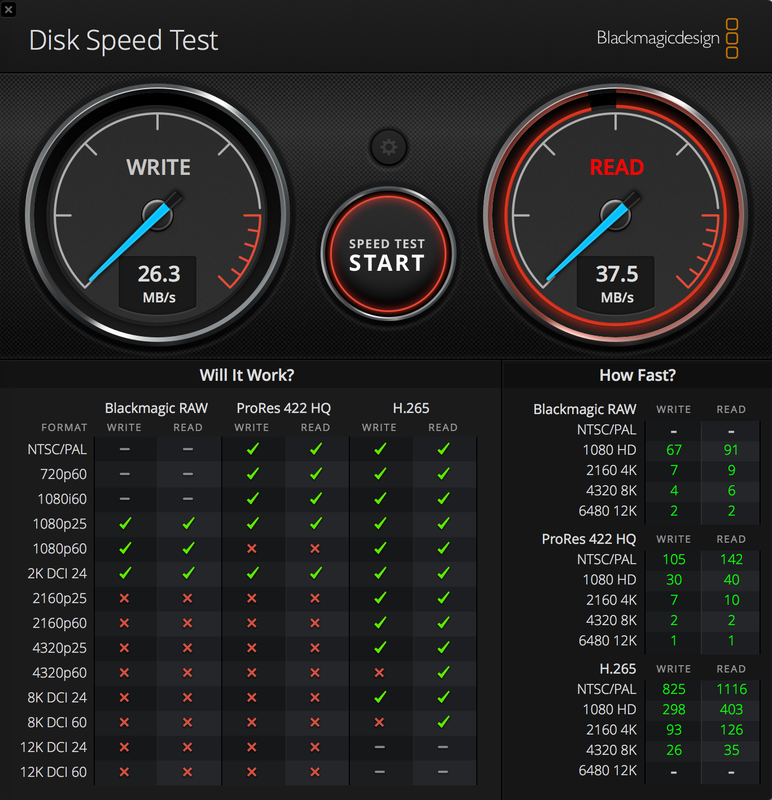
I downloaded Black Magic disk speed test. This is ran from my laptop over the wi-fi however when I'm playing the files from the NAS, it is directly connected to the Zidoo media player that outputs the audio and video to the display. The connection between the NAS and Zidoo was initially an ethernet cable, then I switched to HDMI. Both connections had the stuttering. Here's the speed test over wi-fi.
Re: Zidoo Z9X and F4-424
Posted: 09 Dec 2024, 13:42
by TMroy
From the benchmark test results, your drives seem working fine. Please check the network connection issue and confirm whether your network bandwidth meets the video bitrate you want to play.
Re: Zidoo Z9X and F4-424
Posted: 09 Dec 2024, 15:07
by HD335
TMroy wrote: ↑09 Dec 2024, 13:42
From the benchmark test results, your drives seem working fine. Please check the network connection issue and confirm whether your network bandwidth meets the video bitrate you want to play.
The NAS is directly connected to the media player via a certified high speed HDMI cable, the same cable that I would use to connect to a 4K UHD Blu-ray player so the network is not needed for data transfer from NAS to the Zidoo media player. Is there anything else within the NAS that might be causing the slight interruption?
Re: Zidoo Z9X and F4-424
Posted: 13 Dec 2024, 07:40
by HD335
It looks like it's something with the NAS unit itself, I purchased another brand and decided to try a DAS instead to test if it's a hard drive issue. High bitrate video files even up to 80gb have no issues playing on the new unit. Compared between the two units, the F4-424 is louder and makes the hard drive have louder sounds when reading. It's too bad, I felt the TOS interface was pretty good for a beginner but ultimately the case usage here does not work for me as it can't handle the larger files continuously reading and providing a smooth stream to my media player.
Re: Zidoo Z9X and F4-424
Posted: 13 Dec 2024, 12:12
by TMroy
"The NAS is directly connected to the media player via a certified high speed HDMI cable" what this mean? can you play a video from your media player via HDMI directly connect to NAS?
My initial judgment is that this is an issue with your network or the network connection of your Zidoo media player.
Re: Zidoo Z9X and F4-424
Posted: 15 Dec 2024, 03:47
by HD335
TMroy wrote: ↑13 Dec 2024, 12:12
"The NAS is directly connected to the media player via a certified high speed HDMI cable" what this mean? can you play a video from your media player via HDMI directly connect to NAS?
My initial judgment is that this is an issue with your network or the network connection of your Zidoo media player.
Yes, I was able to play the video files with a high speed USB cable attached from the NAS to the media player as well. But any higher bitrate files with larger file sizes of 20gb or more will cause the slight issues in playback.
Re: Zidoo Z9X and F4-424
Posted: 15 Dec 2024, 03:51
by HD335
It's really too bad this didn't work out, I liked it and overall it's a good unit with the exception of dealing with larger files and whatever the NAS was asking the hard drives to do, made the hard drives work louder than the DAS I'm using now. Could it be a defective NAS?