Page 1 of 1
Linux App not working
Posted: 06 Dec 2024, 07:22
by highgrade
The Tnas Desktop app for Linux not is working not discovering my NAS I am Zorin OS
Re: Linux App not working
Posted: 06 Dec 2024, 11:23
by RyanYang
Thank you for your feedback! We will check and make the necessary adjustments. In the meantime, you can try the following methods:
1. Install TNAS PC using a Windows system.
2. Log into the router to view connected devices and their IP addresses.
3. Install the `nmap` tool on Zorin OS to scan the IP addresses of devices on the local network. Here are the steps to install and use `nmap`:
# Adjust the IP range according to your network configuration
Re: Linux App not working
Posted: 08 Dec 2024, 08:17
by highgrade
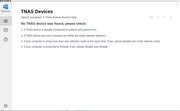
Still not seeing nas Via TNAS PC software please see attachment
Re: Linux App not working
Posted: 21 Jan 2025, 17:47
by EthanLiu
Recently, we have completed the adaptation work for the new version of TNAS PC on Linux systems. You can try downloading the installation package from the following link:
https://download3.terra-master.com/Apps ... _amd64.deb
If you encounter any issues during installation or use, please contact us immediately. We will conduct further adaptation and optimization work based on your feedback.