No access to media folder on TNAS from Emby Server  [SOLVED]

Discussion on Emby media server, clients
Post Reply
User avatar
jhnbrg
Posts: 7
Joined: 03 Dec 2024, 21:04
Germany

No access to media folder on TNAS from Emby Server  [SOLVED]

Post by jhnbrg »

Hello everyone.

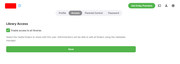
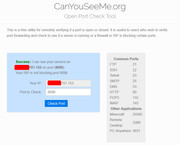
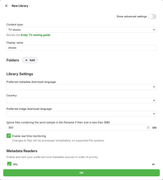
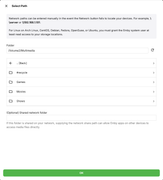
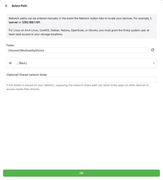
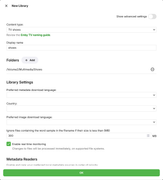
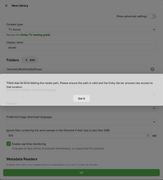
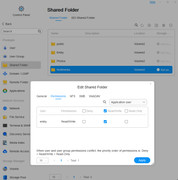
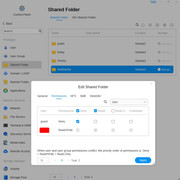
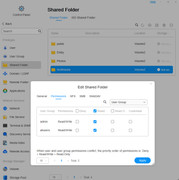
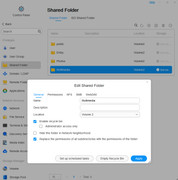
I need your help, please. I have the TNAS F4-423 with two Volumes. The operating system is TOS6 6.0.535, installed on Volume 1. Emby Server version installed on the TNAS: 4.8.8.0. My problem is that I have no access to media folders on the NAS when I want to create a new library on Emby Server. Media folders are on Volume 2/Multimedia. All necessary user permissions are set. I have full access to the media folders on my PC desktop and on my Sony Smart TV. Below are screenshots describing my problem. Any ideas how to solve this problem?

Image Image Image Image Image Image Image

Image Image Image Image
F4-423
User avatar
jhnbrg
Posts: 7
Joined: 03 Dec 2024, 21:04
Germany

Re: No access to media folder on TNAS from Emby Server

Post by jhnbrg »

Update:

I have and had (!) full access to the media folders on Volume 2, though! Emby Server App can't find media folders. So I installed PLEX for testing. And I have full access to media folders on my NAS when I create a new library on PLEX Server. Seems Emby is buggy.
F4-423
User avatar
RyanYang
TM Support
Posts: 1141
Joined: 01 Dec 2020, 11:50
China

Re: No access to media folder on TNAS from Emby Server

Post by RyanYang »

When adjusting the permissions for the Emby application user on a shared folder, try enabling the option to 'Inherit shared folder permissions'.
To contact our team, please send email to following addresses, remember to replace (at) with @
Technical team: support(at)terra-master.com (for technical support)
Service team: service(at)terra-master.com (for purchasing, return, replacement)
User avatar
jhnbrg
Posts: 7
Joined: 03 Dec 2024, 21:04
Germany

Re: No access to media folder on TNAS from Emby Server

Post by jhnbrg »

When adjusting the permissions for the Emby application user on a shared folder, try enabling the option to 'Inherit shared folder permissions'.
The option "Replace the permissions of all subdirectories with permissions of the folder" is set and it works on Plex Server. This is the alert message from Emby Server:

Exception of type 'SQLitePCL.pretty.SQLiteException' was thrown. at SQLitePCL.pretty.SQLiteDatabaseConnection.PrepareStatement(String sql, ReadOnlySpan`1& tail) at SQLitePCL.pretty.DatabaseConnection.PrepareStatement(IDatabaseConnection This, String sql) at Emby.Server.Implementations.Data.SqliteItemRepository.QueryItemsInTransaction[T](InternalItemsQuery query, IDatabaseConnection db, String[] columnsToSelect, Boolean filterColumns, String[] groupBy, Func`5 rowReaderFn, String methodName) at Emby.Server.Implementations.Data.SqliteItemRepository.QueryItemsInTransaction[T](InternalItemsQuery query, IDatabaseConnection db, String[] columnsToSelect, Boolean filterColumns, Func`5 rowReaderFn, String methodName) at Emby.Server.Implementations.Data.SqliteItemRepository.GetItemList(InternalItemsQuery query) at Emby.Server.Implementations.Library.LibraryManager.GetItemsResult(InternalItemsQuery query) at MediaBrowser.Controller.Entities.Folder.GetItemsInternal(InternalItemsQuery query) at MediaBrowser.Controller.Entities.AggregateFolder.GetItemsInternal(InternalItemsQuery query) at MediaBrowser.Controller.Entities.Folder.GetItems(InternalItemsQuery query) at MediaBrowser.Controller.Entities.Folder.GetChildren(InternalItemsQuery query) at MediaBrowser.Controller.Entities.Folder.GetChildrenForValidation() at Emby.Server.Implementations.Library.LibraryManager.ValidatePhysicalRoots(IProgress`1 progress, IDirectoryService directoryService, CancellationToken cancellationToken) at Emby.Server.Implementations.Library.LibraryManager.PerformLibraryValidation(IProgress`1 progress, CancellationToken cancellationToken) at Emby.Server.Implementations.Library.LibraryManager.ValidateMediaLibraryInternal(IProgress`1 progress, CancellationToken cancellationToken) at Emby.Server.Implementations.ScheduledTasks.ScheduledTaskWorker.ExecuteInternal(TaskOptions options)
F4-423
User avatar
jhnbrg
Posts: 7
Joined: 03 Dec 2024, 21:04
Germany

Re: No access to media folder on TNAS from Emby Server

Post by jhnbrg »

The problem is solved. It was a database conflict, not permissions. Everything works now. I got help in Emby Forum.

https://emby.media/community/index.php? ... by-server/
F4-423
User avatar
ciwamib
Posts: 3
Joined: 04 Mar 2026, 14:53
Argentina

Re: No access to media folder on TNAS from Emby Server

Post by ciwamib »

Hi, this usually comes down to how Emby Server accesses storage on TerraMaster F4-423 rather than basic user permissions.

Even if your user has access, Emby may be running under a different system account that doesn’t have rights to Volume 2. Check the shared folder permissions specifically for the Emby service user (or “app” user in TOS), not just your login. Also verify that Volume 2/Multimedia is mounted and visible to apps in TOS6.

If that looks correct, try adding the folder via its full path (e.g. /mnt/md1/Multimedia) instead of browsing. A restart of the Emby service after permission changes can also help.
Post Reply

Return to “Emby Media Server”