

I tried to use CloudSync to sync my OneDrive folder to my F8 NAS.
I must have at least 30 folders in my OneDrive root.
Creating n+ links to keep the whole thing in sync is not reasonable.
What happens when a new folder is created?
You really need to support '.' as a selection folder for both the source and destination with the meaning that is syncs everything under the sharename or into the destination base folder. That's how a mapped drive works in Windows - you map the entire sharename, not just a single folder. It's how mounting a Remote Folder should work as well.
In addition, CloudSync doesn't properly handle external shared links in OneDrive.
What I mean is, if someone shares a folder with me, I'm given the option to incorporate it directly into my OneDrive structure.
CloudSync sees it in the folder selector, but doesn't link properly. I'm not sure what it sees it as, but it doesn't create a functioning folder.
I don't know if the same is true for a single file.
Thank you,
David
Allowing '.' as a valid folder and OneDrive issues
Re: Allowing '.' as a valid folder and OneDrive issues
Right now the source selector looks like this:
Folder 1
Folder 2
...
You could change it to:
Sharename
Folder 1
Folder 2
...
That way you could select the Sharename as the source or any of the sub-folders.
You basically do this with the destination by allowing you to choose any empty folder.
Folder 1
Folder 2
...
You could change it to:
Sharename
Folder 1
Folder 2
...
That way you could select the Sharename as the source or any of the sub-folders.
You basically do this with the destination by allowing you to choose any empty folder.

Re: Allowing '.' as a valid folder and OneDrive issues
DavidLB,
I believe I'm having a similar flavor of issue.
I was told by support they are unable to link to the root folder of a shared OneDrive, and that I should create a task for each subfolder. Obviously, this is outrageously ridiculous and impractical for all sorts of reasons, and you've certainly cited some of them.
Certainly, my Synology NAS has no trouble with this! It works just fine.
And, I also have the links issues you mentioned.
But look at this... Syncing to the root folder! For some reason, it worked! So, we KNOW and HAVE PROOF the system is capable of syncing a full OneDrive account, it's just that it only works sometimes and no one seems to know why...
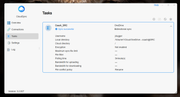
There's clearly a software defect in play here. How we get it fixed is beyond me. I may return my device as a result of this.
I believe I'm having a similar flavor of issue.
I was told by support they are unable to link to the root folder of a shared OneDrive, and that I should create a task for each subfolder. Obviously, this is outrageously ridiculous and impractical for all sorts of reasons, and you've certainly cited some of them.
Certainly, my Synology NAS has no trouble with this! It works just fine.
And, I also have the links issues you mentioned.
But look at this... Syncing to the root folder! For some reason, it worked! So, we KNOW and HAVE PROOF the system is capable of syncing a full OneDrive account, it's just that it only works sometimes and no one seems to know why...
There's clearly a software defect in play here. How we get it fixed is beyond me. I may return my device as a result of this.


Re: Allowing '.' as a valid folder and OneDrive issues
Thank you for your feedback. We will collect the issues you mentioned and provide them to our product team.
To contact our team, please send email to following addresses, remember to replace (at) with @
Technical team: support(at)terra-master.com (for technical support)
Service team: service(at)terra-master.com (for purchasing, return, replacement, RMA service)
Technical team: support(at)terra-master.com (for technical support)
Service team: service(at)terra-master.com (for purchasing, return, replacement, RMA service)
Re: Allowing '.' as a valid folder and OneDrive issues
It appears to be a defect in the software of the NAS, honestly. I'm having the same issue with the Google Drive sync client.