Cant find my folders when making a library
Posted: 11 Nov 2024, 07:28
Hi
Im trying to get my old NAS working with plex that has TOS 3 on it..
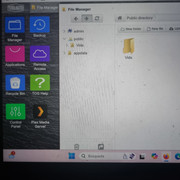
I've installed plex media server on there, I can see all my files in file manager (all moved to the NAS, didnt realise I couldnt organize them after moving), but when I log into plex with the NAS, in add folders - browse for media folder, none of my folders show. permissions for the admin user are read/write for all folders. I can't add a user named plex (saw this as a solution) just says operation failed, not sure what else to try, please help.
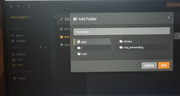
in browse for media folders, theres things like /,md0, Library and tmp_transcoding and nothing more and I dont know where even these are located if anyuone knows?
Thanks
Im trying to get my old NAS working with plex that has TOS 3 on it..
I've installed plex media server on there, I can see all my files in file manager (all moved to the NAS, didnt realise I couldnt organize them after moving), but when I log into plex with the NAS, in add folders - browse for media folder, none of my folders show. permissions for the admin user are read/write for all folders. I can't add a user named plex (saw this as a solution) just says operation failed, not sure what else to try, please help.
in browse for media folders, theres things like /,md0, Library and tmp_transcoding and nothing more and I dont know where even these are located if anyuone knows?
Thanks