
Hello all
I just delete 30TB old unwanted folder, but my storage pool is not refreshing with the new free space available.
Any suggestion? Maybe have I to wait till the system refresh?
Thanks
Free up space and delete files


Re: Free up space and delete files
Hello, since the amount of data you deleted is very large, it will take some time for the background to complete the thorough cleaning. Please wait patiently until the data is completely cleaned. If you are familiar with Linux commands, you can log in to the server through SSH and check the volume usage to better understand the progress. Thank you for your understanding and cooperation.
To contact our team, please send email to following addresses, remember to replace (at) with @:
Technical team: support(at)terra-master.com(for technical support)
Service team: service(at)terra-master.com(for purchasing, return, replacement, RMA service)
Technical team: support(at)terra-master.com(for technical support)
Service team: service(at)terra-master.com(for purchasing, return, replacement, RMA service)
Re: Free up space and delete files
Thank u very much for your answer @TMgevin.
I was wondering this but i was doubtfull because 1h is already passed
I was wondering this but i was doubtfull because 1h is already passed

Re: Free up space and delete files
Just to be sure. The capacity of the Storage Pool represents the capacity you have allocated to the volume(s) and does not change as data changes. You should be looking at the capacity of the volume.
To contact our team, please send email to following addresses, remember to replace (at) with @:
Technical team: support(at)terra-master.com (for technical support)
Service team: service(at)terra-master.com (for purchasing, return, replacement, RMA service)
Technical team: support(at)terra-master.com (for technical support)
Service team: service(at)terra-master.com (for purchasing, return, replacement, RMA service)
Re: Free up space and delete files
Very strange situation.
After 4 days the free space is not changed.. but the 30TB folder has been deleted and is not visible anymore in the explorer.
Any ideas?
I have already tried to restart the nas
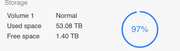
After 4 days the free space is not changed.. but the 30TB folder has been deleted and is not visible anymore in the explorer.
Any ideas?
I have already tried to restart the nas


Re: Free up space and delete files
You most likely have Snapshots enabled. The data you deleted is still part of a snapshot and, on deletion, the data is actually retained so that it can be recovered from the snapshot. It will appear with "Others" in the usage gui.
F5-221 TOS7.0.1278 - 4x4TB (Ironwolf) Traid
F2-424 TOS7.0.1278 - 2x500GB nvme (P3) Traid, 2x6TB HDD (HGST) Traid
F2-221 TOS7.0.1278 - 1x3TB Ext4, 1x4TB Btrfs
F2-425+ TOS7.0.1278 - 2x500GB nvme (P3) Traid, 2x6TB HDD (EXOS) Traid
F2-424 TOS7.0.1278 - 2x500GB nvme (P3) Traid, 2x6TB HDD (HGST) Traid
F2-221 TOS7.0.1278 - 1x3TB Ext4, 1x4TB Btrfs
F2-425+ TOS7.0.1278 - 2x500GB nvme (P3) Traid, 2x6TB HDD (EXOS) Traid
Re: Free up space and delete files - SOLVED
Hey Gremlin I owe you a barrel of premium beer.
It was space used by snapshot and once I delete the system backup, free space is now available.
Thanks to you for the winning tip.
Cheers.
It was space used by snapshot and once I delete the system backup, free space is now available.
Thanks to you for the winning tip.
Cheers.
Re: Free up space and delete files
You just got lucky. I don't drink 
F5-221 TOS7.0.1278 - 4x4TB (Ironwolf) Traid
F2-424 TOS7.0.1278 - 2x500GB nvme (P3) Traid, 2x6TB HDD (HGST) Traid
F2-221 TOS7.0.1278 - 1x3TB Ext4, 1x4TB Btrfs
F2-425+ TOS7.0.1278 - 2x500GB nvme (P3) Traid, 2x6TB HDD (EXOS) Traid
F2-424 TOS7.0.1278 - 2x500GB nvme (P3) Traid, 2x6TB HDD (HGST) Traid
F2-221 TOS7.0.1278 - 1x3TB Ext4, 1x4TB Btrfs
F2-425+ TOS7.0.1278 - 2x500GB nvme (P3) Traid, 2x6TB HDD (EXOS) Traid


Re: Free up space and delete files
Hello there,
I'm having a similar issue but I do not have snapshots enabled. I moved little over 5 TB (close to 100k files) from one volume to another using the File Manager inside TOS (which triggered a simple `mv` command, as I confirmed via `ps` while it was running), but the original volume still shows the same free space about 12 hours later. Is this normal?
Both df and btrfs df still show 18~19 TB used on Volume1, instead of the expected ~13 after the move:
I understand that btrfs has a form of garbage collection going on due to its COW nature, but I'm surprised that after so much time it's still exactly as it was before, and I would have expected at least some sign of change. Then again I'm not familiar with btrfs and I'm used used to the oddities of hfs+ and apfs 
Any hints would be most welcome. Thanks!
I'm having a similar issue but I do not have snapshots enabled. I moved little over 5 TB (close to 100k files) from one volume to another using the File Manager inside TOS (which triggered a simple `mv` command, as I confirmed via `ps` while it was running), but the original volume still shows the same free space about 12 hours later. Is this normal?
Both df and btrfs df still show 18~19 TB used on Volume1, instead of the expected ~13 after the move:
Code: Select all
master@Supernova:/# df -h | grep Volume
/dev/mapper/vg0-lv0   22T   19T  3.2T  86% /Volume1
/dev/mapper/vg1-lv1  7.3T  5.2T  2.1T  72% /Volume3
/dev/mapper/vg2-lv2  3.7T  654G  3.0T  18% /Volume4

master@Supernova:/# btrfs filesystem df /Volume1
Data, single: total=18.61TiB, used=18.58TiB
System, DUP: total=8.00MiB, used=2.00MiB
Metadata, DUP: total=31.00GiB, used=25.98GiB
GlobalReserve, single: total=512.00MiB, used=0.00B
Any hints would be most welcome. Thanks!

Re: Free up space and delete files
Did you successfully move the files you migrated? Based on your information above, did you migrate the files on volume 1 to volume 2?
When migrating folders, did you confirm that there was enough space on the destination volume to store the files you needed to store?
To contact our team, please send email to following addresses, remember to replace (at) with @
Technical team: support(at)terra-master.com (for technical support)
Service team: service(at)terra-master.com (for purchasing, return, replacement, RMA service)
Technical team: support(at)terra-master.com (for technical support)
Service team: service(at)terra-master.com (for purchasing, return, replacement, RMA service)