garbage partitions of the system on hdd
Posted: 30 Oct 2024, 05:01
Hello forum members. Sorry, I'm just learning English and use a translator.
I became the owner of f2-423 tos5 and I have several questions for the developers.
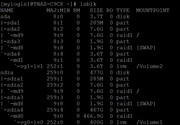
1) I have 1 nvme disk and 1 hdd in my configuration. When initializing, I select nvme for the system (raid is a single disk). After rebooting, I put an ext4 partition on the entire hdd space (raid is a single disk). But along with the partition, the operating system partitions also appear. Why? I don't want to use a slow disk for the operating system, but tos5 does it itself.
2) I left the f2-423 on for a week. It is connected only to a home router, there are no programs on it, no tasks. But several times a day the hdd starts working hard for 10 minutes. What scheduled tasks in TOS5 reduce the resource of my disk? Are there any backdoors among them?
3) I can format the entire hdd to ext4 via terminal, but the system does not see the partition. How can I delete junk partitions and get the full disk space for myself?
I became the owner of f2-423 tos5 and I have several questions for the developers.
1) I have 1 nvme disk and 1 hdd in my configuration. When initializing, I select nvme for the system (raid is a single disk). After rebooting, I put an ext4 partition on the entire hdd space (raid is a single disk). But along with the partition, the operating system partitions also appear. Why? I don't want to use a slow disk for the operating system, but tos5 does it itself.
2) I left the f2-423 on for a week. It is connected only to a home router, there are no programs on it, no tasks. But several times a day the hdd starts working hard for 10 minutes. What scheduled tasks in TOS5 reduce the resource of my disk? Are there any backdoors among them?
3) I can format the entire hdd to ext4 via terminal, but the system does not see the partition. How can I delete junk partitions and get the full disk space for myself?