garbage partitions of the system on hdd

RAID, Volume, storage pool, hard drive, USB, SSD cache and iSCSI LUN
Locked
User avatar
zeran2
Posts: 4
Joined: 29 Jul 2024, 16:28
Russia

garbage partitions of the system on hdd

Post by zeran2 »

Hello forum members. Sorry, I'm just learning English and use a translator.
I became the owner of f2-423 tos5 and I have several questions for the developers.
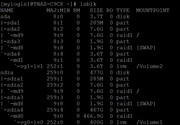
1) I have 1 nvme disk and 1 hdd in my configuration. When initializing, I select nvme for the system (raid is a single disk). After rebooting, I put an ext4 partition on the entire hdd space (raid is a single disk). But along with the partition, the operating system partitions also appear. Why? I don't want to use a slow disk for the operating system, but tos5 does it itself.
2) I left the f2-423 on for a week. It is connected only to a home router, there are no programs on it, no tasks. But several times a day the hdd starts working hard for 10 minutes. What scheduled tasks in TOS5 reduce the resource of my disk? Are there any backdoors among them?
3) I can format the entire hdd to ext4 via terminal, but the system does not see the partition. How can I delete junk partitions and get the full disk space for myself?
Image
User avatar
Gremlin
Gold Member
Posts: 1631
Joined: 02 Dec 2022, 22:31
Great Britain

Re: garbage partitions of the system on hdd

Post by Gremlin »

That is how Tos5 works. The partitions are not 'junk' they are active raid1 mirrors of the os and swap partitions. Tos 6 will be slightly different and you can choose up to two drives for the os partitions
F5-221 TOS7.0.0777 - 4x4TB (Ironwolf) Traid
F2-424 TOS7.0.0777 - 2x500GB nvme (P3) Traid, 2x6TB HDD (HGST) Traid
F2-221 TOS7.0.0777 - 1x3TB Ext4, 1x4TB Btrfs
F2-425+ TOS7.0.0777 - 2x500GB nvme (P3) Traid, 2x6TB HDD (EXOS) Traid
User avatar
TMzethar
TM Support
Posts: 2826
Joined: 27 Oct 2020, 16:43

Re: garbage partitions of the system on hdd

Post by TMzethar »

You can open a terminal and run the following command to see a count of processes reading or writing to the disk every 100 seconds (subject to change).

Code: Select all

pidstat -d 100 
For more information about problems that may interfere with HDD hibernation, you can refer to this:
viewtopic.php?t=473
To contact our team, please send email to following addresses, remember to replace (at) with @:
Technical team: support(at)terra-master.com (for technical support)
Service team: service(at)terra-master.com (for purchasing, return, replacement, RMA service)
User avatar
zeran2
Posts: 4
Joined: 29 Jul 2024, 16:28
Russia

Re: garbage partitions of the system on hdd

Post by zeran2 »

Gremlin wrote: 30 Oct 2024, 06:18 That is how Tos5 works. The partitions are not 'junk' they are active raid1 mirrors of the os and swap partitions. Tos 6 will be slightly different and you can choose up to two drives for the os partitions
in tos6, will I protect the hdd from the system partition? This is great news.
Locked

Return to “Storage”