

When attempting to install TrueNAS on the F8 SSD, I encountered some difficulties. After some research, I finally found an effective method.
Refer to the community solution: https://forums.truenas.com/t/terramaste ... -log/13867
If it is F8 SSD/F8 SSD Plus, before installation, please refer to this post to upgrade the motherboard BIOS and the firmware of the PCIe expansion chip (ASM2086):
viewtopic.php?t=8961
To successfully install TrueNAS, you need to enter the BIOS immediately after booting and make the following adjustments:
F8 SSD, F8 SSD Plus Bios modification method:
1.Security →Secure Boot→ Secure Boot→Disabled
2.Chipset → North Bridge → VT-d→Disabled
3. Boot → TOS Boot First → Disabled, then set the priority boot device in "Boot Option # 1"
F2-424, F4-424, F4-424 Pro Bios modification method:
1.Security →Secure Boot→ Secure Boot→Disabled
2.Chipset → North Bridge → VT-d→Disabled
3. Boot → TOS Boot First → Disabled, then set the priority boot device in "Boot Option # 1"
F4-424 Max, F6-424 Max Bios modification method:
1.Security →Secure Boot→ Secure Boot→Disabled
2.Chipset → North Bridge → VT-d→Disabled
3.Fast → TOS Boot First → Disabled
4. Go to Boot → UEFI NVMe Drive BBS priorities/UEFI Hard Disk Drive BBS priorities/UEFI USB Drive BBS priorities.
Adjust the priority boot devices for each group, and then set the priority boot devices in "Boot Option # 1".
After making these adjustments, the installation proceeded smoothly.
If you encounter similar issues, you might try these settings.
Hope this helps!
How to install TrueNAS or other system using an F8 SSD/F8 SSD Plus/424/424 Pro/424 Max?
How to install TrueNAS or other system using an F8 SSD/F8 SSD Plus/424/424 Pro/424 Max?
F8 SSD、F2-424、F2-221.
-
crisisacting

- Silver Member
- Posts: 532
- Joined: 20 Jan 2022, 16:42
Re: How to install TrueNAS using an F8 SSD?
VT-d is necessary if planning on using a VM under trueNAS for passing through the iGPU to transcode video, so this actually needs to fixed with a UEFI update by TerraMaster.
-
000joshua000

- Posts: 9
- Joined: 21 Sep 2024, 13:49

Re: How to install TrueNAS using an F8 SSD?
Hello everyone.
Just to let you know that I installed Truenas Scale on my TerraMaster SSD F8 Plus using this procedure (see the solution at the bottom of the post directly, it's so simple!!!).
Another thing for those who have this F8, it is indicated in the documentation that this NAS has a maximum memory capacity of 32GB. However, in my MinisForum MS-01, it was specified that the maximum capacity was 64GB (2x32GB) and I installed 96GB (2x48GB) without problem. So I decided to test a 48GB stick on the TerraMaster F8, and it works perfectly!!!
Just to let you know that I installed Truenas Scale on my TerraMaster SSD F8 Plus using this procedure (see the solution at the bottom of the post directly, it's so simple!!!).
Another thing for those who have this F8, it is indicated in the documentation that this NAS has a maximum memory capacity of 32GB. However, in my MinisForum MS-01, it was specified that the maximum capacity was 64GB (2x32GB) and I installed 96GB (2x48GB) without problem. So I decided to test a 48GB stick on the TerraMaster F8, and it works perfectly!!!
-
Lijsterbesje

- Posts: 17
- Joined: 27 Nov 2024, 18:08

Re: How to install TrueNAS using an F8 SSD?
I installed TrueNAS-SCALE-24.10.0.2 without disabling VT-d
F4-424
-
Lijsterbesje
- Posts: 17
- Joined: 27 Nov 2024, 18:08
Re: How to install TrueNAS using an F8 SSD?
Sorry, i just saw it's about an F8. i\m have an F4 424.
F4-424


Re: How to install TrueNAS using an F8 SSD?
The setup is the same for the F4/F6/F4/F2 of the latest generation.
The older ones need BIOS Update, but latest one do not, just disable autoboot to TOS and enjoy any OS you want.
The older ones need BIOS Update, but latest one do not, just disable autoboot to TOS and enjoy any OS you want.


Re: How to install TrueNAS or other system using an F8 SSD/F8 SSD Plus/424/424 Pro/424 Max?
Two Methods for Installing TrueNAS on the F8 SSD Plus NAS
Method 1: Install TrueNAS on an NVMe Drive in Slots 5–8
If you install TrueNAS on an NVMe drive located in slots 5–8, you do not need to disable VT-d or turn off Secure Boot. Everything should work smoothly without additional configuration.
Method 2: Install TrueNAS on an NVMe Drive in Slots 1–4
If you install TrueNAS on an NVMe drive in slots 1–4, you will need to:
Disable VT-d before the first boot to avoid issues during installation.
Once the installation is complete, re-enable VT-d after the second reboot.
Important Note:
For both methods, you must disable "TOS First Boot" before installation—this is something most people are likely already aware of.
Why Does This Happen?
The likely reason for this behavior is that slots 5–8 are directly connected via PCIe lanes, while slots 1–4 go through the PCH (chipset). This difference affects how VT-d handles passthrough and device initialization.
Hope this helps!
Method 1: Install TrueNAS on an NVMe Drive in Slots 5–8
If you install TrueNAS on an NVMe drive located in slots 5–8, you do not need to disable VT-d or turn off Secure Boot. Everything should work smoothly without additional configuration.
Method 2: Install TrueNAS on an NVMe Drive in Slots 1–4
If you install TrueNAS on an NVMe drive in slots 1–4, you will need to:
Disable VT-d before the first boot to avoid issues during installation.
Once the installation is complete, re-enable VT-d after the second reboot.
Important Note:
For both methods, you must disable "TOS First Boot" before installation—this is something most people are likely already aware of.
Why Does This Happen?
The likely reason for this behavior is that slots 5–8 are directly connected via PCIe lanes, while slots 1–4 go through the PCH (chipset). This difference affects how VT-d handles passthrough and device initialization.
Hope this helps!

-
crisisacting
- Silver Member
- Posts: 532
- Joined: 20 Jan 2022, 16:42
Re: How to install TrueNAS or other system using an F8 SSD/F8 SSD Plus/424/424 Pro/424 Max?
The Alder Lake-N platform that the F8 SSD series is based on has all 9 of the available PCIe Gen3 lanes coming off the PCH.
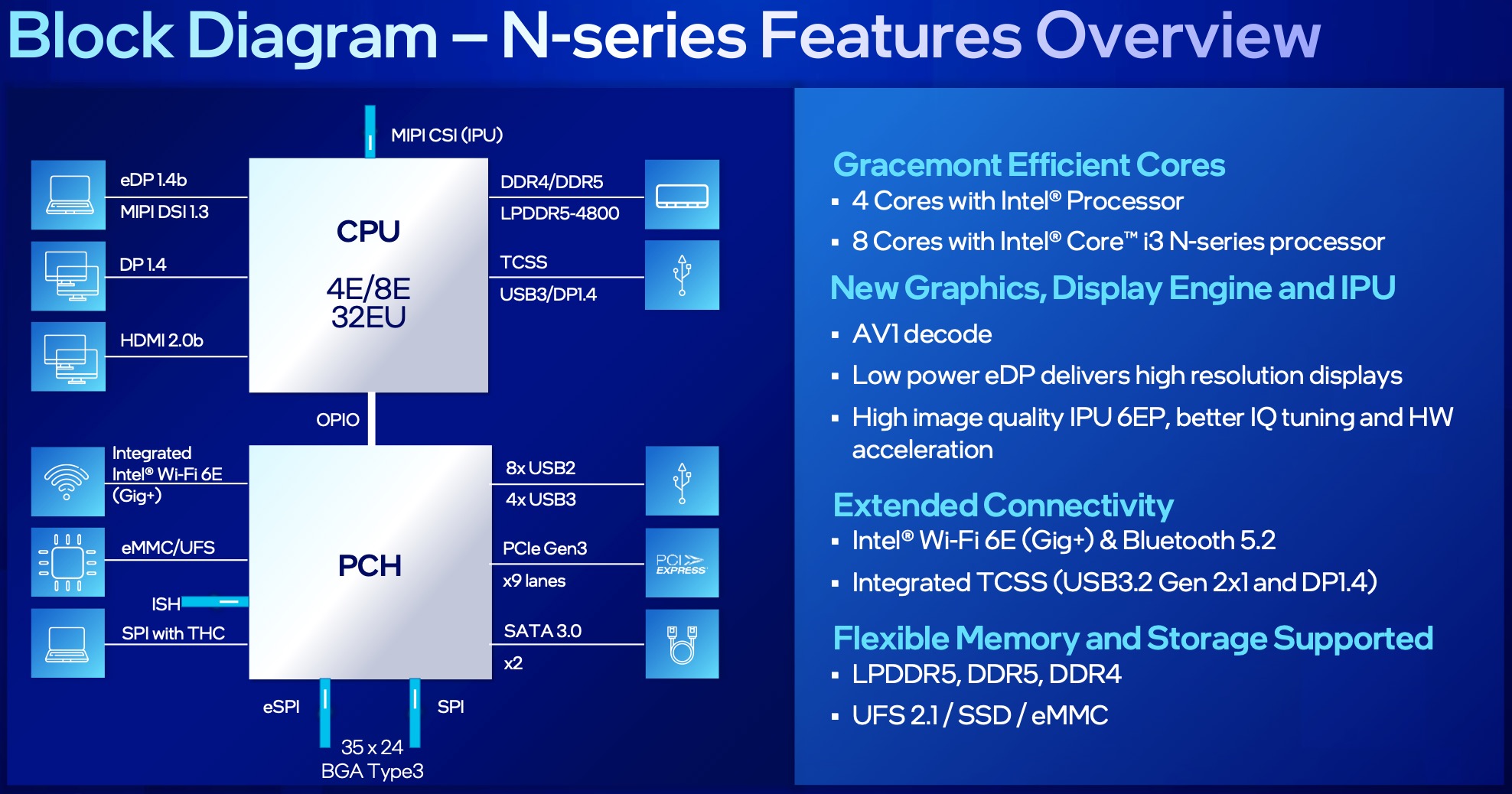
The Marvell 10G Ethernet PHY, ASMedia ASM2806 PCIe switch & RealTek RTS5432 USB 3.2 Gen2 hub are each consuming ×1, leaving only 6 Gen3×1 lanes for the NVMe drives; the ASMedia ASM2806 is there to extend Gen3×1 to 2 NVMe drives to get the overall amount to 8.
If the UEFI/BIOS has chipset options showing the distribution of PCIe lanes, it should match the above.
Only NVMe 1 & 2 slots (off the ASMedia ASM2806) should be avoided; the rest should all be from the integrated PCH & allow for VT-d to remain enabled.
-
Peterlll06

- Posts: 17
- Joined: 18 Feb 2025, 12:12
Re: How to install TrueNAS or other system using an F8 SSD/F8 SSD Plus/424/424 Pro/424 Max?
Thank you for sharing, it is very helpful to me.
-
tontonlulu

- Posts: 1
- Joined: 20 Mar 2025, 04:13

TrueNAS Scale 24.10.2 on F4-424
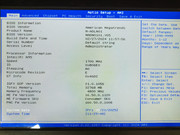
Hi everybody, I'm new on this forum. I'm struggling with TrueNAS Scale 24.10.2 install on a brand new F4-424. Even by disabling Vt-d and secure boot, massive PCie errors are still present so impossible to run TrueNAS properly. BIOS version attached. I've also done two other test. By removing the nvme and install on a sata hdd same issue. By downgrading the ram to 8 GB with the original Terramaster, same issue. FYI, I've also installed Proxmox without any difficulties... Any idea on what could be wrong? Thank you
F4-424