Page 1 of 2
Update Docker Engine
Posted: 21 Oct 2024, 00:48
by pixelspusher
Seems like we're stuck with a TWO YEAR old version of Docker Engine. Is there a reliable way to update it to the latest?
TOS is on 20.10.17 (from 2022-06-06) when the current version is 27.3.1.
Re: Update Docker Engine
Posted: 13 Nov 2024, 18:18
by DCCentR
I also like to see more recent versions of Docker Engine and Portainer
Re: Update Docker Engine
Posted: 13 Nov 2024, 21:39
by TMeric
Both Docker and Docker Engine will be updated in the near future. Please be patient and wait for the updates.
Re: Update Docker Engine
Posted: 18 Nov 2024, 23:11
by DCCentR
TMeric wrote: ↑13 Nov 2024, 21:39
Both Docker and Docker Engine will be updated in the near future. Please be patient and wait for the updates.
But not Portainer?

Re: Update Docker Engine
Posted: 02 Dec 2024, 16:47
by bugacha
I see docker is updated today to
Code: Select all
docker --version
Docker version 27.2.1, build 9e34c9b
Good job @TerraMaster team
Re: Update Docker Engine
Posted: 03 Dec 2024, 07:24
by fcs001fcs
Updated Docker Engine and Docker Manager Apps today.
Docker Manager 2.1.2 has problem with the graphs in "Overview", both "Total CPU Usage" and "Total RAM Usage". CPU is zero most times and RAM is way too low.
TM: Kindly investigated this error and fix for the next version. Thanks.
Otherwise, I updated to Docker Engine 27.2.1 and Docker Manager 2.1.2 and they seem to be working OK. I use a standalone Portainer (not TOS App) and my containers seem to all work OK. I did have to reinstall an "Open Speed Test" stack/container due to permissions errors in the log, but a very minor issue.
Re: Update Docker Engine
Posted: 03 Dec 2024, 07:29
by fcs001fcs
fcs001fcs wrote: ↑03 Dec 2024, 07:24
Updated Docker Engine and Docker Manager Apps today.
Docker Manager 2.1.2 has problem with the graphs in "Overview", both "Total CPU Usage" and "Total RAM Usage". CPU is zero most times and RAM is way too low.
TM: Kindly investigated this error and fix for the next version. Thanks.
Otherwise, I updated to Docker Engine 27.2.1 and Docker Manager 2.1.2 and they seem to be working OK. I use a standalone Portainer (not TOS App) and my containers seem to all work OK. I did have to reinstall an "Open Speed Test" stack/container due to permissions errors in the log, but a very minor issue.
Sorry, forgot to mention I am on TOS 6.0.535
Re: Update Docker Engine
Posted: 03 Dec 2024, 21:51
by TMeric
fcs001fcs wrote: ↑03 Dec 2024, 07:24
Updated Docker Engine and Docker Manager Apps today.
Docker Manager 2.1.2 has problem with the graphs in "Overview", both "Total CPU Usage" and "Total RAM Usage". CPU is zero most times and RAM is way too low.
TM: Kindly investigated this error and fix for the next version. Thanks.
Otherwise, I updated to Docker Engine 27.2.1 and Docker Manager 2.1.2 and they seem to be working OK. I use a standalone Portainer (not TOS App) and my containers seem to all work OK. I did have to reinstall an "Open Speed Test" stack/container due to permissions errors in the log, but a very minor issue.
Thank you for your feedback. We will verify the issue you mentioned as soon as possible.
Re: Update Docker Engine
Posted: 03 Dec 2024, 22:31
by Phildefer
Hi,
Since the update of the Docker engine when I want to open the console on my container with Portainer I have this message : Unable to retrieve image. details
Re: Update Docker Engine
Posted: 03 Dec 2024, 23:56
by fcs001fcs
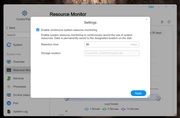
When I disable (uncheck) "Enable continuous resource monitoring", I get some data points on the graph.
I checked the storage location listed in the "Resource monitoring" settings and that file "system.db" does not exist. The DB that is listed in that directory is "resource-monitor.db". I think this may be the problem.
I do not have the ability in the GUI to change the "Storage location" as it is greyed-out for me. See attached screenshot.
TM: How do I set the correct "Storage location" in the "Resource monitoring" settings?