

Hey gang,
Not sure on the best place to post this, but figured to start there.
I have a F8 SSD plus, with 8x Crucial P3 Plus 4TB PCIe Gen4 3D NAND NVMe M.2 SSD. It's setup with TRAID. There is one volume which is 24.5 TB formatted with EXT4. The only running service is Samba. TOS version is 6.0.500
I have an PC based server and very old Synology box. I'm running Syncovery (file back up utility) on the server to copy files from the Synology to the F8.
Two times while in the middle of copying data over for a few hours, the volume goes offline. Any PC with a mapped drive or pointer to the F8's volume is not able to access it. I can see that there are online users via TOS, but they are not able to access the volume and data.
System always sounds incredibly quiet, so it doesn't appear to get overheated. No real useful data or statuses in the log. Resource usage from what I can tell looks incredibly low.
If I shut down the F8 (via a web browser) and then restart it, everything works again. Is there anything specific that I should check? Is this a known issue?
I need a consistent running environment to copy data to and from.
Volume is going offline with F8 plus
Re: Volume is going offline with F8 plus
Thanks to anyone who can help in advance.


Re: Volume is going offline with F8 plus
This looks like an issue we are working on fixing. Is it possible to see the status of the volume through the TOS control panel and the contents of the shared folder through file manager when it is inaccessible?
To contact our team, please send email to following addresses, remember to replace (at) with @
Technical team: support(at)terra-master.com (for technical support)
Service team: service(at)terra-master.com (for purchasing, return, replacement)
Technical team: support(at)terra-master.com (for technical support)
Service team: service(at)terra-master.com (for purchasing, return, replacement)
Re: Volume is going offline with F8 plus
yes on the volume. Not sure on the shared folder through the file manager. Will verify that the next time it goes out.
Re: Volume is going offline with F8 plus
I had two file transfers going. One looked to end pre-maturely, but the other is currently still going.
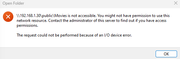
I went to check what had transferred vs possibly not with the one that finished, when I double click the directory in Windows the following error is displayed: "IP\public\dirName is not accessible. You might not have permission to use this network resource. Contact the administrator of this server to find out if you have access permissions. The request could not be performed because of an I/O device error."
In TOS, when I drill down to this directory and attempt to open it: "Connection failed. Please confirm the mounted remote server address is correct and accessible". I can repeat this and the same error occurs in TOS. I can access other directories right now successfully.
Yesterday when I got the error in windows that the directory was not accessible, it impacted all directories where the NAS needed rebooted completely.
I went to check what had transferred vs possibly not with the one that finished, when I double click the directory in Windows the following error is displayed: "IP\public\dirName is not accessible. You might not have permission to use this network resource. Contact the administrator of this server to find out if you have access permissions. The request could not be performed because of an I/O device error."
In TOS, when I drill down to this directory and attempt to open it: "Connection failed. Please confirm the mounted remote server address is correct and accessible". I can repeat this and the same error occurs in TOS. I can access other directories right now successfully.
Yesterday when I got the error in windows that the directory was not accessible, it impacted all directories where the NAS needed rebooted completely.
Re: Volume is going offline with F8 plus
Took screenshots.
Error from windows
Error in TOS when navigating to this specific folder

Error from windows
Error in TOS when navigating to this specific folder

Re: Volume is going offline with F8 plus
The permissions exception has been fixed, please wait for the next TOS 6 update.
To contact our team, please send email to following addresses, remember to replace (at) with @:
Technical team: support(at)terra-master.com (for technical support)
Service team: service(at)terra-master.com (for purchasing, return, replacement, RMA service)
Technical team: support(at)terra-master.com (for technical support)
Service team: service(at)terra-master.com (for purchasing, return, replacement, RMA service)
Re: Volume is going offline with F8 plus
Roger that. Just to verify, this is for changing permissions during long copy processes.
Re: Volume is going offline with F8 plus
Yes, it's about random privilege exceptions that occur during transmission.
To contact our team, please send email to following addresses, remember to replace (at) with @:
Technical team: support(at)terra-master.com (for technical support)
Service team: service(at)terra-master.com (for purchasing, return, replacement, RMA service)
Technical team: support(at)terra-master.com (for technical support)
Service team: service(at)terra-master.com (for purchasing, return, replacement, RMA service)
Re: Volume is going offline with F8 plus
Circling back to this. Upgraded the TOS version to latest. This issue looks to be 100% resolved. I've many transfer threads to and from the unit with no failed transfers or connections. I tried hard to get it to break, but it's very stable.
Kuddos to a fast resolution!
Kuddos to a fast resolution!