

Hello,
why "Execution Command" is not editible in Docker Manager prior to launching container?
Thank you!
Execution command not editible in docker manager
-
TMpzhen
Re: Execution command not editible in docker manager
Modifying the execution command usually requires specifying it at the image level or through parameters when starting the container. A container that has already been configured cannot be used to edit and execute commands when it is disabled. The execution commands can only be modified by starting the container。


Re: Execution command not editible in docker manager
Can you please explain in more details ?TMpzhen wrote: ↑22 Sep 2024, 16:23Modifying the execution command usually requires specifying it at the image level or through parameters when starting the container. A container that has already been configured cannot be used to edit and execute commands when it is disabled. The execution commands can only be modified by starting the container。
I downloaded iperf3 container that has entry point iperf3 which will never work (needs either -s or -c flags)
Container is not running, I press edit and go to Execution Command and its not modifiable.
The only way to fix this is by stopping DockerEngine and modifying config.v2.json directly.
Can this be fixed in UI please ?
Re: Execution command not editible in docker manager
Here is the screenshot
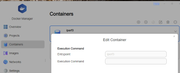
Re: Execution command not editible in docker manager
I need to provide arguments to entry point from screenshot
I'm modifying 2 places :
Code: Select all
"Path":"iperf3","Args":["-s"]
"Entrypoint":["iperf3","-s"]
Same problem with Minio container. If you download and run it, it never starts up because of invalid command line
Command line supposed to look like this
Code: Select all
"Path":"/usr/bin/docker-entrypoint.sh","Args":["minio","server","/data","--console-address",":9090"]
"Cmd":["minio","server","/data","--console-address",":9090"]
Do you guys even test containers when release stuff ??
Re: Execution command not editible in docker manager
Just to be precise, only Args needs to be changed to provide arguments to entry point
Code: Select all
  "Path": "iperf3",
  "Args": [
    "-s"
  ],

Re: Execution command not editible in docker manager
The implementation of your request in the UI is not currently supported and the project team will discuss ways to improve it.
To contact our team, please send email to following addresses, remember to replace (at) with @:
Technical team: support(at)terra-master.com (for technical support)
Service team: service(at)terra-master.com (for purchasing, return, replacement, RMA service)
Technical team: support(at)terra-master.com (for technical support)
Service team: service(at)terra-master.com (for purchasing, return, replacement, RMA service)
Re: Execution command not editible in docker manager
Thank you, it will be very helpful !
For your reference at least 2 containers require it from the strat :
iperf3
minio
(Top entry in registry)
Synology DSM supports editing command line arguments too


Re: Execution command not editible in docker manager
You may consider to use a docker-compose.yml (a project) style configuration. For minio mine looks like this. Variables may be set this way or using env-file
Code: Select all
services:

  minio:
    image: ${MINIO_IMAGE_NAME}
    container_name: $DOCKER_NAME
    volumes:
      - $DOCKER_SHARED/$DOCKER_NAME:/data:z
    command: minio server /data --console-address 0.0.0.0:9001
    environment:
      - MINIO_ROOT_USER=${MINIO_ROOT_USER}
      - MINIO_ROOT_PASSWORD=${MINIO_ROOT_PASSWORD}
      - MINIO_REGION_NAME=${MINIO_REGION_NAME}
      - MINIO_BROWSER=${MINIO_BROWSER}
      - MINIO_BROWSER_REDIRECT_URL=${MINIO_BROWSER_REDIRECT_URL}
    restart: always
    networks:
      - proxy
    labels:
      - "traefik.enable=true"
      - "traefik.docker.network=proxy"

      - "traefik.http.middlewares.minio-gzip.compress=true"
      - "traefik.http.middlewares.minio-redir-https.redirectScheme.scheme=https"

      - "traefik.http.routers.minio-http.entrypoints=http"
      - "traefik.http.routers.minio-http.rule=Host(`${MINIO_HOST}`)"
      - "traefik.http.routers.minio-http.middlewares=minio-redir-https"
      - "traefik.http.routers.minio-http.service=minio-backend"

      - "traefik.http.routers.minio-https.middlewares=minio-gzip"
      - "traefik.http.routers.minio-https.entrypoints=https"
      - "traefik.http.routers.minio-https.tls=true"
      - "traefik.http.routers.minio-https.rule=Host(`${MINIO_HOST}`)"
      - "traefik.http.routers.minio-https.service=minio-backend"

      - "traefik.http.routers.minio-admin.middlewares=minio-gzip"
      - "traefik.http.routers.minio-admin.entrypoints=https"
      - "traefik.http.routers.minio-admin.tls=true"
      - "traefik.http.routers.minio-admin.rule=Host(`${MINIO_ADMIN_DOMAIN}`)"
      - "traefik.http.routers.minio-admin.service=minio-admin-backend"

      - "traefik.http.services.minio-backend.loadbalancer.server.scheme=http"
      - "traefik.http.services.minio-backend.loadbalancer.server.port=9000"

      - "traefik.http.services.minio-admin-backend.loadbalancer.server.scheme=http"
      - "traefik.http.services.minio-admin-backend.loadbalancer.server.port=9001"
    extra_hosts:
      - "${MINIO_HOST}:0.0.0.0"
    healthcheck:
      test: ["CMD", "curl", "-f", "http://localhost:9000/minio/health/live"]
      interval: 3s
      retries: 12
    logging:
      driver: "json-file"
      options:
        max-size: "10m"

networks:
  proxy:
    external: true
main: T9-450