TOS6 stopped fan


TOS6 stopped fan
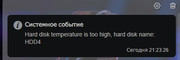
Hi guys. I have upgraded to TOS6, my device is F4-424 PRO. I had a situation three times twice that the dimmer was beeping about the overheating of the hard drive. At that moment, the temperature was 65 Celsius, the processor temperature was 85, I noticed that the fan speed was 0. Is there an update to solve this bug with the fan? Version 6.0.229-00147 is currently being built


Re: TOS6 stopped fan
F5-221 TOS7.0.1278 - 4x4TB (Ironwolf) Traid
F2-424 TOS7.0.1278 - 2x500GB nvme (P3) Traid, 2x6TB HDD (HGST) Traid
F2-221 TOS7.0.1278 - 1x3TB Ext4, 1x4TB Btrfs
F2-425+ TOS7.0.1278 - 2x500GB nvme (P3) Traid, 2x6TB HDD (EXOS) Traid
F2-424 TOS7.0.1278 - 2x500GB nvme (P3) Traid, 2x6TB HDD (HGST) Traid
F2-221 TOS7.0.1278 - 1x3TB Ext4, 1x4TB Btrfs
F2-425+ TOS7.0.1278 - 2x500GB nvme (P3) Traid, 2x6TB HDD (EXOS) Traid
Re: TOS6 stopped fan
Hi. My fan stops in auto mode and does not start for some reason, in medium mode it keeps RPM 1232... and it doesn't seem to turn off at all. But I'm worried about auto mode, is it a TOS6 bug or bios?) Or is it a whole device defect ? )
Re: TOS6 stopped fan
I cannot speak for the hardware you are running (too new for me  ) but I'm sure it's down to TOS and possibly a combination with the bios. I will occasionally catch the fan speed showing as somewhere between 10-80 rpm (ie stopped, but not quite. I am usually able to just set a fixed speed depending on ambient temp and activity and leave it at that, but occasionally I will still see the fans doing odd things. (Despite any fixes supposedly made).
I did make some changes to the bios settings (such as pwm slope and trigger temps) which I think helped. [In my bios saved as 'user settings' so I can switch back and forth with defaults.] Now I switch off my TOS6 device at night as it's only for testing.
) but I'm sure it's down to TOS and possibly a combination with the bios. I will occasionally catch the fan speed showing as somewhere between 10-80 rpm (ie stopped, but not quite. I am usually able to just set a fixed speed depending on ambient temp and activity and leave it at that, but occasionally I will still see the fans doing odd things. (Despite any fixes supposedly made).I did make some changes to the bios settings (such as pwm slope and trigger temps) which I think helped. [In my bios saved as 'user settings' so I can switch back and forth with defaults.] Now I switch off my TOS6 device at night as it's only for testing.
F5-221 TOS7.0.1278 - 4x4TB (Ironwolf) Traid
F2-424 TOS7.0.1278 - 2x500GB nvme (P3) Traid, 2x6TB HDD (HGST) Traid
F2-221 TOS7.0.1278 - 1x3TB Ext4, 1x4TB Btrfs
F2-425+ TOS7.0.1278 - 2x500GB nvme (P3) Traid, 2x6TB HDD (EXOS) Traid
F2-424 TOS7.0.1278 - 2x500GB nvme (P3) Traid, 2x6TB HDD (HGST) Traid
F2-221 TOS7.0.1278 - 1x3TB Ext4, 1x4TB Btrfs
F2-425+ TOS7.0.1278 - 2x500GB nvme (P3) Traid, 2x6TB HDD (EXOS) Traid
Re: TOS6 stopped fan
Thanks for the help, I'll wait for the support service to respond. I hope a new version of the TOS6 build will be released soon and this will solve the problem.Gremlin wrote: ↑03 Jul 2024, 17:56 I cannot speak for the hardware you are running (too new for me
I did make some changes to the bios settings (such as pwm slope and trigger temps) which I think helped. [In my bios saved as 'user settings' so I can switch back and forth with defaults.] Now I switch off my TOS6 device at night as it's only for testing.

Re: TOS6 stopped fan
abs1ck wrote: ↑03 Jul 2024, 19:02Thanks for the help, I'll wait for the support service to respond. I hope a new version of the TOS6 build will be released soon and this will solve the problem.Gremlin wrote: ↑03 Jul 2024, 17:56 I cannot speak for the hardware you are running (too new for me
I did make some changes to the bios settings (such as pwm slope and trigger temps) which I think helped. [In my bios saved as 'user settings' so I can switch back and forth with defaults.] Now I switch off my TOS6 device at night as it's only for testing.
Please tell me, when the fan speed is 0, what is the CPU load?
I need you to provide more information to help us locate the problem.
1. When the speed is 0, please feel it with your hand or check whether the fan is rotating?
2. Please try to manually adjust it to high speed mode. If the fan can rotate faster in high speed mode, please pay attention to the temperature of each part at this time.
To contact our team, please send email to following addresses, remember to replace (at) with @:
Technical team: support(at)terra-master.com(for technical support)
Service team: service(at)terra-master.com(for purchasing, return, replacement, RMA service)
Technical team: support(at)terra-master.com(for technical support)
Service team: service(at)terra-master.com(for purchasing, return, replacement, RMA service)
Re: TOS6 stopped fan
1. I've been using the device for 15 days. During this time, there have been 3 instances of HDD overheating. When the widget showed 0 RPM, the fan indeed wasn't spinning, and there was no airflow at all.TMeric wrote: ↑03 Jul 2024, 22:04abs1ck wrote: ↑03 Jul 2024, 19:02Thanks for the help, I'll wait for the support service to respond. I hope a new version of the TOS6 build will be released soon and this will solve the problem.Gremlin wrote: ↑03 Jul 2024, 17:56 I cannot speak for the hardware you are running (too new for me
I did make some changes to the bios settings (such as pwm slope and trigger temps) which I think helped. [In my bios saved as 'user settings' so I can switch back and forth with defaults.] Now I switch off my TOS6 device at night as it's only for testing.
Please tell me, when the fan speed is 0, what is the CPU load?
I need you to provide more information to help us locate the problem.
1. When the speed is 0, please feel it with your hand or check whether the fan is rotating?
2. Please try to manually adjust it to high speed mode. If the fan can rotate faster in high speed mode, please pay attention to the temperature of each part at this time.
The first time, I turned off the NAS and removed the HDDs, which were too hot to hold and cooled down on the table.
The second time, I immediately switched the fan mode to high, and within 10 minutes, the HDD and CPU temperatures decreased.
The CPU load was minimal, as far as I remember from the widget, it was 0.6-1.5 percent – no containers in Docker were running, Plex was not used, and no backups were being created... The NAS was idle.
2. The temperature difference between auto and high mode is 2-4 degrees Celsius. Currently, I have set the fan to medium mode for 23 hours, and it has not stopped so far.

Re: TOS6 stopped fan
Are you saying that even if you turn on the high speed mode and let the fan spin at high speed, the CPU temperature only drops by 2-4 degrees? If so, this may be a hardware problem, please contact the after-sales service.abs1ck wrote: ↑03 Jul 2024, 23:25 1. I've been using the device for 15 days. During this time, there have been 3 instances of HDD overheating. When the widget showed 0 RPM, the fan indeed wasn't spinning, and there was no airflow at all.
The first time, I turned off the NAS and removed the HDDs, which were too hot to hold and cooled down on the table.
The second time, I immediately switched the fan mode to high, and within 10 minutes, the HDD and CPU temperatures decreased.
The CPU load was minimal, as far as I remember from the widget, it was 0.6-1.5 percent – no containers in Docker were running, Plex was not used, and no backups were being created... The NAS was idle.
2. The temperature difference between auto and high mode is 2-4 degrees Celsius. Currently, I have set the fan to medium mode for 23 hours, and it has not stopped so far.
If you can keep the fan spinning in medium or high speed mode and the temperature stays within normal limits, you can wait for our future version updates where we will optimize the F4-424 Pro fan adaptation.
To contact our team, please send email to following addresses, remember to replace (at) with @:
Technical team: support(at)terra-master.com (for technical support)
Service team: service(at)terra-master.com (for purchasing, return, replacement, RMA service)
Technical team: support(at)terra-master.com (for technical support)
Service team: service(at)terra-master.com (for purchasing, return, replacement, RMA service)
Re: TOS6 stopped fan
The high CPU temperature occurred when the fan stopped, reaching 85 degrees Celsius. When the fan is running at medium speed, the temperature is around 45-46 degrees Celsius. At high fan speed, the CPU temperature is 42-44 degrees Celsius. Are these normal values?TMzethar wrote: ↑04 Jul 2024, 10:44 Are you saying that even if you turn on the high speed mode and let the fan spin at high speed, the CPU temperature only drops by 2-4 degrees? If so, this may be a hardware problem, please contact the after-sales service.
If you can keep the fan spinning in medium or high speed mode and the temperature stays within normal limits, you can wait for our future version updates where we will optimize the F4-424 Pro fan adaptation.