How to Fix the Issue That VirtualBox Cannot be Opened But Indicating a PHP error?

TOS application, TNAS PC, TNAS mobile
Post Reply
User avatar
TMzethar
TM Support
Posts: 2817
Joined: 27 Oct 2020, 16:43

How to Fix the Issue That VirtualBox Cannot be Opened But Indicating a PHP error?

Post by TMzethar »

Applicable Version:
TOS 5

Applicable Models:
All TNAS models (excluding F2-210, F4-210 models)

Symptoms:
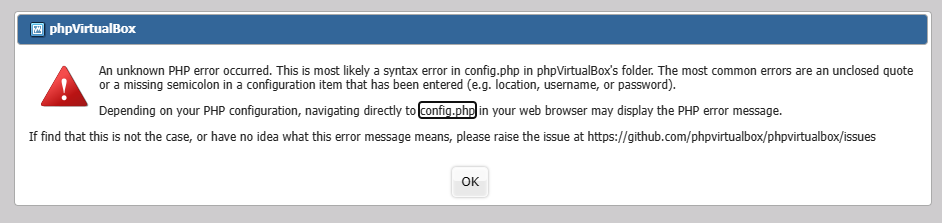
When VirtualBox is enabled, a PHP error appears on the page. As shown in the image:
Image

Cause of Failure:
This problem is usually caused by errors in the PHP configuration file. Generally, VirtualBox should run as your custom superuser, but for unknown reasons, the superuser in the configuration file has been mistakenly changed to root. The specific reason for the problem is still under investigation.

Solution:
1. Log in to your TNAS via SSH. https://forum.terra-master.com/cn/viewt ... =79&t=1511
2. Execute the following command: /etc/init.d/php-fpm restart If an error message appears in the red box in the image, proceed to step 3:

Image

3. Execute the following command to change root back to your superuser:

Code: Select all

vi /etc/nginx/php-fpm.conf
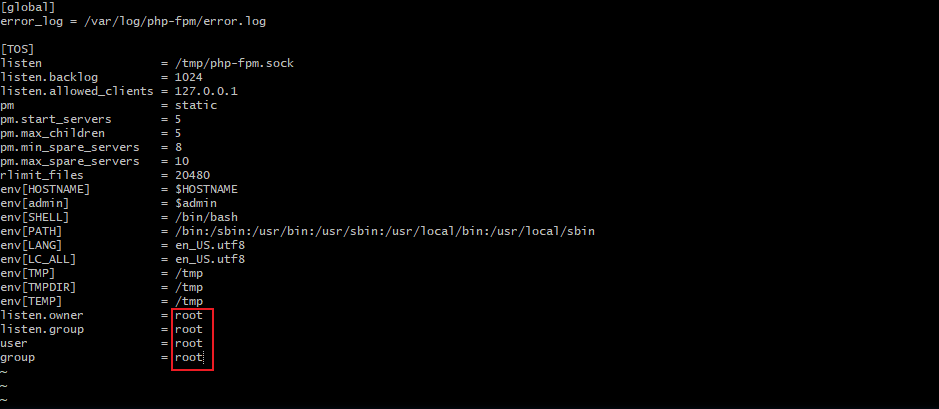
Before Modification:
Image

Press the "i" key to enter edit mode.
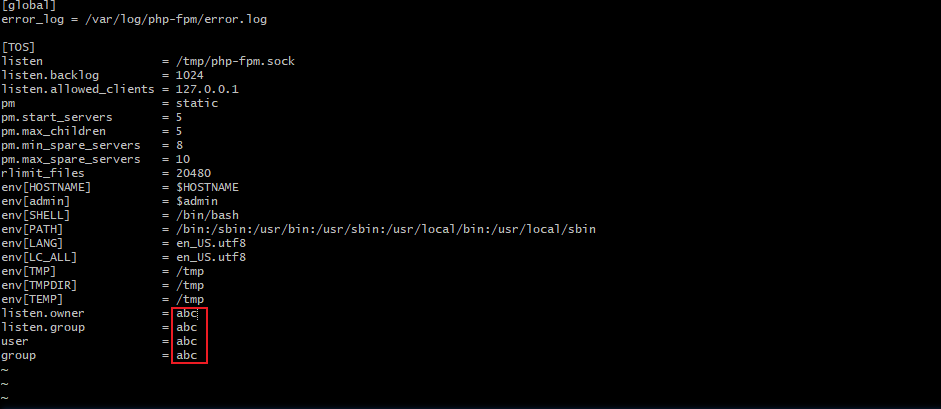
Use the arrow keys to move the cursor to the position that needs to be modified, delete "root", and enter the name of your superuser.
Press the ESC key to exit edit mode, and then press "Shift" + ":".
After the colon ":" appears, type "wq", then press Enter to save the configuration and exit.

After Modification:
Image

4. Please execute the following command to restart the PHP service:

Code: Select all

/etc/init.d/php-fpm restart
To contact our team, please send email to following addresses, remember to replace (at) with @:
Technical team: support(at)terra-master.com (for technical support)
Service team: service(at)terra-master.com (for purchasing, return, replacement, RMA service)
User avatar
star
Posts: 16
Joined: 17 Mar 2024, 04:25
Sweden

Re: How to Fix the Issue That VirtualBox Cannot be Opened But Indicating a PHP error?

Post by star »

TMzethar wrote: 26 Feb 2024, 15:42
Cause of Failure:
This problem is usually caused by errors in the PHP configuration file. Generally, VirtualBox should run as your custom superuser, but for unknown reasons, the superuser in the configuration file has been mistakenly changed to root. The specific reason for the problem is still under investigation.
The error why this happens is if you install virtualbox with a user that is admin but not the super user.

if you install it with the super user it will work :)
Post Reply

Return to “Applications”