[TOS5]Why does the Emby application Show an Error When Selecting TNAS Shared Folders?

TOS application, TNAS PC, TNAS mobile
Post Reply
User avatar
TMnight
TM Support
Posts: 181
Joined: 30 Sep 2022, 16:40

[TOS5]Why does the Emby application Show an Error When Selecting TNAS Shared Folders?

Post by TMnight »

Applicable Version
TOS 5

Applicable Models
All TNAS models (excluding F2-210 and F4-210 models)

Symptoms
When selecting TNAS shared folders, the Emby application displays an error.

Cause of the Issue
The shared folder added to Emby does not have the necessary permissions for the media user group

Solution
1.Please set media user group permissions for the shared folder added to Emby. Go to TOS Control Panel > Shared Folders, select the relevant shared folder, click the "Edit" button, and configure read and write permissions for the media user group.
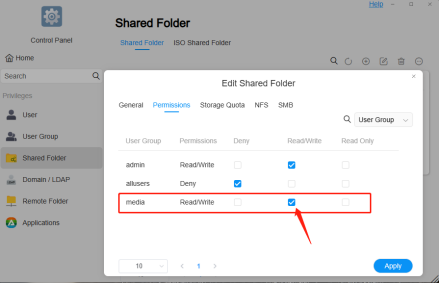
Image

2.Please close the Emby application first, and then restart the Emby application.
To contact our team, please send email to following addresses, remember to replace (at) with @:
Technical team: support(at)terra-master.com(for technical support)
Service team: service(at)terra-master.com(for purchasing, return, replacement, RMA service)
Post Reply

Return to “Applications”