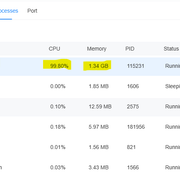
This process (3sWAS1GI) is definitely NOT a native TOS 7 system process, nor does it have anything to do with any TOS AI features. The randomized 8-character alphanumeric name, nearly 100% CPU usage (99.80%), and high memory footprint (1.34 GB) strongly match the typical profile of an unauthorized cryptocurrency mining trojan (malware / malicious script). Because miners frequently establish persistent backdoors and scheduled cron jobs across system paths, we strongly recommend following these steps to isolate, verify, clean, and harden your setup:
1. Disconnect the NAS from the Internet
Disconnect your NAS from the internet, or immediately disable router port forwarding, DMZ, and UPnP. This cuts off communication with external Command & Control (C2) mining servers and stops further payloads from loading.
2. Verify Data Safety, Readability, and Back Up
Connect to the NAS strictly over your local network and check your shared folders. Ensure your personal files, media, and documents remain intact, unencrypted, and properly readable. At this point, it is strongly recommended to back up your important data first.
3. Reinstall the Latest TOS System
Reinstalling TOS is the cleanest and most reliable way to completely purge unauthorized binaries and malicious background tasks:
- Reinstalling the system typically only resets configurations and permissions, but will not delete data on the hard drives. Please refer to our official guide:viewtopic.php?t=423
- Install the latest TOS version to restore system services and core files to a clean state.
4. Audit Infection Vectors & Harden Security
- Check Application WAN Exposures: Verify if third-party app WebUIs (such as qBittorrent) were mapped directly to the internet with default or weak credentials (admin:adminadmin), as these are primary targets for automated botnet exploits.
- Disable Router DMZ & UPnP: Never place the NAS into the router's DMZ, and turn off UPnP automatic port mapping.
- Enforce Strong Credentials: System credentials will be initialized afresh during the reinstallation process. Be sure to configure complex, high-entropy passwords for all admin accounts and containers—never reuse simple passwords.
- Standardize Remote Access Methods: Avoid opening raw management ports to the public internet. Please use official TNAS.online, or establish encrypted VPN connections via Tailscale or OpenVPN for remote access.
If you have any questions, please feel free to leave a reply here or contact our online support team via the link below:
https://salesiq.zohopublic.com/signatur ... 97d0be8892