Page 1 of 1
[Help] After update 7.0.1105 TOS shows bios warning
Posted: 17 Aug 2026, 08:24
by ajsango

BIOS Version MADNO102.V05
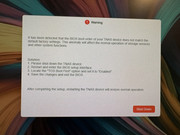
Error message after login to TOS 7.0 as follows:
"It has been detected that the bios boot order of your TNAS device does not match the default factory settings. This anomaly will affect the normal operation of storage services and other system functions.
Solution:
1) Shut down the TNAS device
2) Restart and enter bios setup interface
3) Locate the "TOS BOOT FIRST" option and set it to enabled
4) Save the changes and exit the bios.
After completing the setup, restarting the TNAS device will restore normal operation."
I can verify that the TOS BOOT FIRST option is enabled. Message still persists. This update has essentially bricked my TNAS device making it unusable. I am grateful for any suggestion that can overcome this problem Thank you in advance.
The TOS appears to boot normally, because I can login to the web interface.. however this warning doesn't not allow me to pass with only the option to shutdown the device.
Re: [Help] After update 7.0.1105 TOS shows bios warning
Posted: 17 Aug 2026, 08:41
by ajsango
I forgot to mention that my device is TNAS F6-424.
Re: [Help] After update 7.0.1105 TOS shows bios warning
Posted: 17 Aug 2026, 16:07
by EriChan
Thank you for the detailed description. As this issue is uncommon and involves multiple potential factors, please contact our support team via the link below to schedule a remote technical support session. Our engineers will connect directly to diagnose and help fix the problem:
https://salesiq.zohopublic.com/signatur ... 97d0be8892
(Please remember to include this forum thread link and your forum ID when reaching out.)
Re: [Help] After update 7.0.1105 TOS shows bios warning
Posted: 19 Sep 2026, 20:29
by grami
I am experiencing the exact same issue. After a difficult upgrade process that required resetting the system to installation mode, I was finally able to get the update through. However, upon rebooting, the UI locked me out with an error stating my BIOS is incorrect. Resetting the BIOS to factory defaults has had no effect.
I’ve done some troubleshooting and noticed a workaround: if I disconnect all drives except the OS drive, I can temporarily regain access to the UI. Unfortunately, the moment I reboot the system again, I am locked out once more.
This is a critical usability issue. A mismatch warning should be handled with a dismissible notification or a clear warning banner rather than a hard lockout that completely prevents access and forces users to seek support. As it stands, being locked out of the management interface leaves me dependent on the community forums and seriously considering migrating my setup to a more stable platform like TrueNAS or OpenMediaVault—solutions that don't break functionality during routine upgrades.
Additionally, the reference link provided earlier in this thread appears to be broken.
If anyone from support or the community has a reliable fix for this BIOS version check failure, I would appreciate the help.
Re: [Help] After update 7.0.1105 TOS shows bios warning
Posted: 19 Sep 2026, 20:37
by Phil
grami wrote: ↑19 Sep 2026, 20:29
I am experiencing the exact same issue. After a difficult upgrade process that required resetting the system to installation mode, I was finally able to get the update through. However, upon rebooting, the UI locked me out with an error stating my BIOS is incorrect. Resetting the BIOS to factory defaults has had no effect.
I’ve done some troubleshooting and noticed a workaround: if I disconnect all drives except the OS drive, I can temporarily regain access to the UI. Unfortunately, the moment I reboot the system again, I am locked out once more.
This is a critical usability issue. A mismatch warning should be handled with a dismissible notification or a clear warning banner rather than a hard lockout that completely prevents access and forces users to seek support. As it stands, being locked out of the management interface leaves me dependent on the community forums and seriously considering migrating my setup to a more stable platform like TrueNAS or OpenMediaVault—solutions that don't break functionality during routine upgrades.
Additionally, the reference link provided earlier in this thread appears to be broken.
If anyone from support or the community has a reliable fix for this BIOS version check failure, I would appreciate the help.
Thank you for the detailed description. Please contact our support team via the link below to schedule remote technical support. Our engineers will contact you directly to diagnose and assist in resolving the issue:
https://salesiq.zohopublic.com/signatur ... 97d0be8892
Re: [Help] After update 7.0.1105 TOS shows bios warning [SOLVED]
Posted: 19 Sep 2026, 22:09
by Gremlin
grami wrote: ↑19 Sep 2026, 20:29
If anyone from support or the community has a reliable fix for this BIOS version check failure, I would appreciate the help.
It should, of course, be noted that this is NOT anything to do with the BIOS version as such. The error message says the Boot Order is wrong.
Why it does that is a mystery (to me) BUT, it does give a solution in the error message. If that solution does not work, that is a different matter.
Re: [Help] After update 7.0.1105 TOS shows bios warning
Posted: 19 Sep 2026, 22:36
by ajsango
Sorry to hear your suffering from the same issue. Unfortunately, for me my OS was installed on the same volume as my data so when I engaged terramaster support, the only solution was to wipe my volume, lose my data, and start over. However, this time I purchased two ssd drives, one for the TOS and one for hypercache. This way, if the OS bombs again, hopefully my data is intact. I totally agree with you that a boot mismatch should be able to be bypassed to allow access to the management interface.. I’ve been hesitant to apply any additional incremental patching for fear it will brick my TNAS again.. anyway, I hope you can recover the error without having to start over again. Good luck.
Re: [Help] After update 7.0.1105 TOS shows bios warning
Posted: 24 Sep 2026, 03:00
by grami
My NAS Setup
- 2x 1TB M.2 SSD
- 3x 16TB IronWolf HDD
- M.2 #1: HyperCache
- M.2 #2: OS drive
- HDDs: RAID 5
────────────────────────────────────────────────────────────────────────────────
How I Fixed It
Step 1 — Removed the HyperCache M.2 drive completely. This gave me a clean install with no extra drives interfering.
Step 2 — Reset BIOS to factory defaults. This cleared custom settings that were likely causing the boot issue.
Step 3 — In the BIOS I did the following:
- Disabled TOS boot
- Changed the boot order and rebooted
- Re-entered BIOS and re-enabled TOS, then saved
This toggle sequence cleared the stuck BIOS boot flag.
Step 4 — Forced the unit to boot from the USB installer instead of the internal drive.
Step 5 — Chose custom install. I did not use the upgrade option. This mattered.
Step 6 — Downloaded the latest bootloader and .ins file manually from the Terra Master support site, then used the manual install path.
Step 7 — During install, the system flagged the original OS disk and warned it was only 8GB and should be at least 32GB. The upgrade path did not show this warning at all. This seemed like a bug or misleading message.
Step 8 — Completed the install and rebooted multiple times. This stopped the BIOS warning from showing on every boot.
Step 9 — Re-inserted the HyperCache M.2 drive and assigned it back to its volume through TOS.
────────────────────────────────────────────────────────────────────────────────
Current Status
Rebooted several times since finishing. The error is gone.
My takeaway: the error was not related to the actual cause. It was a red herring. The real fix was the clean custom install plus the BIOS boot toggle.
Re: [Help] After update 7.0.1105 TOS shows bios warning
Posted: 24 Sep 2026, 15:51
by CursaYang
The following known causes may lead to this error:
1. The BIOS was not updated, or the BIOS boot order was not adjusted, before upgrading to TOS 7 — this applies only to certain models. Please refer to the TOS 7 update notes:
viewtopic.php?t=10183
2. There are multiple system disks, but only one of them was selected when upgrading to TOS 7, so a conflict between the old and new systems caused the boot to fail. You can remove the drives other than the TOS 7 system disk, enter the system, and then insert the other drives. Then go to Storage Management > Disk > System Disk and check whether any drives contain other systems.
3. The USB drive on the motherboard, or the boot system on the USB drive, is faulty. You can refer to this post to re-flash the boot system:
viewtopic.php?t=6433
This issue may be caused by one or more of the above. We therefore recommend that you contact our online support team for assistance when you encounter this issue. If possible, you can also connect a monitor before startup to check for error messages during boot.