

NAS:
TerraMaster F4-425 Plus
OS:
TOS 7 (latest available version)
Application:
USB Copy (latest version)
Source:
CloudSync OneDrive backup folder
Problem description:
I created a USB Copy task to back up folders created by CloudSync.
Source folders:
Volume2/Main_archive/ONEDRIVE_backup
and destination to an extrenal usb drive formated NTFS
USB Copy fails with the following error:
"Backup file failed ONEDRIVE_backup
(Error: failed backup file)"
The USB copy succesfully performs the rest of the backup, the folder from Onedrive is simply skipped
The log does not show the specific file that causes the failure.
Tests performed:
1) USB Copy works correctly with normal folders.
Example:
Normal folders on Volume2 are backed up successfully.
2) CloudSync folders fail.
Both:
- old CloudSync OneDrive folder;
- new CloudSync OneDrive folder created with a new task;
produce the same USB Copy error.
4) FreeFileSync test:
A backup made using FreeFileSync from PC to USB disk works correctly.
The problem seems specific to USB Copy handling files created by TerraMaster CloudSync.
USB Copy does not provide enough information in the log to identify the failing file.
Questions:
1. Why does USB Copy fail on CloudSync-generated folders?
2. Can USB Copy provide a detailed log showing the file that causes the error?
3. Is there a compatibility issue between USB Copy and CloudSync-created files?
4. Are there known issues with TOS 7, CloudSync and USB Copy?
Thank you.
[Help] [BUG?] USB Copy fails when backing up CloudSync OneDrive folders on TOS 7


Re: [Help] [BUG?] USB Copy fails when backing up CloudSync OneDrive folders on TOS 7
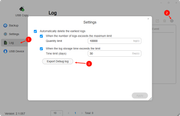
To help us pinpoint the issue, please follow the steps shown in the image below and send the app's debug logs to our technical support email ( [email protected] ) for further analysis.
To contact our team, please send email to following addresses, remember to replace (at) with @
Technical team: support(at)terra-master.com(for technical support)
Service team: service(at)terra-master.com(for purchasing, return, replacement, RMA service)
Technical team: support(at)terra-master.com(for technical support)
Service team: service(at)terra-master.com(for purchasing, return, replacement, RMA service)