[Help] F8 plus SSD
Posted: 18 Jul 2026, 17:06
Dear all,
I have a very strange problem with my F8 plus. I was wondering why the TNAS app on my Mac doesn't find the F8 plus. So I attached a TV via HDMI. Once powering on I can see the boot process. When it gets to initializing the network I see that it doesn't get an IP address. DHCP server is active, my Macbook and other equipment is getting an ip address without a problem.
I flashed the USB stick with the latest available image, no help. I tried to use the "reset" method with holding the. reset button, no help. I removed all SSDs, no help.
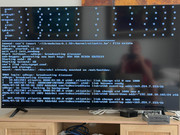
When I unplug the network cable it shows the correct ip, reinserting the cable gets back to a self given ip. see attached picture.
Any hint? Thanks, Marcus
I have a very strange problem with my F8 plus. I was wondering why the TNAS app on my Mac doesn't find the F8 plus. So I attached a TV via HDMI. Once powering on I can see the boot process. When it gets to initializing the network I see that it doesn't get an IP address. DHCP server is active, my Macbook and other equipment is getting an ip address without a problem.
I flashed the USB stick with the latest available image, no help. I tried to use the "reset" method with holding the. reset button, no help. I removed all SSDs, no help.
When I unplug the network cable it shows the correct ip, reinserting the cable gets back to a self given ip. see attached picture.
Any hint? Thanks, Marcus