Page 1 of 1
[Help] F6-424 Max CPU core temperature ~100C
Posted: 10 Jul 2026, 05:29
by fallenazazel
I have just updated my F6-424Max to TOS7.0777 and one of the cores (Core0) of my CPU is often at 100C, in fact all of the courses are higher temps than I have seen. The room hasnt changed as its set with aircon, and activity is no different to normal.
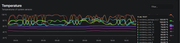
Does this mean I need to reseat the CPU with new thermal paste, its a relatively new machine.
Thanks
Re: [Help] F6-424 Max CPU core temperature ~100C
Posted: 10 Jul 2026, 07:15
by CursaYang
If the CPU core temperature was within the normal range prior to the TOS 7 upgrade, then reaching temperatures as high as 100°C after the upgrade is abnormal. Please generate and download a log report via TOS > Technical Support > Issue Report, and then email it to our technical support address (support(at)terra-master.com) so that we can analyze it.
Re: [Help] F6-424 Max CPU core temperature ~100C
Posted: 11 Jul 2026, 16:23
by TMzethar
Based on the system report you provided, the fan is currently set to automatic mode, and the CPU has been under sustained high load for a long period.
We recommend that you first try setting the fan to a fixed high speed. If the temperature still reaches 100°C, you may consider either replacing the thermal paste or slightly lowering the CPU power consumption in the BIOS.
In addition, your system RAM has been triggering OOM (Out of Memory) events, which have severely impacted system services. We suggest that you limit the RAM usage allocated to Docker containers and virtual machines.
Re: [Help] F6-424 Max CPU core temperature ~100C
Posted: 11 Jul 2026, 19:12
by Gremlin
If the apps in use before and after the upgrade are unchanged, does that not imply (regarding the OOM events) that TOS7 is less optimised and/or a greater "consumer" of RAM than TOS6. Would that be something that @TM might address?

{Given the cost of ram these days maybe @TM might provide foc ram upgrades for machines that can be upgraded.


}
Re: [Help] F6-424 Max CPU core temperature ~100C
Posted: 12 Jul 2026, 10:07
by TMzethar
If this is related to an update, we will verify and investigate it. However, in general, system-level changes should not have this kind of impact.
Re: [Help] F6-424 Max CPU core temperature ~100C
Posted: 12 Jul 2026, 16:45
by TMroy
It doesn't make sense that the same service or process would consume more resources just because it's running on TOS 7 — that's illogical, and even intentionally making it happen would be extremely difficult. The only plausible explanation is that there's a process keeping one CPU core consistently under high load, and that this task wasn't happening on the previous system. The key is to identify which process is consuming the CPU. Another possibility is a hardware cooling issue, but why would it surface right after a system update? Coincidence? Or perhaps it existed before, but the device owner simply hadn't noticed it?
You can identify CPU-intensive processes in the system resource monitor. If no process shows high CPU usage, that likely points to a hardware cooling issue.
Oggetto: [Aiuto] F6-424 Temperatura massima del core della CPU ~100C
Posted: 17 Jul 2026, 22:41
by MrVanz
I noted the same problem in this very hot days in northern Italy using ClamAV and automatic speed. If I set on high speed seem going ok.
Re: Oggetto: [Aiuto] F6-424 Temperatura massima del core della CPU ~100C
Posted: 18 Jul 2026, 15:59
by MikeZhang
Please send system report so that we can analyze for you
Re: [Help] F6-424 Max CPU core temperature ~100C
Posted: 22 Jul 2026, 05:43
by fallenazazel
TMzethar wrote: ↑11 Jul 2026, 16:23
Based on the system report you provided, the fan is currently set to automatic mode, and the CPU has been under sustained high load for a long period.
We recommend that you first try setting the fan to a fixed high speed. If the temperature still reaches 100°C, you may consider either replacing the thermal paste or slightly lowering the CPU power consumption in the BIOS.
In addition, your system RAM has been triggering OOM (Out of Memory) events, which have severely impacted system services. We suggest that you limit the RAM usage allocated to Docker containers and virtual machines.
Thanks for the update on the findings. There have been some OOM since Immich and its database, though this was setup before the TOS7 upgrade.I will adjust the fan speed and test, although the thermal paste will be inspected.
Appreciate your time with this
Re: [Help] F6-424 Max CPU core temperature ~100C
Posted: 22 Jul 2026, 09:25
by TMzethar
fallenazazel wrote: ↑22 Jul 2026, 05:43
Thanks for the update on the findings. There have been some OOM since Immich and its database, though this was setup before the TOS7 upgrade.I will adjust the fan speed and test, although the thermal paste will be inspected.
Appreciate your time with this
Got it. If it still overheats even after switching to high speed, you might want to reapply the thermal paste.
Additionally, we kindly request that you provide the device's serial number to allow us to review any further product-related information on our side.