

Hello
When my F2-425 had TOS 6 I could see for example serial number, disk temperature and firmware on my external Seagate disk connected with USB but in TOS 7 it is not working. S.M.A.R.T is obviously not working anymore and in TOS 6 Ironwolf Health Management was working but not in TOS 7.
Does anyone know why? Is it possible to fix in a new firmware?
TOS 7 USB IronWolf Health S.M.A.R.T


Re: TOS 7 USB IronWolf Health S.M.A.R.T
It seems to be working on my f5-221 (only nas I have with Ironwolf installed).
Smart-info also seems to be working.
F5-221 TOS7.0.1278 - 4x4TB (Ironwolf) Traid
F2-424 TOS7.0.1278 - 2x500GB nvme (P3) Traid, 2x6TB HDD (HGST) Traid
F2-221 TOS7.0.1278 - 1x3TB Ext4, 1x4TB Btrfs
F2-425+ TOS7.0.1278 - 2x500GB nvme (P3) Traid, 2x6TB HDD (EXOS) Traid
F2-424 TOS7.0.1278 - 2x500GB nvme (P3) Traid, 2x6TB HDD (HGST) Traid
F2-221 TOS7.0.1278 - 1x3TB Ext4, 1x4TB Btrfs
F2-425+ TOS7.0.1278 - 2x500GB nvme (P3) Traid, 2x6TB HDD (EXOS) Traid


Re: TOS 7 USB IronWolf Health S.M.A.R.T
I have a D4-320 with 4 x12tb Iron Wolf Pro which is attached to my F4-424 Pro and (smarts) is working.
Also for temps, I see them on the device monitoring overview screen
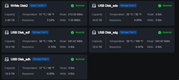
actually everything you are looking for, I see it this way
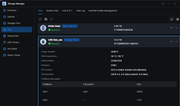
Also for temps, I see them on the device monitoring overview screen
actually everything you are looking for, I see it this way
F6-424 & F4-425 Plus at 7.0.1298
F4-424 Pro (x2) at 7.0.1298
D4-320 (Offline until I can afford more HDDs)
F4-424 Pro (x2) at 7.0.1298
D4-320 (Offline until I can afford more HDDs)


Re: TOS 7 USB IronWolf Health S.M.A.R.T
You can refer to the location shown in rfbjr's screenshot to check if the external hard drive information is visible. If you cannot see it, please provide screenshots of your page; alternatively, you can use the `smartctl` command in the terminal to check the drives for any anomalies.
Replace X with the actual hard drive letter.
Code: Select all
smartctl -a /dev/sdXTo contact our team, please send email to following addresses, remember to replace (at) with @
Technical team: support(at)terra-master.com(for technical support)
Service team: service(at)terra-master.com(for purchasing, return, replacement, RMA service)
Technical team: support(at)terra-master.com(for technical support)
Service team: service(at)terra-master.com(for purchasing, return, replacement, RMA service)
Re: TOS 7 USB IronWolf Health S.M.A.R.T
Just to clarify or note, the drives in my D4-320 are mounted/attached to the F4-424 Pro as a storage pool.
F6-424 & F4-425 Plus at 7.0.1298
F4-424 Pro (x2) at 7.0.1298
D4-320 (Offline until I can afford more HDDs)
F4-424 Pro (x2) at 7.0.1298
D4-320 (Offline until I can afford more HDDs)