

[Help] System Resource widget stops working
[Help] System Resource widget stops working
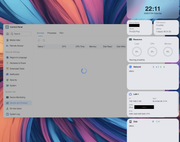
Probably can get most of my information from the screenshot. But I've seen this one Safari, Chrome browsers on Mac and Chrome in Linux. When I reboot my NAS, the system resource widget works for a little while. Also, my Control Panel -> Services is locked up. Again, a reboot will fix, but my uptime is only a day and looks like I need to reboot again?


Re: [Help] System Resource widget stops working
We have not previously encountered the scenario you described. It is likely that certain processes were interrupted during execution. Please activate debug mode and forward the logs to our technical team for further investigation.
To contact our team, please send email to following addresses, remember to replace (at) with @:
Support team: support(at)terra-master.com (for technical support only)
Service team: service(at)terra-master.com (for purchasing, return, replacement, RMA service)
Support team: support(at)terra-master.com (for technical support only)
Service team: service(at)terra-master.com (for purchasing, return, replacement, RMA service)
Re: [Help] System Resource widget stops working
For others, removing the external D5-Hybrid from my F4-425 plus "fixed" this issue. An external enclosure, especially from the same company probably shouldn't cause this behavior. If the external drives are slow, maybe an error message or set to ignore the enclosure. But I guess I'll just have to remove the D5-Hybrid from my setup.

Re: [Help] System Resource widget stops working
Based on your description, since the issue was resolved after removing the D5-Hybrid, it may be related to the response time of the external storage device.
When a D5-Hybrid contains a large amount of data, or if one of the installed drives has slow response times or abnormal I/O behavior, the system may require additional time to detect and access the device. This can temporarily affect functions such as the System Resource widget or the Control Panel service page. In most cases, the system should recover after the detection process is completed.
If the issue occurs again, please generate a system report through TOS Web → Support & Help → Report Issues, then download the report and send it to our support team by email. Please include the download link of the report in your email so our technical team can further analyze the related logs.
Additionally, please check the health status of the hard drives installed in the D5-Hybrid and confirm whether there are any disk errors, I/O delays, or abnormal responses.
Thank you for your feedback. We will continue to assist with the investigation based on the information provided.
When a D5-Hybrid contains a large amount of data, or if one of the installed drives has slow response times or abnormal I/O behavior, the system may require additional time to detect and access the device. This can temporarily affect functions such as the System Resource widget or the Control Panel service page. In most cases, the system should recover after the detection process is completed.
If the issue occurs again, please generate a system report through TOS Web → Support & Help → Report Issues, then download the report and send it to our support team by email. Please include the download link of the report in your email so our technical team can further analyze the related logs.
Additionally, please check the health status of the hard drives installed in the D5-Hybrid and confirm whether there are any disk errors, I/O delays, or abnormal responses.
Thank you for your feedback. We will continue to assist with the investigation based on the information provided.
To contact our team, please send email to following addresses, remember to replace (at) with @:
Support team: support(at)terra-master.com (for technical support only)
Support team: support(at)terra-master.com (for technical support only)