

Hello TerraMaster support,
I am experiencing an issue with static IP assignment on my TerraMaster NAS after creating a network bridge for virtual machines.
Environment
NAS model: F4-424 Pro
Operating system: TOS 7 (7.0.0765)
Network: one Ethernet interface bridged (bridge0) for KVM/VMs, LAN 192.168.100.0/24, router at 192.168.100.1
Current NAS IP: obtained via DHCP on bridge0 (for example 192.168.100.106)
Problem description
Originally, the NAS was using a static IP address 192.168.100.4 on the physical interface (eth0).
After I created a bridge (bridge0) in TOS 7 and attached the physical interface to the bridge, the NAS obtained a new IP address via DHCP on bridge0 and is reachable.
Now I want to assign the previous static IP 192.168.100.4 directly to bridge0 via Control Panel → Network → Interface → Edit → Configure network manually, but the web UI shows the following error and refuses to save the configuration:
“Esta dirección IP ya existe, pero ya no está asignada a nada.”
This happens even though 192.168.100.4 is not in use on the network and is not configured on any NAS interface. According to your documentation, both DHCP and manual static configuration are supported on bridge interfaces in TOS 7, and I specifically need the manual static configuration.
Troubleshooting performed
Verified on the router that 192.168.100.4 is not used by any device and has never been assigned by DHCP (no active lease, no reservation).
On the NAS, checked from the terminal:
bash
ip addr | grep 192.168.100.4
ip route | grep 192.168.100.4
arp -n | grep 192.168.100.4
The address 192.168.100.4 is not assigned to any interface; it only appears as an incomplete ARP entry on bridge0, which indicates a failed ARP resolution and not a local address assignment.
Searched for 192.168.100.4 in the configuration files under /etc and /etc/tos/config and updated/removed all references that were clearly metadata rather than active interface configuration, for example:
/etc/network.config
/etc/NetworkManager/system-connections/Wired connection 1.nmconnection.bak
/etc/tos/config/smb.json
/etc/tos/config/oscar/OverviewLocation*.json
/etc/tos/config/routine.json
Rebooted the NAS several times after these changes to ensure that TOS reloaded its network configuration.
Currently, bridge0 works correctly with DHCP, and all virtual machines connected to the bridge have network connectivity. The only problem is that the web UI will not allow me to set 192.168.100.4 as a static IP on bridge0, always showing the same “already exists” error, even though the address is free.
Important requirement
I am aware of the recommendation in your forum and FAQ to set the NAS to DHCP and use a static DHCP reservation on the router instead of a static IP inside TOS. However, in my environment this is not an acceptable solution:
I need the IP to be configured as manual static directly on the NAS (TOS), not via DHCP reservation, for consistency with internal documentation, automation, firewall rules, and other services that depend on the NAS configuration being fully self-contained.
Your own TOS documentation explicitly states that interfaces and bridges can be configured manually with a static IP address, subnet mask, gateway, and DNS; this is the mode I am trying to use.
Therefore, please do not suggest DHCP + router-side static reservation as the final workaround. I specifically need to understand and fix the static IP validation issue in TOS so that 192.168.100.4 can be assigned manually to bridge0.
Expected behavior
If 192.168.100.4 is not configured on any NAS interface and is not used elsewhere on the LAN, TOS 7 should allow assigning this address as a static IP on bridge0 without error.
Request
Could you please:
Confirm whether this is a known issue/bug in TOS 7 related to static IP validation after creating a bridge.
Provide a safe procedure to fully reset or rebuild the NAS network configuration and any internal IP registry/database, so that 192.168.100.4 can be reused on bridge0 as a manual static IP, not via DHCP.
Indicate which log files or configuration files you need (for example /etc/network.config, /etc/tos/config/*, relevant system logs), and I will export and send them to you as requested.
I prefer to keep using 192.168.100.4 for this NAS for consistency with existing documentation and services, and I specifically need this to be configured as a manual static IP on the bridge interface.
Thank you in advance for your help.
Best regards,
[Help] TOS 7 cannot assign previous static IP on bridge


Re: [Help] TOS 7 cannot assign previous static IP on bridge
Have you confirmed that the 192.168.100.4 is not included within the DHCP pool of addresses available for assignment on the router?
F5-221 TOS7.0.1278 - 4x4TB (Ironwolf) Traid
F2-424 TOS7.0.1278 - 2x500GB nvme (P3) Traid, 2x6TB HDD (HGST) Traid
F2-221 TOS7.0.1278 - 1x3TB Ext4, 1x4TB Btrfs
F2-425+ TOS7.0.1278 - 2x500GB nvme (P3) Traid, 2x6TB HDD (EXOS) Traid
F2-424 TOS7.0.1278 - 2x500GB nvme (P3) Traid, 2x6TB HDD (HGST) Traid
F2-221 TOS7.0.1278 - 1x3TB Ext4, 1x4TB Btrfs
F2-425+ TOS7.0.1278 - 2x500GB nvme (P3) Traid, 2x6TB HDD (EXOS) Traid


Re: [Help] TOS 7 cannot assign previous static IP on bridge
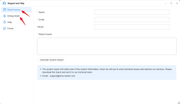
To help us quickly troubleshoot the issue you are experiencing, please enable system debug mode first, then reproduce the problematic operation. After that, please download both the logs generated by the “Report issues” function and the complete log package collected by debug mode, and send them together to our official support email: [email protected]. Please also include the link to this forum thread in your email so that we can quickly correlate the context and follow up on your case.
(Refer to the screenshot below for the location to enable debug mode.)
-
Herewerare2024

- Posts: 50
- Joined: 06 Oct 2024, 03:48

Re: [Help] TOS 7 cannot assign previous static IP on bridge
My advice is to modify the routers DHCP range to include the 192.168.100.4 within the range... then add the device to the routers static IP list.
I suspect the router isn't playing nice with devices using IP's outside of the DHCP range. I don't have info on the router you use. If the network interface was previously registered to the target IP, does the bridge you created also use the same MAC? ...because if it is different there is going to be a conflict when using that IP with a different MAC.
I think the MAC conflict is another likely source of failure. The IP may be "reserved" due to previous configuration actions.
Cheers,
I suspect the router isn't playing nice with devices using IP's outside of the DHCP range. I don't have info on the router you use. If the network interface was previously registered to the target IP, does the bridge you created also use the same MAC? ...because if it is different there is going to be a conflict when using that IP with a different MAC.
I think the MAC conflict is another likely source of failure. The IP may be "reserved" due to previous configuration actions.
Cheers,