Page 1 of 1
[Help] F4-423 TOS7 shared folder not showing
Posted: 21 Jun 2026, 21:04
by Hugodad
Hi all,
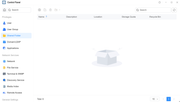
I can't add any of my shared folder whithin Jellyfin or plex or any other apps
folders are invisible
Need some help, thanks
Re: [Help] F4-423 TOS7 shared folder not showing
Posted: 22 Jun 2026, 14:50
by MikeZhang
Please try restarting your device to see if that resolves the issue. If no folders are still displayed, please share screenshots of the storage pool and volume pages to help us pinpoint the problem.
Re: [Help] F4-423 TOS7 shared folder not showing
Posted: 20 Jul 2026, 17:13
by Schnorra
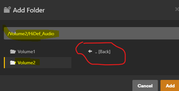
I am getting the same issue.. all my Plex paths have disappeared and when I try to remap, my /vol2 showed the root folder but none of the folders underneath.
Same issue with QBitorrent and Jellyfin.. I have rebooted the Server and restarte the apps.. This is on Tos 7 on F4-423

Re: [Help] F4-423 TOS7 shared folder not showing
Posted: 20 Jul 2026, 17:16
by Schnorra
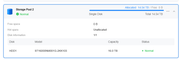
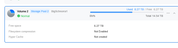
here is my screenshots of the storage pool and volume pages to help us pinpoint the problem.
Re: [Help] F4-423 TOS7 shared folder not showing
Posted: 20 Jul 2026, 17:57
by Schnorra
I tired unmounting and remounting the 'shared folders' which sit on my Old Buffalo LinkStation.. The remounted fine, the subfolder show up as 'connected' in the Tos File Manager and show up in my Win11 File manager under the mapped TOS server..
BUT.. when you try to traverse to them on locally hosted TOS servers like Plex, JellyFin, QBitorrent.. The paths do no appear..I have rebooted the Tos7, rebooted Plex and Jellyfin..nothing..but the SMB shares are mapped! This has happened since going to TOS7
Re: [Help] F4-423 TOS7 shared folder not showing
Posted: 20 Jul 2026, 20:33
by TMzethar
Following an upgrade to TOS 7, a permission conversion procedure may be required. If this conversion has not been carried out, we recommend that you reconfigure the applicable permissions as needed.