Process started from NAS does not see files in its own folder
Posted: 02 Jun 2026, 01:36
Good day
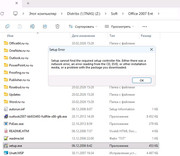
Please help me solve a significant problem. I got Terramaster F2-423, TOS 6.0, domain authorization. When I place some installation files on a share, and then start "setup.exe", this process does not see files in its own folder. I noticed it, for example, on installation files of Office 2007, or driver packs. It does not matter whether I use admin account or someone's else. I can read, write, delete any file in this folder or subfolder.
Please help me solve a significant problem. I got Terramaster F2-423, TOS 6.0, domain authorization. When I place some installation files on a share, and then start "setup.exe", this process does not see files in its own folder. I noticed it, for example, on installation files of Office 2007, or driver packs. It does not matter whether I use admin account or someone's else. I can read, write, delete any file in this folder or subfolder.