Page 1 of 8

[Help] F4-424 unreachable every 48-72h (or less)

Posted: 25 May 2026, 02:55
by exqo
Summary
My F4-424 freezes completely at unpredictable intervals (every 12h to 3 days).
The issue has persisted for ~6 months across a full migration from TOS 6
(kernel 6.1.x) to TOS 7.0.0601 (kernel 6.12.63+). I have collected
extensive forensic logs pointing to a low-level I/O / storage-subsystem
block that is independent of any user software.

Hardware
Model: F4-424
CPU: Intel N95
RAM: 8 GB DDR5 (stock, single module)
Drives: 2x Seagate IronWolf 4TB (ST4000VN006) RAID1 + 1x WD Red 8TB (WD80EFPX)
All drives SMART PASSED, 0 reallocated/pending sectors, 0 CRC errors
BTRFS: 0 errors on all counters (write/read/flush/corruption/generation)

Symptoms — two observed signatures

SILENT HANG: system fully sane (load ~0.1, 0 processes in D-state),
then instant freeze with NO trace. Web UI 504, SSH dead, only physical
reboot recovers. No kernel panic/oops (taint stays O+L, never D).
SLOW I/O STORM: load climbs progressively over ~2h to 200+, with
thousands of processes (peak 3720) stuck in uninterruptible D-state,
while btrfs-transaction blocks on write_all_supers / folio_wait_bit_common.
Disk utilization stays near 0% — processes are waiting, not doing I/O.

Both point to the same root cause: a sudden block of the storage I/O path
(BTRFS transaction / md RAID write) that cascades to a full system stall.

What has been systematically ELIMINATED
Docker containers: reproduces with minimal stack (6-9 lightweight containers)
  • All applications (Immich, qBittorrent, *arr): reproduces without them
  • Aggressive SMART polling (ter_smartfan + ResourceCollection spawning
    smartctl): identified and mitigated — was a REAL secondary issue, now resolved
  • Thermal: HDD 30-37C, CPU 44-50C at all times — perfect
  • Disks: all SMART PASSED, no bad sectors
  • BTRFS filesystem: 0 errors, scrubs clean
  • USB devices: disconnected, no change
  • WiFi Realtek modules: cleaned by TOS 7
  • TOS 6 specific config: TOS 7 fresh install reproduces identical pattern
  • Kernel 6.1.x specific bug: kernel 6.12.63+ reproduces identical pattern
Diagnostic data available
6 archived freeze-watch logs (30s interval) capturing pre-crash state
Covers crashes on 14/05 (TOS 6), 19/05, 22/05, 23/05, 24/05 (TOS 7)
Load progression, D-state process maps with kernel wchan, dmesg tails
pstore/efi_pstore configured with panic-on-lockup: NO trace captured,
suggesting a hardware-level freeze rather than a kernel software bug

Remaining hypotheses
Given that the issue is constant across two different kernels (6.1 and 6.12),
a pure kernel bug is less likely. The constant factor is the hardware:

RAM (never tested)
SATA controller / motherboard
PSU instability

Request

Are there known issues with the F4-424 motherboard/SATA controller
causing BTRFS/md transaction stalls?
Diagnostic procedure you recommend before RMA
RMA process for motherboard/unit replacement under EU 2-year warranty

I can provide all logs on request. Thank you.
Re: [Help] F4-424 unreachable every 48-72h (or less)

Posted: 25 May 2026, 16:40
by MikeZhang
exqo wrote: 25 May 2026, 02:55
Thank you for the extremely detailed investigation and forensic data.
The two freeze signatures you documented are particularly important:

Silent full-system freeze with no kernel panic/oops and no persistent trace
Progressive D-state accumulation with BTRFS transaction threads blocked in write_all_supers / folio_wait_bit_common while actual disk throughput remains near zero

This strongly suggests a lower-layer I/O path stall rather than filesystem corruption itself.

Your elimination matrix is also very valuable:

SMART clean on all disks
BTRFS counters clean
Reproducible across two kernel generations
Reproducible after clean TOS 7 install
Reproducible with minimal containers
Thermal conditions normal
Secondary SMART polling storm already mitigated

It's recommended to enable debug mode in TOS desktop top dock bar "Support and Help"
and attach one HDMI monitor to the NAS
When it becomes unreachable again, observe HDMI output and take photos for us to analyze
then you may manage to enter TOS desktop again by pressing power button, generate debug logs and send to support email for analysis.

You may also run a full multi-pass MemTest86 overnight if it's available for you, which will better help us address where the issue locates

Re: [Help] F4-424 unreachable every 48-72h (or less)

Posted: 26 May 2026, 02:48
by rgrg1
I have the same issue. I bought my new F4-424 Nas on 01/2026. It has worked for 2 months without any issue but from then I experience same issue as exqo. I have also a thread in the froum and sent all logs via emails.
viewtopic.php?t=9945

Re: [Help] F4-424 unreachable every 48-72h (or less)

Posted: 26 May 2026, 14:37
by MikeZhang
rgrg1 wrote: 26 May 2026, 02:48
Sorry for the inconvenience, is your issue fixed? Is there any update from email support?

Re: [Help] F4-424 unreachable every 48-72h (or less)

Posted: 26 May 2026, 15:46
by rgrg1
Unfortunately, I have not received any feedback or solution yet.
I sent my last email regarding this topic on April 25. Yesterday, I also sent a follow-up email in the hope of receiving a response.


the crashes had different reasons in each case, but the root cause is unknown. Major crashes:
March 23 – First crash
Unknown – no logs available. Likely the first manifestation of kernel memory management bugs.
April 5 – Second crash
Unknown – no logs available.
April 13 – Third crash
khugepaged (Transparent Huge Pages manager) crashed in move_to_new_folio+0x30/0x140, leaving the kernel silently corrupted. 5 days later, 185 cascading crashes in 27 minutes involving smbd (83x), ter_smartfan (61x), and others – all hitting the same corrupted memory address.
April 18/19 – Fourth crash
NTP daemon with misconfigured 127.127.1.0 prefer caused continuous step-mode clock corrections. Each clock change triggered the TOSDaemon Go runtime, gradually corrupting kernel state until silent crash.
April 24/25 – Fifth crash
TOSDaemon VPN autoReconnect goroutine memory leak caused sysMemStat overflow after ~127 hours of uptime, triggering ep_remove kernel bug and vma_interval_tree_remove crash.
April 30 – Sixth crash
Same NTP clock change trigger. Silent kernel death with no log trace.
May 2 – Seventh crash
Samsung mobile app connected at 06:56, activating TOSDaemon which created btrfs subvolumes. Race condition between btrfs subvolume creation and active postgres process caused general protection fault in __rb_erase_color / vma_interval_tree.

there are cases where it crashes between 6 hours and 2 days, but I'm tired of looking at the logs

and it continues, but everything is already turned off, I also did a factory reset and I didn't configure anything

Re: [Help] F4-424 unreachable every 48-72h (or less)

Posted: 26 May 2026, 18:38
by TMnight
exqo wrote: 25 May 2026, 02:55
To help us further analyze this issue, could you please provide the following information?

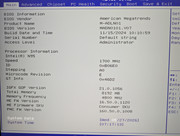
1. BIOS version information
We’d like to confirm the BIOS version currently installed on your NAS.

Please follow these steps:

Power off the NAS completely.
Connect a monitor via HDMI and a keyboard via USB.
Power the NAS back on, then continuously press Esc or Del repeatedly to enter the BIOS setup.
In the BIOS Setup screen, please check the following information:
BIOS Version
Build Date and Time
Please take a screenshot/photo of this page and send it to us.

2. CPU C-state information
Please log in to TOS via SSH and run the following command:

Code: Select all

for c in /sys/devices/system/cpu/cpu[0-9]*; do echo "==================== $(basename $c) ===================="; for s in $c/cpuidle/state*; do echo "$(cat $s/name): usage=$(cat $s/usage), time=$(cat $s/time)"; done; echo; done
This command will show the CPU idle state (C-state) activity statistics for each CPU core.

After running it, please send us:

A screenshot/photo of the BIOS information
The full command output

With this information, we can better determine whether the issue may be related to BIOS version compatibility or CPU power state behavior.

Re: [Help] F4-424 unreachable every 48-72h (or less)

Posted: 26 May 2026, 18:50
by TMnight
rgrg1 wrote: 26 May 2026, 15:46
We will first review the logs you provided to check for any abnormal behavior. In the meantime, to further help us identify the root cause, please assist with the following steps and share the results with us:

1. Provide BIOS version information
We first need to confirm the BIOS version currently installed on your NAS. Please follow these steps:

Power off the NAS completely;
Connect a monitor via the HDMI port and a keyboard via the USB port;
Power the NAS back on, then continuously press Esc or Del repeatedly to enter the BIOS setup;
In the BIOS Setup screen, please check the following information:
BIOS Version
Build Date and Time

Please take a photo or screenshot of this page and send it to us.

2. Provide CPU C-State information
Please log in to the TOS system via SSH and run the following command:

Code: Select all

for c in /sys/devices/system/cpu/cpu[0-9]*; do echo "==================== $(basename $c) ===================="; for s in $c/cpuidle/state*; do echo "$(cat $s/name): usage=$(cat $s/usage), time=$(cat $s/time)"; done; echo; done
Please send us the following information together:

A photo or screenshot of the BIOS page
The full output of the command above

Once we receive this information, we will combine it with the logs you previously provided and continue investigating the root cause of the issue.

Re: [Help] F4-424 unreachable every 48-72h (or less)

Posted: 27 May 2026, 02:51
by rgrg1
Here you can find the requested details:

C-State
gabor@TNAS:~# for c in /sys/devices/system/cpu/cpu[0-9]*; do echo "==================== $(basename $c) ===================="; for s in $c/cpuidle/state*; do echo "$(cat $s/name): usage=$(cat $s/usage), time=$(cat $s/time)"; done; echo; done

Code: Select all

==================== cpu0 ====================
POLL: usage=80789, time=10402577
C1E: usage=22920910, time=2707443105
C6: usage=4502996, time=4400786210
C8: usage=2957228, time=5164694755
C10: usage=9391927, time=69251821860
==================== cpu1 ====================
POLL: usage=107595, time=15127165
C1E: usage=30646192, time=3559972150
C6: usage=5073848, time=4846557276
C8: usage=3595104, time=6055435934
C10: usage=10568055, time=66889641657
==================== cpu2 ====================
POLL: usage=81439, time=10745961
C1E: usage=23156287, time=2750063552
C6: usage=4527166, time=4413363482
C8: usage=2919745, time=5040858017
C10: usage=9103544, time=69327215833
==================== cpu3 ====================
POLL: usage=80239, time=10520785
C1E: usage=22879454, time=2691637706
C6: usage=4457562, time=4358920677
C8: usage=2883273, time=4981303801
C10: usage=9036396, time=69498314080
BIOS version:
gabor@TNAS:~# dmidecode -t bios

Code: Select all

# dmidecode 3.3
Getting SMBIOS data from sysfs.
SMBIOS 3.5.0 present.

Handle 0x0000, DMI type 0, 26 bytes
BIOS Information
        Vendor: American Megatrends International, LLC.
        Version: MADN0101.V07
        Release Date: 11/15/2024
        Address: 0xF0000
        Runtime Size: 64 kB
        ROM Size: 16 MB
        Characteristics:
                PCI is supported
                BIOS is upgradeable
                BIOS shadowing is allowed
                Boot from CD is supported
                Selectable boot is supported
                BIOS ROM is socketed
                EDD is supported
                Japanese floppy for NEC 9800 1.2 MB is supported (int 13h)
                Japanese floppy for Toshiba 1.2 MB is supported (int 13h)
                5.25"/360 kB floppy services are supported (int 13h)
                5.25"/1.2 MB floppy services are supported (int 13h)
                3.5"/720 kB floppy services are supported (int 13h)
                3.5"/2.88 MB floppy services are supported (int 13h)
                Print screen service is supported (int 5h)
                Serial services are supported (int 14h)
                Printer services are supported (int 17h)
                CGA/mono video services are supported (int 10h)
                ACPI is supported
                USB legacy is supported
                BIOS boot specification is supported
                Targeted content distribution is supported
                UEFI is supported
        BIOS Revision: 5.26

Handle 0x0058, DMI type 13, 22 bytes
BIOS Language Information
        Language Description Format: Long
        Installable Languages: 1
                en|US|iso8859-1
        Currently Installed Language: en|US|iso8859-1

additional information

Despite the BIOS C-State setting disabled as I see in the BIOS the kernel is still entering deep C-states. Based on cpuidle statistics collected after 22 hours of uptime:

C10 time: ~69,000,000,000 µs = ~83.6% of total uptime
C6, C8 also active with significant usage counts

This is a known Intel N95 (Alder Lake-N, Stepping A0) bug — when transitioning into deep C6/C8/C10 states, the internal CPU voltage drops below a stable threshold, causing a silent system freeze with zero kernel logs, no panic, no oops.

Reference: a TrueNAS SCALE user with identical hardware (Terramaster F4-424, Intel N95) documented and solved the exact same/similar issue:
https://www.reddit.com/r/homelab/commen ... ockups_on/


Yesterday, out of desperation after months of instability, I upgraded from TOS 6 to TOS 7. However, based on the C-State evidence collected today, I now believe the TOS version is irrelevant — if the root cause is the Intel N95 C-State bug, it will reproduce on TOS 7 as well, since it is a kernel-level issue independent of the TOS version.

Could you please clarify: is this a hardware defect, or is it a firmware/kernel configuration issue that can be fixed via a BIOS update or kernel parameter? Could it be the root cause the C-State as I mentioned above? Thank you

Here you can find the BIOS version screenshot
Image

further BIOS settings what I could extract through SSH

gabor@TNAS:~# dmidecode -t 4

Code: Select all

# dmidecode 3.3
Getting SMBIOS data from sysfs.
SMBIOS 3.5.0 present.

Handle 0x004A, DMI type 4, 48 bytes
Processor Information
        Socket Designation: U3E1
        Type: Central Processor
        Family: Other
        Manufacturer: Intel(R) Corporation
        ID: E0 06 0B 00 FF FB EB BF
        Version: Intel(R) N95
        Voltage: 0.9 V
        External Clock: 100 MHz
        Max Speed: 3400 MHz
        Current Speed: 2673 MHz
        Status: Populated, Enabled
        Upgrade: Other
        L1 Cache Handle: 0x0047
        L2 Cache Handle: 0x0048
        L3 Cache Handle: 0x0049
        Serial Number: To Be Filled By O.E.M.
        Asset Tag: To Be Filled By O.E.M.
        Part Number: To Be Filled By O.E.M.
        Core Count: 4
        Core Enabled: 4
        Thread Count: 4
        Characteristics:
                64-bit capable
                Multi-Core
                Execute Protection
                Enhanced Virtualization
                Power/Performance Control
gabor@TNAS:~# dmidecode | grep -i "c-state\|power\|turbo\|speedstep"

Code: Select all

        Wake-up Type: Power Switch
        Power Supply State: Safe
        Number Of Power Cords: 1
        Type: Power Supply Fan
        Type: Power Supply Fan
        Location: Power Unit
        Location: Power Unit
        Type: Power Supply Fan
        Location: Power Unit
System Power Supply
        Power Unit Group: 1
        Max Power Capacity: Unknown
                Power/Performance Control
        Internal Reference Designator: J6H1 - SATA Power
        Internal Reference Designator: J4H1 - ATX Power
gabor@TNAS:~# cat /sys/module/intel_idle/parameters/max_cstate
9

Re: [Help] F4-424 unreachable every 48-72h (or less)

Posted: 27 May 2026, 15:34
by exqo
TMnight wrote: 26 May 2026, 18:38
exqo wrote: 25 May 2026, 02:55
To help us further analyze this issue, could you please provide the following information?

1. BIOS version information
We’d like to confirm the BIOS version currently installed on your NAS.

Please follow these steps:

Power off the NAS completely.
Connect a monitor via HDMI and a keyboard via USB.
Power the NAS back on, then continuously press Esc or Del repeatedly to enter the BIOS setup.
In the BIOS Setup screen, please check the following information:
BIOS Version
Build Date and Time
Please take a screenshot/photo of this page and send it to us.

2. CPU C-state information
Please log in to TOS via SSH and run the following command:

Code: Select all

for c in /sys/devices/system/cpu/cpu[0-9]*; do echo "==================== $(basename $c) ===================="; for s in $c/cpuidle/state*; do echo "$(cat $s/name): usage=$(cat $s/usage), time=$(cat $s/time)"; done; echo; done
This command will show the CPU idle state (C-state) activity statistics for each CPU core.

After running it, please send us:

A screenshot/photo of the BIOS information
The full command output

With this information, we can better determine whether the issue may be related to BIOS version compatibility or CPU power state behavior.

Thank you for looking into this and for the clear instructions — we really appreciate you taking the issue seriously. It's also reassuring to see that we are now several users reporting the same symptoms on the F4-424, which hopefully helps narrow things down.

Here are the requested details from my unit:

Code: Select all

==================== cpu0 ====================
POLL: usage=45093, time=1551444
C1E: usage=3767734, time=842547862
C6: usage=975299, time=811111705
C8: usage=473902, time=813721321
C10: usage=3077192, time=19087513021

==================== cpu1 ====================
POLL: usage=41375, time=1468945
C1E: usage=3693811, time=831657060
C6: usage=951845, time=790787722
C8: usage=459982, time=777210418
C10: usage=2966514, time=19155039584

==================== cpu2 ====================
POLL: usage=41354, time=1530368
C1E: usage=3686307, time=822400709
C6: usage=980532, time=818427129
C8: usage=450406, time=757893705
C10: usage=2913789, time=19149137789

==================== cpu3 ====================
POLL: usage=44963, time=1496670
C1E: usage=3735960, time=846960204
C6: usage=943487, time=779293785
C8: usage=469065, time=788875952
C10: usage=2950072, time=19135527329
And about the BIOS:
BIOS Version : MADN0101.V07
Build Date and Time : 2024/11/15

Image

A couple of observations that may be relevant: the cores spend the vast majority of their idle time in the deepest state (C10), and my most recent freeze happened while the system was essentially at rest (Jellyfin idle, load near zero). The other user reporting the same problem is seeing an identical signature — a silent, full-system freeze with no kernel panic, no oops, and no trace written anywhere — and it reproduces even after a clean factory reset with a minimal configuration.

Please let me know if there is anything else you'd like us to collect. We're happy to provide whatever helps, and we'll wait for your analysis before changing anything on our side.

Thank you again for your help.

Re: [Help] F4-424 unreachable every 48-72h (or less)

Posted: 27 May 2026, 18:07
by TMnight
rgrg1 wrote: 27 May 2026, 02:51
Based on the currently provided CPU C-State data, we cannot directly conclude at this stage that the system crashes are caused by a CPU hardware fault. However, the data does show that the system frequently enters deeper power-saving states (such as C10) while idle.

On some Intel platforms, deep C-State behavior has been associated with system stability issues, including random freezes, silent crashes without logs, or hard lockups. Therefore, this is a troubleshooting direction that is worth further verification.

In addition, after reviewing your system information, we found that the BIOS version currently installed on your device is not the latest release. For this reason, we recommend updating the BIOS first, then adjusting the kernel boot parameters, and continuing to monitor the system behavior.

Based on the current findings, we recommend the following steps:

Update the BIOS to the latest version
Adjust the kernel boot parameters to limit the CPU from entering deeper power-saving states

Detailed instructions can be found in the following guide:
https://download2.terra-master.com/Guid ... eters.docx

After completing the above steps, please continue using the NAS normally, and enable Debug Mode in TOS → Support & Help, then monitor whether the system still experiences crashes or freezes.

We take the system crash issue you reported very seriously, and we fully understand how disruptive random freezes or crashes can be to normal usage. Intermittent issues like this often require step-by-step validation and multiple rounds of testing to accurately identify the root cause.

To help us resolve this as efficiently as possible, we sincerely appreciate your continued cooperation throughout the troubleshooting process. Please rest assured that as long as the issue remains unresolved, we will continue working with you, following up on the case, and assisting with further analysis until the root cause is identified and an appropriate solution is found.