Page 10 of 14
Re: TOS 7.0.0804 (x86) Official Release Update
Posted: 04 Aug 2026, 14:59
by Silversnake
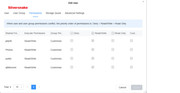
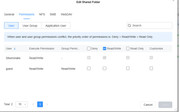
All permissions remain unchanged. I am the owner (nick Silversnake) and main administrator of the entire system. I set up the installation and manage the Jellyfin server; I have full permissions for all operations. Everything worked fine until the upgrade to version 7.0.0804. After the upgrade, the mounted drives stopped working, and Jellyfin ceased to function. Uninstalling and reinstalling hasn't helped. As previously mentioned, the issue likely stems from the additionally installed Storage Manager; after updating the SM, I could once again see all four NVMe drives (NTFS), but Jellyfin fails during library creation—it detects only the three main drives, and I am unable to navigate into the directories. Permissions are set to the maximum level.
Re: TOS 7.0.0804 (x86) Official Release Update
Posted: 04 Aug 2026, 15:13
by TMzethar
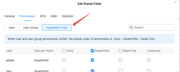
Have you tried this?
Re: TOS 7.0.0804 (x86) Official Release Update
Posted: 04 Aug 2026, 15:23
by Silversnake
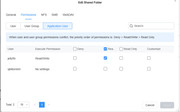
I am Superuser, I tried removing and reactivating everything possible.
Re: TOS 7.0.0804 (x86) Official Release Update
Posted: 04 Aug 2026, 15:30
by Silversnake
Do you happen to have a different version of the SM than this one? Latest installed version: storagemanager_1.0.062_amd64.deb on my F4 SSD.
Re: TOS 7.0.0804 (x86) Official Release Update
Posted: 04 Aug 2026, 16:51
by TMzethar
We sincerely regret any inconvenience caused.
Upon investigation, it has been determined that the ability to access the USB drive via Jellyfin in earlier versions was an unintended side effect of a known defect. With the resolution of that defect in the current release, the previously available access has been removed.
We're planning to improve this in a future release so that USB drives can be accessed properly.
Re: TOS 7.0.0804 (x86) Official Release Update
Posted: 04 Aug 2026, 19:33
by Silversnake
Thanks for the information. The applications I need are working fine in the current version, 7.0.1105. So, I won't experiment and will wait for the Jellyfin app update instead.
Re: TOS 7.0.0804 Official Release (x86) is Released for Update
Posted: 05 Aug 2026, 03:23
by Jimmsan
TMzethar wrote: ↑03 Aug 2026, 14:47
Jimmsan wrote: ↑02 Aug 2026, 15:21
TMzethar wrote: ↑01 Aug 2026, 22:37
We recommend that you check to see if you included your forum ID and URL in the email. We need them to locate your question.
That's exactly what I did in my email.. You should find it if look properly? This what i emailed:
"Subject: TOS 7.0.0804 - Cant Mount USB Drive
Hello,
Per request, here is logs and also some debug log and system report. Issue is USB Drive disc is not detected anymore so cant mount drive/storage pool
Forum link:
viewtopic.php?p=59091#p59091
Forum ID: Jimmsan -
memberlist.php?mode=viewprofile&u=15752"
This is unbelievable bad. It's been almost a week and not really any help. I have a traid usb drive mount disc that's it not functioning because of the upgrade right now that I need.
Unfortunately, we’ve checked several times but haven’t found your email. If you have any attachments larger than 20 MB, please include a shareable link in your email to avoid delivery failures.
If the issue isn’t related to attachments, please try sending us an email from a different account.
Ok, i tried sending it again now, with some more info and screenshots!
let me know if you find it our ill try again.
Re: TOS 7.0.0804 (x86) Official Release Update
Posted: 05 Aug 2026, 04:16
by Silversnake
F4 SSD:
In my case, it makes absolutely no difference where the files (movies, videos) are stored.
a) I create a folder on the main drive (Volume1) and share it. I can see it on other computers on the network, and I can see it on the TV as well.
b) I create the folder as the Superuser; essentially, I have no other option for configuring read/write permissions.
c) I can see this folder in Jellyfin and set it up as a library—the library is created, but the content (movies like *.avi, *.mkv, etc.) isn't visible.
I have three additional NVMe drives in the internal slots. Jellyfin detects these drives but only sees their main system names; it doesn't see any of the folders located on them.
As a layperson, I don't know how the system perceives these internally installed drives.
So, as far as I'm concerned, it doesn't matter whether the drives are internal or in a USB slot. It simply stopped working after the update to version 7.0.804 Everything is broken.
Re: TOS 7.0.0804 Official Release (x86) is Released for Update
Posted: 05 Aug 2026, 09:33
by nitzer71
Update:
I noticed another possible clue. The NAS clock is sometimes drifting behind the correct time even though external NTP servers are reachable.
Checking NTP status shows:
sync_local
refid=LOCAL(0)
instead of using an external NTP source.
The external NTP servers are reachable, but the system is selecting LOCAL(0), and the NAS clock was around 20-30 seconds behind the actual time.
This may explain the previous false UPS notification, as the logs showed:
Clock change detected
upsmon: Processing OS wake-up after sleep
ups_notify_on_power_restored
The UPS itself has not lost power. It looks more like a TOS7 time synchronisation issue.
Re: TOS 7.0.0804 (x86) Official Release Update
Posted: 05 Aug 2026, 15:07
by EriChan
To better assist you in confirming whether there are any abnormalities in the TOS system,please reach out to our online technical support via the link below for investigation:
https://salesiq.zohopublic.com/signatur ... 97d0be8892