Page 10 of 20
Re: TOS 7 Is Now Out of Beta — Official Release
Posted: 14 Jul 2026, 02:32
by Takeiteasy
I updated my F4-424 Max from TOS 6 (version 6.0.0794) to version 7.0.0747.
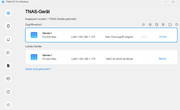
In addition to two NVMe drives as system drives, I had also created two more RAID 1 arrays. After the update, everything seems to have been wiped out—all drives with their data. I can no longer log in; the message says "User does not exist." The only remaining error is a 502 Bad Gateway error. I'm extremely annoyed that this update destroyed all my data and Docker programs.
This is not a reliable NAS or NAS provider in my book if their software update wiped everything out. Months of work went into this. Thanks to Terramaster, clearly number one in data destruction. How can you release software as final that destroys entire systems and valuable data with a single click?
Now I have to find a company that can hopefully still recover my most important data. So I have to pay a lot of money for Terramaster's botched job just to somehow get my lost data back. I don't even want to describe how I feel.

Re: TOS 7 Is Now Out of Beta — Official Release
Posted: 14 Jul 2026, 08:46
by EriChan
We need to check this issue remotely. Please contact the online technical support staff through the following link to schedule remote technical support:
https://salesiq.zohopublic.com/signatur ... 97d0be8892
Re: TOS 7 Is Now Out of Beta — Official Release
Posted: 14 Jul 2026, 13:15
by chris0478
Hi,
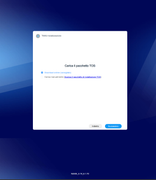
as stated before I cannot change the boot order in my F4-421 with TOS 6. My TNAS boots always from the integrated USB stick first. So I'm afraid that I get into the "Installation Page" issue. I tried to install the TOS 7 beta several months before and ran into this issue. I had to reinstall TOS 6. Fortunately I had the installation image for this.
Now I'm afraid that I will get into the same situation when upgrading to TOS 7 official. What to do If I got stuck in the installation page issue again like
Hendrix83 wrote: ↑14 Jul 2026, 00:23
Hello, I'm trying to update my F2-223 to TOS7, comin from version TOS 6.0.0794. I followed the instructions reported in this thread. However, when the nas reboots, the TNAS PC tells me that the device is not initialized, so I try to log in and it takes me to the webpage where it says that i need to download the TOS package...I'm stuck! What shoul I do? And I cannot afford to lose any data on my NAS!
Is there an official TOS 7 image I can install then?
Best regards
Chris
Re: TOS 7 Is Now Out of Beta — Official Release
Posted: 14 Jul 2026, 16:06
by maincouranteforum
Hello,
I currently own a TerraMaster NAS running TOS 6, and I can see that TOS 7 is now available.
Could you please confirm whether an OTA upgrade from TOS 6 to TOS 7 will be made available directly through the standard TOS 6 update page / “Check for updates” section?
In other words, I would like to know if I should wait for the upgrade to appear automatically in TOS 6, or if the only supported method for upgrading from TOS 6 to TOS 7 will remain the manual update procedure.
If an OTA rollout is planned, do you have an estimated timeframe for when it will be available?
Thank you in advance for your help.
Re: TOS 7 Is Now Out of Beta — Official Release
Posted: 14 Jul 2026, 22:01
by Felix
chris0478 wrote: ↑14 Jul 2026, 13:15
Hi,
as stated before I cannot change the boot order in my F4-421 with TOS 6. My TNAS boots always from the integrated USB stick first. So I'm afraid that I get into the "Installation Page" issue. I tried to install the TOS 7 beta several months before and ran into this issue. I had to reinstall TOS 6. Fortunately I had the installation image for this.
Now I'm afraid that I will get into the same situation when upgrading to TOS 7 official. What to do If I got stuck in the installation page issue again like
Hendrix83 wrote: ↑14 Jul 2026, 00:23
Hello, I'm trying to update my F2-223 to TOS7, comin from version TOS 6.0.0794. I followed the instructions reported in this thread. However, when the nas reboots, the TNAS PC tells me that the device is not initialized, so I try to log in and it takes me to the webpage where it says that i need to download the TOS package...I'm stuck! What shoul I do? And I cannot afford to lose any data on my NAS!
Is there an official TOS 7 image I can install then?
Best regards
Chris
If you need further technical support, please contact our online support team through the following link:
https://salesiq.zohopublic.com/signatur ... 97d0be8892
Our technical team will assist you with further troubleshooting.
Re: TOS 7 Is Now Out of Beta — Official Release
Posted: 14 Jul 2026, 22:14
by Felix
maincouranteforum wrote: ↑14 Jul 2026, 16:06
Hello,
I currently own a TerraMaster NAS running TOS 6, and I can see that TOS 7 is now available.
Could you please confirm whether an OTA upgrade from TOS 6 to TOS 7 will be made available directly through the standard TOS 6 update page / “Check for updates” section?
In other words, I would like to know if I should wait for the upgrade to appear automatically in TOS 6, or if the only supported method for upgrading from TOS 6 to TOS 7 will remain the manual update procedure.
If an OTA rollout is planned, do you have an estimated timeframe for when it will be available?
Thank you in advance for your help.
The OTA upgrade from TOS 6 to TOS 7 is being rolled out gradually by model batches. A new batch of supported models will be released approximately every two weeks.
Currently, the
425 series (including
F4-425, F2-425, F4-425 Plus, and F2-425 Plus) running
TOS 6.0.794 has started receiving the TOS 7 OTA update.
The
424 series (including
F4-424, F2-424, F6-424, F4-424 Pro, F4-424 Max, and F6-424 Max) is planned for the next rollout.
Other supported models will be added gradually according to the release schedule. Please make sure your NAS is running the required TOS version before checking for updates.
For the supported models, required versions, and detailed upgrade information, please refer to the official announcement:
TOS 7 Is Now Out of Beta — Official Release
Re: TOS 7 Is Now Out of Beta — Official Release
Posted: 15 Jul 2026, 00:21
by Takeiteasy
No errors are displayed at startup.
The following error messages appear during shutdown:
[FAILED] Failed unmounting /Volume1.
[FAILED] Failed unmounting Temporary Directory /tmp.
Error 502 persists.
When the NAS is connected to the monitor, logging in with a mouse and keyboard is impossible, as no usernames appear to exist after the update. Therefore, the error cannot be resolved. How this is supposed to work via remote maintenance is beyond me.
Re: TOS 7 Is Now Out of Beta — Official Release
Posted: 15 Jul 2026, 15:30
by chris0478
Hello,
This morning, I finally gathered the courage to run the upgrade. Support had confirmed that my hardware is compatible and that I wouldn't be affected by the "Installation Page Issue." Having already experienced this with a previous update, I was forewarned and made sure to double-check with support beforehand. You even sent me a link for a personal 1-on-1 consultation.
Unfortunately, after the update, I was greeted by the installation page once again. I had to download the bootloader and re-flash the image. Extremely frustrating!!!!
How am I supposed to perform the upgrade on my F4-421 now? Wouldn't the simplest solution be for you to provide us with the corresponding bootloader and a clean image here? Back when I upgraded to version 6, I already had to perform a complete clean install as well......
Could someone help me!!!!!
Re: TOS 7 Is Now Out of Beta — Official Release
Posted: 16 Jul 2026, 15:51
by Felix
Takeiteasy wrote: ↑15 Jul 2026, 00:21
No errors are displayed at startup.
The following error messages appear during shutdown:
[FAILED] Failed unmounting /Volume1.
[FAILED] Failed unmounting Temporary Directory /tmp.
Error 502 persists.
When the NAS is connected to the monitor, logging in with a mouse and keyboard is impossible, as no usernames appear to exist after the update. Therefore, the error cannot be resolved. How this is supposed to work via remote maintenance is beyond me.
We are sorry for the inconvenience caused.
Please provide a photo of the latest screen displayed on your monitor. We will check the current status and determine whether the issue can be resolved remotely.
In most cases, we can use the HDMI output to access the device interface, enable SSH, and then perform further remote diagnostics.
Please contact our online technical support team through the following link to schedule a remote support session:
https://salesiq.zohopublic.com/signatur ... 97d0be8892
Our engineers will assist you with further troubleshooting.
Re: TOS 7 Is Now Out of Beta — Official Release
Posted: 16 Jul 2026, 20:13
by Takeiteasy
Felix wrote: ↑16 Jul 2026, 15:51
We are sorry for the inconvenience caused.
Please provide a photo of the latest screen displayed on your monitor. We will check the current status and determine whether the issue can be resolved remotely.
In most cases, we can use the HDMI output to access the device interface, enable SSH, and then perform further remote diagnostics.
Please contact our online technical support team through the following link to schedule a remote support session:
https://salesiq.zohopublic.com/signatur ... 97d0be8892
Our engineers will assist you with further troubleshooting.
I sent them a private message with the latest information for support.