TOS 7 Is Now Out of Beta — Official Release


Re: TOS 7 Is Now Out of Beta — Official Release
@Gremlin: Alright, many thanks for your support!
F4-423
-
nomadfromx

- Posts: 10
- Joined: 16 Feb 2025, 20:23

Re: TOS 7 Is Now Out of Beta — Official Release
After upgrading from TOS 6 to TOS 7, I've been prompted to enter my username and password for two hours now. But after I enter the password, nothing happens and I'm prompted to enter it again. It keeps repeating. What am I doing wrong?
I have an F6-424 Max, and I have 3 volumes. The system is on Volume3 (SSD).
I have an F6-424 Max, and I have 3 volumes. The system is on Volume3 (SSD).

Re: TOS 7 Is Now Out of Beta — Official Release
Yes, you can upgrade with an M.2 SSD first, then add four HDDs that were used with TOS 6 but don't have a system installed.
After the TOS upgrade, keep the NAS running and plug in the four HDDs while it's on. You can then assemble and mount them through Storage Management, or just run the script /etc/tos/scripts/mntdata in the terminal.
One thing to watch out for:
The old HDDs may still contain old boot partition kernels, which could interfere with TOS 7. To avoid this, after completing the above steps, you may consider migrating the TOS system to each HDD one by one, and finally back to the SSD. This temporary workaround helps prevent potential kernel‑OS mismatches that might otherwise occur.
To contact our team, please send email to following addresses, remember to replace (at) with @:
Technical team: support(at)terra-master.com (for technical support)
Service team: service(at)terra-master.com (for purchasing, return, replacement, RMA service)
Technical team: support(at)terra-master.com (for technical support)
Service team: service(at)terra-master.com (for purchasing, return, replacement, RMA service)


Re: TOS 7 Is Now Out of Beta — Official Release
My updated to 7.0.0777—no problems.
F8 SSD Plus MADN0301. V02 TOS 7.0.1298

Re: TOS 7 Is Now Out of Beta — Official Release
I see that the main problem users face when installing TOS 7 is trying to figure out what BIOS version they have, and whether they need to flash the BIOS or change the boot order.
We understand that connecting a NAS to a monitor and keyboard is quite a difficult task, and sometimes impossible in a home environment.
However, there is a mechanism that allows checking and changing the boot order directly from the installation script: efibootmgr.
It is present in TOS 7 (i cannot check regarding TOS 6).
Why not use it in the installation script, or recommend using it from the terminal before installing TOS 7?
We understand that connecting a NAS to a monitor and keyboard is quite a difficult task, and sometimes impossible in a home environment.
However, there is a mechanism that allows checking and changing the boot order directly from the installation script: efibootmgr.
It is present in TOS 7 (i cannot check regarding TOS 6).
Why not use it in the installation script, or recommend using it from the terminal before installing TOS 7?
-
nomadfromx
- Posts: 10
- Joined: 16 Feb 2025, 20:23
Re: TOS 7 Is Now Out of Beta — Official Release
I had to "hard" power off the device. After turning it back on, everything worked.nomadfromx wrote: ↑12 Jul 2026, 05:49 After upgrading from TOS 6 to TOS 7, I've been prompted to enter my username and password for two hours now. But after I enter the password, nothing happens and I'm prompted to enter it again. It keeps repeating. What am I doing wrong?
I have an F6-424 Max, and I have 3 volumes. The system is on Volume3 (SSD).


Re: TOS 7 Is Now Out of Beta — Official Release
Thank you for sharing your concerns. We fully understand that updating the BIOS can feel like an extra burden, especially when you've been using your TerraMaster device smoothly for years.
Over the past decade, TerraMaster has released multiple hardware revisions, and early BIOS implementations did not follow a unified standard. As we developed TOS 7 with a newer kernel, enhanced security features, and improved hardware support, we discovered that some older BIOS versions cannot correctly pass ACPI tables, NVMe initialization parameters, or power management information to the new OS. Without a BIOS update, users could experience system instability, peripheral detection failures, random freezes, or even boot failures.
We do not take this decision lightly. Requiring a BIOS update was a necessary step to ensure every user gets a stable, secure, and fully compatible TOS 7 experience.
To minimize inconvenience, we have already:
Published detailed, step-by-step BIOS update guides with screenshots and checksums for each affected model on our official website.
Opened a remote assistance channel – if you are uncomfortable performing the update yourself, our technical support team can guide you through it remotely.
Standardized BIOS across all newly manufactured hardware, so future major OS upgrades will not require manual BIOS updates again.
We sincerely apologize for the trouble this causes. If you encounter any issues during the process, please contact us directly – we are here to help.
Thank you for your understanding and continued trust in TerraMaster.
Over the past decade, TerraMaster has released multiple hardware revisions, and early BIOS implementations did not follow a unified standard. As we developed TOS 7 with a newer kernel, enhanced security features, and improved hardware support, we discovered that some older BIOS versions cannot correctly pass ACPI tables, NVMe initialization parameters, or power management information to the new OS. Without a BIOS update, users could experience system instability, peripheral detection failures, random freezes, or even boot failures.
We do not take this decision lightly. Requiring a BIOS update was a necessary step to ensure every user gets a stable, secure, and fully compatible TOS 7 experience.
To minimize inconvenience, we have already:
Published detailed, step-by-step BIOS update guides with screenshots and checksums for each affected model on our official website.
Opened a remote assistance channel – if you are uncomfortable performing the update yourself, our technical support team can guide you through it remotely.
Standardized BIOS across all newly manufactured hardware, so future major OS upgrades will not require manual BIOS updates again.
We sincerely apologize for the trouble this causes. If you encounter any issues during the process, please contact us directly – we are here to help.
Thank you for your understanding and continued trust in TerraMaster.
To contact our team, please send email to following addresses, remember to replace (at) with @:
Support team: support(at)terra-master.com (for technical support only)
Service team: service(at)terra-master.com (for purchasing, return, replacement, RMA service)
Support team: support(at)terra-master.com (for technical support only)
Service team: service(at)terra-master.com (for purchasing, return, replacement, RMA service)


Re: TOS 7 Is Now Out of Beta — Official Release
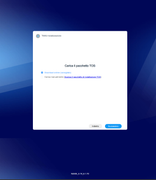
Hello, I'm trying to update my F2-223 to TOS7, comin from version TOS 6.0.0794. I followed the instructions reported in this thread. However, when the nas reboots, the TNAS PC tells me that the device is not initialized, so I try to log in and it takes me to the webpage where it says that i need to download the TOS package...I'm stuck! What shoul I do? And I cannot afford to lose any data on my NAS!

Re: TOS 7 Is Now Out of Beta — Official Release
Я использую стандартный клиент qBittorrent 5.1.4.4
Система: Текущая версия TOS 7.0.0777 , версия BIOS/InitBoot YJ1501X.V05
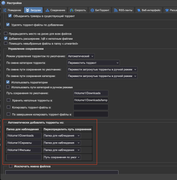
Ситуация: Если в клиенте для автозагрузки торрент файлов установлено несколько каталогов. То 1-й каталог будет работать всегда. А остальные сперва будут работать, а позднее например через 1 сутки уже автозагрузка работать не будет.
Например: У меня есть 1 общий каталог Downloads, и два еще -> Video, Custom_catalog.
Из каталога Downloads - т.е. первого по счету всегда будет подгружаться торрент, а из остальных нет. Я говорю про каталоги которые указаны на скриншоте.
Если взять зайти в "Центр приложений" -> "Установленные" -> "qBittorrent" -> "отключить" -> потом "включить", то из каталогов "Video", "Custom_catalog" подгрузятся торрент файлы и начнется скачивание.
Все права розданы. Пробовал использовать нейросети для лечения проблемы, но решения не смог найти.
По скольку - это стандартный функционал TOS 7, как я понимаю, то я написал в этой ветке.
Система: Текущая версия TOS 7.0.0777 , версия BIOS/InitBoot YJ1501X.V05
Ситуация: Если в клиенте для автозагрузки торрент файлов установлено несколько каталогов. То 1-й каталог будет работать всегда. А остальные сперва будут работать, а позднее например через 1 сутки уже автозагрузка работать не будет.
Например: У меня есть 1 общий каталог Downloads, и два еще -> Video, Custom_catalog.
Из каталога Downloads - т.е. первого по счету всегда будет подгружаться торрент, а из остальных нет. Я говорю про каталоги которые указаны на скриншоте.
Если взять зайти в "Центр приложений" -> "Установленные" -> "qBittorrent" -> "отключить" -> потом "включить", то из каталогов "Video", "Custom_catalog" подгрузятся торрент файлы и начнется скачивание.
Все права розданы. Пробовал использовать нейросети для лечения проблемы, но решения не смог найти.
По скольку - это стандартный функционал TOS 7, как я понимаю, то я написал в этой ветке.
-
Takeiteasy

- Posts: 20
- Joined: 10 Oct 2025, 02:02

Re: TOS 7 Is Now Out of Beta — Official Release
I updated my F4-424 Max from TOS 6 (version 6.0.0794) to version 7.0.0747.
In addition to two NVMe drives as system drives, I had also created two more RAID 1 arrays. After the update, everything seems to have been wiped out—all drives with their data. I can no longer log in; the message says "User does not exist." The only remaining error is a 502 Bad Gateway error. I'm extremely annoyed that this update destroyed all my data and Docker programs.
This is not a reliable NAS or NAS provider in my book if their software update wiped everything out. Months of work went into this. Thanks to Terramaster, clearly number one in data destruction. How can you release software as final that destroys entire systems and valuable data with a single click?
Now I have to find a company that can hopefully still recover my most important data. So I have to pay a lot of money for Terramaster's botched job just to somehow get my lost data back. I don't even want to describe how I feel.
In addition to two NVMe drives as system drives, I had also created two more RAID 1 arrays. After the update, everything seems to have been wiped out—all drives with their data. I can no longer log in; the message says "User does not exist." The only remaining error is a 502 Bad Gateway error. I'm extremely annoyed that this update destroyed all my data and Docker programs.
This is not a reliable NAS or NAS provider in my book if their software update wiped everything out. Months of work went into this. Thanks to Terramaster, clearly number one in data destruction. How can you release software as final that destroys entire systems and valuable data with a single click?
Now I have to find a company that can hopefully still recover my most important data. So I have to pay a lot of money for Terramaster's botched job just to somehow get my lost data back. I don't even want to describe how I feel.
NAS: f4-424 MAX | 64GB RAM Corsair Vengeance DDR5-4800 | 2x1TB Lexar NM790 | 2 x 4 TB + 2x 6TB Seagate IronWolf Raid1 |(Currently in (re)learning mode)