TOS 7.0.0804 (x86) Official Release Update

Official news about TOS, mobile app, PC app updates or beta releases.
User avatar
Jimmsan
Posts: 6
Joined: 29 Jul 2026, 16:29
Sweden

Re: TOS 7.0.0804 Official Release (x86) is Released for Update

Post by Jimmsan »

TMzethar wrote: 01 Aug 2026, 22:37
Jimmsan wrote: 01 Aug 2026, 02:42 Status on my issue that I emailed on?
Thanks
We recommend that you check to see if you included your forum ID and URL in the email. We need them to locate your question.
That's exactly what I did in my email.. You should find it if look properly? This what i emailed:

"Subject: TOS 7.0.0804 - Cant Mount USB Drive

Hello,

Per request, here is logs and also some debug log and system report. Issue is USB Drive disc is not detected anymore so cant mount drive/storage pool

Forum link: viewtopic.php?p=59091#p59091
Forum ID: Jimmsan - memberlist.php?mode=viewprofile&u=15752"

This is unbelievable bad. It's been almost a week and not really any help. I have a traid usb drive mount disc that's it not functioning because of the upgrade right now that I need.
User avatar
Gremlin
Gold Member
Posts: 1719
Joined: 02 Dec 2022, 22:31
Great Britain

Re: TOS 7.0.0804 Official Release (x86) is Released for Update

Post by Gremlin »

Jimmsan wrote: 02 Aug 2026, 15:21
This seems to be a specific issue that may, or may not, relate to the specific release. Maybe this would be better in a dedicated thread. Simply tacking on "I have the same problem" does not say much (and makes it much more difficult to follow.)
In the thread you mention Traid. In the posted image there is a mention of the disk being Raid0 (spanning). This implies the disk(s?) in question are mounted in a multi-disk enclosure but no mention of the type. (Different types of enclosure may behave differently, of course.)
Or, maybe you made a raid including both an attached usb and a drive in the nas itself - I'm not even sure that is recommended or possible.
The error message image posted appears to refer to a detected drive and a missing drive, so if all drives are in an enclosure is only one of the array being detected and the remaining drive(s) being miss-classified?
What type of file system was on the array? I have seen an issue reported with NTFS formatted USB drives, but Traid would not be that. Maybe this is an extension of the same issue.
F5-221 TOS7.0.1130 - 4x4TB (Ironwolf) Traid
F2-424 TOS7.0.1130 - 2x500GB nvme (P3) Traid, 2x6TB HDD (HGST) Traid
F2-221 TOS7.0.1130 - 1x3TB Ext4, 1x4TB Btrfs
F2-425+ TOS7.0.1130 - 2x500GB nvme (P3) Traid, 2x6TB HDD (EXOS) Traid
User avatar
vignatiev
Posts: 10
Joined: 05 Nov 2024, 16:45
Russia

Re: TOS 7.0.0804 Official Release (x86) is Released for Update

Post by vignatiev »

I encountered issues when upgrading to firmware version 7.0.0804. After restarting the NAS, it got stuck at the BIOS screen (displaying the Terramaster logo) and wouldn't allow access to the BIOS setup utility. Removing the HDDs resolved this, after that system booted successfully.

Then I reinstalled a single 16TB HDD along with a 4TB SATA SSD for use as Hyper Cache. The SSD exhibited unusual behavior, constantly writing or reading data even when no active processes were accessing it. I attempted to remove the Hyper Cache configuration. After approximately 8 hours, I physically removed the SATA SSD. Subsequently, I received an error message indicating a corrupted storage pool. A reboot cleared the immediate error.

However, any attempt to re-create the Hyper Cache using that same HDD results in a status that cycles between "Creating" and then immediately switches to "Deleting...," regardless of which SSD drive I try to use. How can I fix this without losing data?

Other storage pool RAID1 + nvme hyper cache works good.

F4-424, F4-424__MADN0101.V08
F4-424
User avatar
adam12345
Posts: 17
Joined: 03 Nov 2024, 16:34
Israel

Re: TOS 7.0.0804 Official Release (x86) is Released for Update

Post by adam12345 »

hey After upgrading for TOS6 i am having a lot of issue with jellyfin
F2-424
at first the server would not would not start so i deleted the community app that i was using and installed via the regular store , i had alot of issues connecting it would not connecting even thought the server was up i deleted the app and the directories (/jellfin and /usr/local/jellyfin/) manually dunno if it helped but now it's working but very slow ,
i using my lg tv as a client and keeps either freezing entirely or i can scroll but it will not response to anything i click , on tos6 never had any issues

can it be permissions or old files from tos6?
User avatar
nitzer71
Posts: 29
Joined: 08 Jul 2026, 08:12
Switzerland

Re: TOS 7.0.0804 Official Release (x86) is Released for Update

Post by nitzer71 »

Update: UPS false notification issue

Just an update on my previous post.

I was receiving the notification:
"The UPS connected to device TNAS has entered AC power mode."
The UPS was not actually losing power. After checking the logs, I found that the notification appeared after a system time change/NTP synchronisation event.

The log sequence was:

Code: Select all

Clock change detected
upsmon: Processing OS wake-up after sleep
ups_notify_on_power_restored
I noticed the latest TOS 7 release notes mention a fix related to system time consistency. I changed the NTP server to:

Code: Select all

au.pool.ntp.org
Changing the NTP server triggered the notification once more during the initial time correction, but I have not received any further false UPS notifications since then.

The UPS itself appears to be working normally. It has not actually switched to battery mode, and there have been no power outages.

I will continue monitoring, but at this stage it looks like the issue may have been related to a system time adjustment rather than an actual UPS power event.
User avatar
TMzethar
TM Support
Posts: 3021
Joined: 27 Oct 2020, 16:43

Re: TOS 7.0.0804 Official Release (x86) is Released for Update

Post by TMzethar »

Jimmsan wrote: 02 Aug 2026, 15:21
TMzethar wrote: 01 Aug 2026, 22:37 We recommend that you check to see if you included your forum ID and URL in the email. We need them to locate your question.
That's exactly what I did in my email.. You should find it if look properly? This what i emailed:
"Subject: TOS 7.0.0804 - Cant Mount USB Drive
Hello,
Per request, here is logs and also some debug log and system report. Issue is USB Drive disc is not detected anymore so cant mount drive/storage pool
Forum link: viewtopic.php?p=59091#p59091
Forum ID: Jimmsan - memberlist.php?mode=viewprofile&u=15752"
This is unbelievable bad. It's been almost a week and not really any help. I have a traid usb drive mount disc that's it not functioning because of the upgrade right now that I need.
Unfortunately, we’ve checked several times but haven’t found your email. If you have any attachments larger than 20 MB, please include a shareable link in your email to avoid delivery failures.
If the issue isn’t related to attachments, please try sending us an email from a different account.
To contact our team, please send email to following addresses, remember to replace (at) with @:
Technical team: support(at)terra-master.com (for technical support)
Service team: service(at)terra-master.com (for purchasing, return, replacement, RMA service)
User avatar
Silversnake
Posts: 15
Joined: 22 Mar 2026, 02:01
Czech Republic

Re: TOS 7.0.0804 Official Release (x86) is Released for Update

Post by Silversnake »

Jellyfin ( 10.11.0)
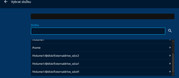
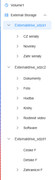
Following issues with drive mounting (which were resolved by installing a different version of Storage Manager), I am unable to select a folder library in Jellyfin.
I have performed the following steps:
1) Uninstallation, download, and fresh installation
2) Restart
3) Running and completing the Jellyfin setup wizard
4) During the wizard setup, it is impossible to select folders other than those on the main drive. It appears that Jellyfin cannot see the other drives or their folder structures—only the main drive where the TOS system is installed (Volume1). The other three drives are in "Move" mode. The drives are visible on the network, and the Multimedia Server is working perfectly, SMB etc.

Everything worked fine in the previous version of the TOS system; this version seems to be quite problematic.
Image
Image
User avatar
TMzethar
TM Support
Posts: 3021
Joined: 27 Oct 2020, 16:43

Re: TOS 7.0.0804 Official Release (x86) is Released for Update

Post by TMzethar »

vignatiev wrote: 02 Aug 2026, 22:02 I encountered issues when upgrading to firmware version 7.0.0804. After restarting the NAS, it got stuck at the BIOS screen (displaying the Terramaster logo) and wouldn't allow access to the BIOS setup utility. Removing the HDDs resolved this, after that system booted successfully.

Then I reinstalled a single 16TB HDD along with a 4TB SATA SSD for use as Hyper Cache. The SSD exhibited unusual behavior, constantly writing or reading data even when no active processes were accessing it. I attempted to remove the Hyper Cache configuration. After approximately 8 hours, I physically removed the SATA SSD. Subsequently, I received an error message indicating a corrupted storage pool. A reboot cleared the immediate error.

However, any attempt to re-create the Hyper Cache using that same HDD results in a status that cycles between "Creating" and then immediately switches to "Deleting...," regardless of which SSD drive I try to use. How can I fix this without losing data?

Other storage pool RAID1 + nvme hyper cache works good.

F4-424, F4-424__MADN0101.V08
Regarding the issue you mentioned of the system “getting stuck on the BIOS screen,” Is this the first time it's happened? Please keep an eye out to see if similar issues occur in the future. Generally speaking, a reasonable amount of time is required to test and initialize the HDD.
Regarding the Hyper Cache error you mentioned, we recommend that you contact us online to schedule a remote troubleshooting session with engineers:
https://salesiq.zohopublic.com/signatur ... 97d0be8892
Please include your forum ID and the URL for this post.
To contact our team, please send email to following addresses, remember to replace (at) with @:
Technical team: support(at)terra-master.com (for technical support)
Service team: service(at)terra-master.com (for purchasing, return, replacement, RMA service)
User avatar
TMzethar
TM Support
Posts: 3021
Joined: 27 Oct 2020, 16:43

Re: TOS 7.0.0804 Official Release (x86) is Released for Update

Post by TMzethar »

adam12345 wrote: 03 Aug 2026, 02:27 hey After upgrading for TOS6 i am having a lot of issue with jellyfin
F2-424
at first the server would not would not start so i deleted the community app that i was using and installed via the regular store , i had alot of issues connecting it would not connecting even thought the server was up i deleted the app and the directories (/jellfin and /usr/local/jellyfin/) manually dunno if it helped but now it's working but very slow ,
i using my lg tv as a client and keeps either freezing entirely or i can scroll but it will not response to anything i click , on tos6 never had any issues

can it be permissions or old files from tos6?
What version were you using before updating to 7.0.804?
If the issue arose after upgrading to TOS 7 and was not caused by this 7.0.804 update, we recommend that you consider opening a separate thread to discuss the problem.
We’ll try to reproduce the issue based on the information you’ve provided.
After the upgrade, did you reconfigure Jellyfin to match the settings you used with TOS 6? Behavior can vary significantly depending on the settings.
We’ll keep you updated here as we make progress. Please let us know if you discover anything else.
What version of the Jellyfin Server app are you currently using?
To contact our team, please send email to following addresses, remember to replace (at) with @:
Technical team: support(at)terra-master.com (for technical support)
Service team: service(at)terra-master.com (for purchasing, return, replacement, RMA service)
User avatar
TMzethar
TM Support
Posts: 3021
Joined: 27 Oct 2020, 16:43

Re: TOS 7.0.0804 Official Release (x86) is Released for Update

Post by TMzethar »

nitzer71 wrote: 03 Aug 2026, 10:26
Glad that you figured out the issue, and thank you for sharing the details.
We'll discuss it to see if we can avoid UPS false alerts.
To contact our team, please send email to following addresses, remember to replace (at) with @:
Technical team: support(at)terra-master.com (for technical support)
Service team: service(at)terra-master.com (for purchasing, return, replacement, RMA service)
Post Reply

Return to “Update Notice”