Page 7 of 20
Re: TOS 7 Is Now Out of Beta — Official Release
Posted: 08 Jul 2026, 15:44
by obvious
Hello, Im facing the same problem.
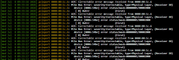
Maybe it's not hardware related since I've only seen those messages after upgrading from TOS6 to TOS7.
Re: TOS 7 Is Now Out of Beta — Official Release
Posted: 08 Jul 2026, 16:17
by EriChan
Thank you for your feedback. The "Correctable error" means the system has automatically resolved the physical layer event, so it won't affect your normal use or data safety. Since TOS 7 upgraded to a new kernel, the logging threshold has changed. We've passed your ASM1062 hardware details to our team to optimize log filtering in a future update.
Re: TOS 7 Is Now Out of Beta — Official Release
Posted: 08 Jul 2026, 19:57
by Pretext3890
EriChan wrote: ↑08 Jul 2026, 16:17
The "Correctable error" means the system has automatically resolved the physical layer event, so it won't affect your normal use or data safety. Since TOS 7 upgraded to a new kernel, the logging threshold has changed. We've passed your ASM1062 hardware details to our team to optimize log filtering in a future update.
I am concerned about the source and numbers of these errors, even though they are "Correctable".
900k+ records in about 1.5 hours of NAS uptime cannot be considered “normal operation”
tnas:/# grep -o 'AER' /var/log/syslog | wc -l
949936
tnas:/# uptime
up 1:20, 0 users, load average: 0.30, 0.29, 0.40
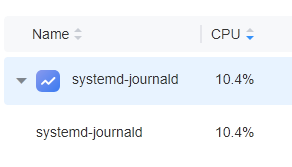
moreover, journald constantly eats 10% of CPU - it's not OK
Re: TOS 7 Is Now Out of Beta — Official Release
Posted: 08 Jul 2026, 21:04
by TMroy
This could be a compatibility issue between the hardware and its drivers. We will investigate and follow up with you.
Re: TOS 7 Is Now Out of Beta — Official Release
Posted: 08 Jul 2026, 21:50
by Pretext3890
TMroy wrote: ↑08 Jul 2026, 21:04
Thank you. I'll look forward to hearing back from you.
Re: TOS 7 Is Now Out of Beta — Official Release
Posted: 09 Jul 2026, 06:34
by mab
Pretext3890 wrote: ↑07 Jul 2026, 21:48
After updating my F4-424/MADN0101.V08 to TOS7, syslog is
flooded by repeating messages even w/o any disks attached (except for the NVME system one)
Code: Select all
Jul  7 16:40:35 tnas kernel: [  112.072760] pcieport 0000:00:1c.6: AER: Correctable error message received from 0000:00:1c.6
Jul  7 16:40:35 tnas kernel: [  112.072767] pcieport 0000:00:1c.6: PCIe Bus Error: severity=Correctable, type=Physical Layer, (Receiver ID)
Jul  7 16:40:35 tnas kernel: [  112.072769] pcieport 0000:00:1c.6:   device [8086:54be] error status/mask=00000001/00002000
Jul  7 16:40:35 tnas kernel: [  112.072770] pcieport 0000:00:1c.6:    [ 0] RxErr                  (First)
Code: Select all
tnas:/# grep -o 'AER' /var/log/syslog | wc -l
13118
tnas:/# uptime
16:55:28 up 2 min,  0 users,  load average: 1.62, 0.99, 0.39
Code: Select all
-[0000:00]-+-00.0  Intel Corporation Device 4618
           +-02.0  Intel Corporation Device 46d2
           +-14.0  Intel Corporation Device 54ed
           +-14.2  Intel Corporation Device 54ef
           +-16.0  Intel Corporation Device 54e0
           +-17.0  Intel Corporation Device 54d3
           +-1c.0-[01]----00.0  Realtek Semiconductor Co., Ltd. RTL8125 2.5GbE Controller
           +-1c.3-[02]----00.0  Realtek Semiconductor Co., Ltd. RTL8125 2.5GbE Controller
           +-1c.6-[03]----00.0  ASMedia Technology Inc. ASM1062 Serial ATA Controller
           +-1d.0-[04]----00.0  O2 Micro, Inc. Device 8760
           +-1d.1-[05]--
           +-1f.0  Intel Corporation Device 5482
           +-1f.3  Intel Corporation Device 54c8
           +-1f.4  Intel Corporation Device 54a3
           \-1f.5  Intel Corporation Device 54a4
Please advise.
I'm having the exact same issue in my F4-424 model, but my firmware is MADN0101.V05
Re: TOS 7 Is Now Out of Beta — Official Release
Posted: 09 Jul 2026, 07:10
by rjlupin
I have a F4-425 Plus that was running TOS 6.0.794. I updated the Bios per the guide to BJFX-TWLX-108. It booted normal after and then I selected the downloaded TOS 7 update file. It unzipped and logged me out. I then tried to log back in but it said no users were found (I tried both). After restarting, I now cannot even access the machine over the network (same IP address I can see via router and on the NAS startup). Using TNAS PC, I can see the old connection is offline and there is a new uninitialized TNAS device with the same IP. I'm worried that if I reinitialize it may wipe data. I emailed support but figured yall might be able to help
Re: TOS 7 Is Now Out of Beta — Official Release
Posted: 09 Jul 2026, 08:49
by CursaYang
rjlupin wrote: ↑09 Jul 2026, 07:10
I have a F4-425 Plus that was running TOS 6.0.794. I updated the Bios per the guide to BJFX-TWLX-108. It booted normal after and then I selected the downloaded TOS 7 update file. It unzipped and logged me out. I then tried to log back in but it said no users were found (I tried both). After restarting, I now cannot even access the machine over the network (same IP address I can see via router and on the NAS startup). Using TNAS PC, I can see the old connection is offline and there is a new uninitialized TNAS device with the same IP. I'm worried that if I reinitialize it may wipe data. I emailed support but figured yall might be able to help
The system partition and data partition are independent, so reinitializing them will not affect the files on the hard drive. Regarding your question, it might be due to the BIOS boot order. Is your TOS system installed on an HDD or an M.2 SSD? You can refer to the instructions in this post to enter the BIOS and check the current boot order:
viewtopic.php?t=10182
Re: TOS 7 Is Now Out of Beta — Official Release
Posted: 09 Jul 2026, 08:51
by rjlupin
Okay, I only have HDDs in it so the system image should be on one of those.
Re: TOS 7 Is Now Out of Beta — Official Release
Posted: 09 Jul 2026, 13:15
by Ben455
EriChan wrote: ↑08 Jul 2026, 15:24
For compatibility and data security reasons, major cross-generation version upgrades are not supported via automatic updates. Only manual upgrades are available.
Thanks.
Update Done manuelle, in 20m’.after update, i have launched Some application update , storage manager application update was stuck at 99% , but fine after a restart. Then update Done automatically to last version (7.0.0777) went fine.