

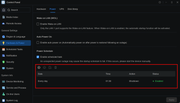
In our internal testing on TOS 7.0.0517, after deleting the scheduled power-on task, the system did not reboot at the originally scheduled time. If possible, please find the online customer service option in the bottom right corner of the official website to schedule a remote session. We can arrange for an engineer to assist you remotely in troubleshooting the issue.usersky wrote: ↑21 Apr 2026, 21:27 F5-221 here. There is an issue with Hardware and power/Power/Power schedule: I had two items in the list, one for power on every day in the morning, the other one to power off every evening. I disabled power on item and NAS is still powering on every morning. I completely deleted the item from the list so now there is just the daily power off there. NAS still powers on every morning at the exact time I had it scheduled before disabling/deleting scheduled power on. Somehow altough it is deleted, it still is active and I don't know of any way to stop NAS from powering on every morning by itself:
Don't know how old the issue is so probably is not new to 7.0.0517 but it is just now I encountered it so I report it here.
(it would be easier if the update notices will be posted as before)
TOS 7.0.0517 Beta (X86) is Released for Update
Re: TOS 7.0.0517 Beta (X86) is Released for Update
To contact our team, please send email to following addresses, remember to replace (at) with @
Technical team: support(at)terra-master.com(for technical support)
Service team: service(at)terra-master.com(for purchasing, return, replacement, RMA service)
Technical team: support(at)terra-master.com(for technical support)
Service team: service(at)terra-master.com(for purchasing, return, replacement, RMA service)


Re: TOS 7.0.0517 Beta (X86) is Released for Update
Found out last night that:
so that's some time I'll never get backThe system report does not include logs related to Rsync.

Anyway,based on the "ticking" nas that sits beside my desk, the task I had initiated did complete. Checked the log (using terminal) and noted that it took 3 seconds to "build the file list" and over 7 hours to transfer the data. This transfer seemed too slow:
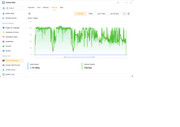
both source and destination are on same 2.5Gbe switch with aggregated links.
It was a lot of data - no compression, no encryption - being an already compressed backup (3rd party app). Unfortunately the rsync log does not include any size info to make life easier. On completion the destination nas showed the destination volume was over 90% full. (2.5TB capacity).
Deleted all files in the destination volume and re-ran a test on smaller data set which is currently running at 2-3 times the original speed.

Note1: Rsync logs only record the last run of any particular task from what I could see.
Note2: Destination rsync server is running Tos7.0.0500.
Note3; Have not found any explanation as to why all saved tasks were deleted.
F5-221 TOS7.0.1278 - 4x4TB (Ironwolf) Traid
F2-424 TOS7.0.1278 - 2x500GB nvme (P3) Traid, 2x6TB HDD (HGST) Traid
F2-221 TOS7.0.1278 - 1x3TB Ext4, 1x4TB Btrfs
F2-425+ TOS7.0.1278 - 2x500GB nvme (P3) Traid, 2x6TB HDD (EXOS) Traid
F2-424 TOS7.0.1278 - 2x500GB nvme (P3) Traid, 2x6TB HDD (HGST) Traid
F2-221 TOS7.0.1278 - 1x3TB Ext4, 1x4TB Btrfs
F2-425+ TOS7.0.1278 - 2x500GB nvme (P3) Traid, 2x6TB HDD (EXOS) Traid


Re: TOS 7.0.0517 Beta (X86) is Released for Update
https://ibb.co/rKHwzpdv
Не сохраняет изменения
Не сохраняет изменения
F4-424 Max
-
luismartin

- Posts: 58
- Joined: 14 Jan 2025, 01:56

Re: TOS 7.0.0517 Beta (X86) is Released for Update
I tried to change the disk sleep time again, but now it's not possible because the time window doesn't appear and the "Apply" button doesn't work either.
It has been set to 10 minutes and it is not possible to change it.
Any ideas on how to solve this? Regards
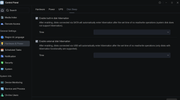
It has been set to 10 minutes and it is not possible to change it.
Any ideas on how to solve this? Regards

Re: TOS 7.0.0517 Beta (X86) is Released for Update
Can you remove the tick in the enable boxes? Does the Apply button then work?luismartin wrote: ↑23 Apr 2026, 01:03 I tried to change the disk sleep time again, but now it's not possible because the time window doesn't appear and the "Apply" button doesn't work either.
It has been set to 10 minutes and it is not possible to change it.
Any ideas on how to solve this? Regards
F2-425 Plus, 16GB RAM, 2 x 500GB WD SN700 EXT4 RAID1, 2 x 3TB WD Red EXT4 RAID1, TOS 7.0.<latest>
F4-SSD, 16GB RAM, 4 x 4TB SN700 Btrfs TRAID, TOS 7.0.<latest>
F4-SSD, 16GB RAM, 4 x 4TB SN700 Btrfs TRAID, TOS 7.0.<latest>
Re: TOS 7.0.0517 Beta (X86) is Released for Update
Рекомендуемый список и список категорий в центре приложений по умолчанию сортируются по количеству загрузок, тогда как списки "Все" и "Установленные" по умолчанию сортируются по имени. Любые изменения порядка на странице действуют только один раз и не изменяют порядок сортировки по умолчанию.
The recommended list and category list in the application center are sorted by download volume by default, while the "All" and "Installed" lists are sorted by name by default. Any reordering on the page only takes effect for that single instance and does not change the default sorting.
To contact our team, please send email to following addresses, remember to replace (at) with @
Technical team: support(at)terra-master.com(for technical support)
Service team: service(at)terra-master.com(for purchasing, return, replacement, RMA service)
Technical team: support(at)terra-master.com(for technical support)
Service team: service(at)terra-master.com(for purchasing, return, replacement, RMA service)
-
luismartin
- Posts: 58
- Joined: 14 Jan 2025, 01:56
Re: TOS 7.0.0517 Beta (X86) is Released for Update
That doesn't work either.snapsh0t wrote: ↑23 Apr 2026, 13:38Can you remove the tick in the enable boxes? Does the Apply button then work?luismartin wrote: ↑23 Apr 2026, 01:03 I tried to change the disk sleep time again, but now it's not possible because the time window doesn't appear and the "Apply" button doesn't work either.
It has been set to 10 minutes and it is not possible to change it.
Any ideas on how to solve this? Regards
It doesn't work from the mobile app either; it seems like you can change the sleep disk time, but it doesn't and always stays at 10 minutes.
The problem in my case is that with that 10-minute timeout, each time the disks wake up, the files aren't available until a couple of minutes later. (I still don't understand why the disks have to start up one by one).
Re: TOS 7.0.0517 Beta (X86) is Released for Update
It's not a generic problem as I have disk sleep set to 30 minutes and I have control over the settings. I suspect there's another setting somewhere that's inhibiting it on your NAS. I expect you'll be advised to contact TM Support to arrange an online session.
F2-425 Plus, 16GB RAM, 2 x 500GB WD SN700 EXT4 RAID1, 2 x 3TB WD Red EXT4 RAID1, TOS 7.0.<latest>
F4-SSD, 16GB RAM, 4 x 4TB SN700 Btrfs TRAID, TOS 7.0.<latest>
F4-SSD, 16GB RAM, 4 x 4TB SN700 Btrfs TRAID, TOS 7.0.<latest>
-
luismartin
- Posts: 58
- Joined: 14 Jan 2025, 01:56
Re: TOS 7.0.0517 Beta (X86) is Released for Update
You're right, there had to be something disabling the disk sleep time change. I restored the system to the "restored system configuration" from two days ago, and now sleep mode is working correctly.
Thanks for your help.


Re: TOS 7.0.0517 Beta (X86) is Released for Update
Another gremlin in my F5-221/7.0.0517:
CloudSync, I have a working connection for OneDrive and a task that works with that connection. When I want to create another task with the same connection, I can specify everything, pick the target folder (so the connection cleary works since I can browse onedrive from the dialog to pick the target folder) and at the finish when about to save the new task it says in red:
The remote directory is not available. Please select another directory.
This happens no matter what target directory I pick. As mentioned connection works, another task with the same connection works.
If this is not the good place for this report please advise or move the post where appropriate. Thanks!
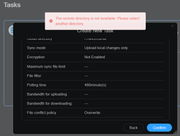
CloudSync, I have a working connection for OneDrive and a task that works with that connection. When I want to create another task with the same connection, I can specify everything, pick the target folder (so the connection cleary works since I can browse onedrive from the dialog to pick the target folder) and at the finish when about to save the new task it says in red:
The remote directory is not available. Please select another directory.
This happens no matter what target directory I pick. As mentioned connection works, another task with the same connection works.
If this is not the good place for this report please advise or move the post where appropriate. Thanks!