Page 6 of 6
Re: TOS 7.0.0465 Beta (X86) is Released for Update
Posted: 30 Mar 2026, 09:54
by mcfly
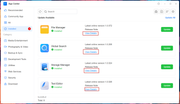
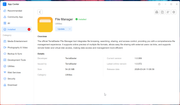
Not sure if this has been fixed since this latest update, but when clicking "view details" under "Release Note" for available app updates, it doesn't actually show anything related to release note details, only the app details itself. This is pretty pointless unless it actually shows the changes imo.
Re: TOS 7.0.0465 Beta (X86) is Released for Update
Posted: 30 Mar 2026, 14:52
by storageninja
I also emailed to PM, sharing to prevent duplicate bug reports:
I removed some data for privacy but a FAILED scheduled task is emailed as “COMPLETED + Error log attachment” that should be fixed in TOS7? I only checked this one:
Checked: Enable script error notifications
Secondly where the new notification design is able to suppress jobs/tasks in the desktop gui, in the TOS 7 iOS beta app the tasks are not suppressed and still visible, could that be enhanced in the mobile app to behave the same as the desktop?
Re: TOS 7.0.0465 Beta (X86) is Released for Update
Posted: 30 Mar 2026, 20:00
by DCCentR
Cant't disable IPv6 on both lan ports - clicking the "Confirm" button do nothing
Re: TOS 7.0.0465 Beta (X86) is Released for Update
Posted: 31 Mar 2026, 03:51
by EriChan
mcfly wrote: ↑30 Mar 2026, 09:54
Thanks for your feedback.
To clarify: the applications you mentioned (such as the file manager, global search, etc.) are core apps deeply integrated into the TOS system. Currently, the specific updates and optimizations for these apps are usually included in the TOS system release notes and are not listed separately in the App Center.
Thank you for bringing this issue to our attention. Our product team is evaluating the matter and plans to improve the transparency of update details in future versions. We will continue to optimize this experience!
Re: TOS 7.0.0465 Beta (X86) is Released for Update
Posted: 31 Mar 2026, 04:05
by samius
Can you add the amnezia wireguard module to kernel 6.12.63+? OR include wg-easy in the application list with the amneziaWG option?
module -
https://github.com/amnezia-vpn/amneziaw ... nel-module
wg-easy -
https://wg-easy.github.io/wg-easy/lates ... g/amnezia/
Re: TOS 7.0.0465 Beta (X86) is Released for Update
Posted: 31 Mar 2026, 21:05
by EriChan
Thanks for your feedback.Your request has been forwarded to the product department for evaluation.
Re: TOS 7.0.0465 Beta (X86) is Released for Update
Posted: 07 Apr 2026, 12:42
by usersky
Currently, common scenarios requiring re-login include:
1. After the NAS device restarts;
2. The connection between the mobile device and the NAS is interrupted for an extended period or abnormally disconnected.
Please provide the above information, and we will investigate immediately. We sincerely apologize for the poor experience this has caused.
Both points are unfortunate and not normal for mobile apps.
1. It should not matter if NAS restarts, it is normal to persist the state of the connected clients. I power cycle NAS every night in order to reduce electric bill. This means I have to login every day. This is not how servers behave. Client should not be impacted by a server restart. Do you care how about how many times some Google's servers power cycle? Should you be disconnected from the email app each time they update their servers? This is a long standing inconvenience for me using TOS and honestly it is quite easy to fix, just persist/restore auth tokens.
2. It is normal for an app to not be used for "extended periods of time". I use a lot of apps rarely and they do not disconnect. This is not proper behaviour. I understand I may set an expire time policy but beyond this it should stay connected no matter how much time or power cycles pass.
Re: TOS 7.0.0465 Beta (X86) is Released for Update
Posted: 08 Apr 2026, 02:11
by EriChan
Thank you for your insightful feedback. Your points regarding "Server restarts should not impact client login status" and the necessity of "Token Persistence" are technically sound and align with our product design goals.
Regarding your specific scenario of daily power cycling, our technical team has conducted multiple rounds of stress testing in our lab (simulating client reconnection after NAS shutdown). However, on our current test devices, the login state remains persistent, and we have been unable to reproduce the automatic logout issue you described.
To help us pinpoint the root cause, could you please provide the following details:
- Your specific phone model and the Android 16 Build/Kernel version.
- If the issue occurs again, could you provide a screen recording showing the process from opening the app to the login prompt? This will help us determine if the logout is triggered immediately or after a timeout.
We sincerely appreciate your cooperation and are committed to reproducing and resolving this compatibility challenge.
Re: TOS 7.0.0465 Beta (X86) is Released for Update
Posted: 09 Apr 2026, 22:43
by usersky
@EriChan just login in the web interface, restart nas and refresh the page, there it looses the authentification for sure each and every time.