Page 6 of 8
Re: TOS 6.0.783 (X86) is Released for Update
Posted: 16 Oct 2025, 20:59
by mmick
CursaYang wrote: ↑14 Oct 2025, 11:05
luismartin wrote: ↑14 Oct 2025, 06:41
This isn't just a question for 6.0.783, it applies to all other updates.
I have TOS installed on only one M.2 drive, but not on any of the 12 drives in my T12-450.
Would I have less risk of RAID data loss by disconnecting all 12 drives, updating the M.2 drive, shutting down, and reconnecting the drives again?
Version 6.0.783 has added a system disk management feature. You can update the system separately on the M.2 drive and then insert other HDDs.
One question I have the F4 423 and I have four hard disks. If I install now a M2 drive, can I install the operating system on it, and the nas will boot from it?
Re: TOS 6.0.783 (X86) is Released for Update
Posted: 17 Oct 2025, 05:40
by luismartin
As far as I know, you need to perform a Factory Default, and when it shows you where to install TOS, choose M.2 so that it boots only from M.2.
I recommend performing a Backup Sustem Configuration first.
Re: TOS 6.0.783 (X86) is Released for Update
Posted: 17 Oct 2025, 16:21
by Lex
mmick wrote: ↑16 Oct 2025, 20:59
CursaYang wrote: ↑14 Oct 2025, 11:05
luismartin wrote: ↑14 Oct 2025, 06:41
This isn't just a question for 6.0.783, it applies to all other updates.
I have TOS installed on only one M.2 drive, but not on any of the 12 drives in my T12-450.
Would I have less risk of RAID data loss by disconnecting all 12 drives, updating the M.2 drive, shutting down, and reconnecting the drives again?
Version 6.0.783 has added a system disk management feature. You can update the system separately on the M.2 drive and then insert other HDDs.
One question I have the F4 423 and I have four hard disks. If I install now a M2 drive, can I install the operating system on it, and the nas will boot from it?
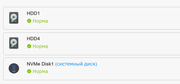
NVMe is system
Re: TOS 6.0.783 (X86) is Released for Update
Posted: 17 Oct 2025, 17:41
by CursaYang
In version 6.0.783, if you want the NAS to boot from the newly installed M.2 drive. After installing the M.2 drive, you can directly migrate the system from the HDD to the M.2 drive.
Re: TOS 6.0.783 (X86) is Released for Update
Posted: 18 Oct 2025, 19:08
by mmalchuk
F5-221 was updated from 6.0.770 to 6.0.783-01200 without any issues.
F4-423 was updated from 6.0.750 to 6.0.770 with issue of no UI, booting from system disk in BIOS helps, then updated to 6.0.783-01200 without any issues.
Re: TOS 6.0.783 (X86) is Released for Update
Posted: 20 Oct 2025, 03:46
by mmalchuk
mmalchuk wrote: ↑18 Oct 2025, 19:08
F4-423 was updated from 6.0.750 to 6.0.770 with issue of no UI, booting from system disk in BIOS helps, then updated to 6.0.783-01200 without any issues.
Update: The multimedia server is disabled after the update. I don't know if the 770 or the 783 updates disabled it. ReEnable worked.
Re: TOS 6.0.783 (X86) is Released for Update
Posted: 20 Oct 2025, 23:22
by mmick
CursaYang wrote: ↑17 Oct 2025, 17:41
In version 6.0.783, if you want the NAS to boot from the newly installed M.2 drive. After installing the M.2 drive, you can directly migrate the system from the HDD to the M.2 drive.
Great news, thank you! Do you know if there is any special minimum size for the M.2 SSD? (ATM I have a spare 256 GB NVMe M.2 SSD)
Re: TOS 6.0.783 (X86) is Released for Update
Posted: 21 Oct 2025, 14:58
by CursaYang
SSD has no capacity requirements; 256GB is also acceptable.
Re: TOS 6.0.783 (X86) is Released for Update
Posted: 21 Oct 2025, 17:14
by Gremlin
To put that in perspective, The operating system partitions occupy about 11Gigabytes (with overhead).
I run a pair of 500GB nvme in Raid (1). This gives me a Storage pool space of >450GB.
How much space you might actually need would depend on the intended use for that space.
Re: TOS 6.0.783 (X86) is Released for Update
Posted: 29 Oct 2025, 10:28
by Lau6311
Noted your happiness.

Appreciate advice from you and anyone : Can I jump straight to TOS 6.0.783 from current 648 ?
Reason is to avoid the issues caused by intermediate TOS versions. Thank you.
I currently have same F2-223 with TOS 6.0.648 months ago with minimum issues. As a simple user, Emby for media, browser for intensive files transfer, Photo for handphones media management. 5 UPS for emergency power management for PCs, routers and 2xNAS.
Comment: I like the new feature of selectively residing TOS at all drives like HDD and SSD, as preferring using faster SSD for TOS. Noted that when upgrading from TOS 5 to 6, all drives (2 HHD and 2 NVME SSD) have TOS 6 installed, but after changing the cache SSD to balance mode, I lost the TOS at cache SSD, only 3 drives have TOS instead of all 4, and I do not know the priority accessing TOS is from HDD or SSD ??
So far, I am happy with F2-223 as a good entry level NAS, fast enough for normal functions (using NAS 2x2.5Gbe and PC 2x2.5Gbe with one using ethernet adapter thru a 1Gbe switch with max speed about 220-250 GBps using SMB multichannel.
Will report status after a successful TOS upgrade.