Page 5 of 10
Re: TOS 7.0.0517 Beta (X86) is Released for Update
Posted: 18 Apr 2026, 20:31
by User009
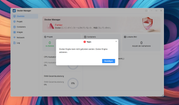
Docker Engine seems to disable itself at random times. My TNAS is always offline with blocked internet access, but that shouldn't be a problem or is it?
Re: TOS 7.0.0517 Beta (X86) is Released for Update
Posted: 18 Apr 2026, 22:02
by Gravitator
Nginx does not start after reboot.
After starting manually, everything is OK, the NAS web interface responds. I would like to know how to solve this problem permanently without using SSH or multiple reboots.
These services are still active:
TOSDaemon.service
redis.service
I am attaching the nginx startup log:
Apr 18 18:49:39 TNAS systemd[1]: Starting A high performance web server and a reverse proxy server...
Apr 18 18:49:39 TNAS nginx_prepare[1818]: No configuration errors found.
Apr 18 18:49:39 TNAS nginx_prepare[1818]: Configuration validation failed, restoring original file.
Apr 18 18:49:40 TNAS nginx[2051]: nginx: [warn] the "ssl" directive is deprecated, use the "listen ... ssl" directive instead in /etc/nginx/nginx.conf:65
Apr 18 18:49:40 TNAS nginx[2051]: nginx: [emerg] host not found in upstream "api.github.com" in /etc/nginx/AppAccessControl/AppAccessControl-transmission.conf:26
Apr 18 18:49:40 TNAS systemd[1]: nginx.service: Control process exited, code=exited, status=1/FAILURE
Apr 18 18:49:40 TNAS systemd[1]: nginx.service: Failed with result 'exit-code'.
Apr 18 18:49:40 TNAS systemd[1]: Failed to start A high performance web server and a reverse proxy server.
Apr 18 18:49:40 TNAS systemd[1]: nginx.service: Consumed 1.121s CPU time.
Apr 18 18:49:48 TNAS systemd[1]: nginx.service: Unit cannot be reloaded because it is inactive.
Re: TOS 7.0.0517 Beta (X86) is Released for Update
Posted: 19 Apr 2026, 11:15
by EriChan
Regarding the issue of Nginx not starting after a reboot, here is a detailed explanation and recommendation:
Core Error: The log shows nginx: [emerg] host not found in upstream "api.github.com", indicating that when the system starts and tries to load Nginx, it cannot resolve the domain name api.github.com.
Triggering Cause: When Nginx starts, it will verify all domain names referenced in the configuration file. Due to the special network environment in your location, if the network is not fully ready or the DNS server responds too slowly at this time, Nginx will crash and exit directly because it cannot resolve the domain name.
Why Manual Start Works Normally: When started manually, the system's network has already been successfully connected and the DNS cache has been established, so Nginx can pass the domain name verification and run smoothly.
Recommended Operation: Optimize Network DNS Settings
Setting a more stable manual DNS can speed up the resolution during startup, often solving the race condition problem.
1.Log in to TOS, go to Control Panel > Network Services > Network > Interface.
2.Select the network interface you are using (such as LAN1) and click Edit.
3.Uncheck "Automatically obtain network settings" and set the IP manually.
4.In the DNS Server field, manually enter the following addresses:
- Primary DNS: 1.1.1.1 (Cloudflare)
- Secondary DNS: 8.8.8.8 (Google)
5.Click Apply and try to restart the TNAS.
Re: TOS 7.0.0517 Beta (X86) is Released for Update
Posted: 19 Apr 2026, 15:33
by Gravitator
Thanks! Now it's clear where to go.
It's strange, of course. Do I understand correctly that if the Internet is not available, nginx will not start?
Re: TOS 7.0.0517 Beta (X86) is Released for Update
Posted: 20 Apr 2026, 02:16
by EriChan
You are essentially correct in the current context.
To be more specific: Nginx itself doesn't need the Internet to run, but it has a very strict startup validation mechanism. In your TNAS, the Transmission configuration references api.github.com. Nginx is forced to resolve this domain the moment it starts.
If the domain cannot be resolved at that exact second (due to slow DNS response or others), Nginx treats the config file as 'invalid' and refuses to start. This is why it works manually but fails after a reboot.
Our laboratory is attempting to reproduce this specific scenario and evaluate optimizations to avoid affecting device accessibility.
In response to this situation, you can try the following options:
- Option 1: Use the previous optimized network DNS settings method, which will allow you to continue to retain and use Transmission.
- Option 2: If you don't need to use Transmission urgently at the moment, you can try to uninstall the application from the App Center. After uninstallation, the system will automatically remove the problematic configuration file, and Nginx will no longer fail to start due to being unable to resolve the domain name.
Re: TOS 7.0.0517 Beta (X86) is Released for Update
Posted: 20 Apr 2026, 13:11
by Gravitator
Thanks for the clarifications.
Deleting Transmission helped.
Defrag option TOS7
Posted: 21 Apr 2026, 05:08
by luismartin
Could you please confirm if the "file system defragmentation" option works with TOS7?
I ran it on a 200TB RAID 5 and it took 5 seconds, so it doesn't seem to work.
Re: TOS 7.0.0517 Beta (X86) is Released for Update
Posted: 21 Apr 2026, 15:35
by Gremlin
RSYNC Backup issues?:
Noticed an rsync task had failed (on the day this version was installed

).
Checked rsync task list and the failed task was disabled. Noticed the source folder path had "self-modified"

to something unusual. Can't say for sure what because:
I edited the rsync task back to what it should have been and commenced a test run.
The task appeared to start but, almost immediately (I switched to monitor system resource usage), ALL the set tasks for rsync were wiped.
The dialogue now shows "Create" and no task logs are available.
I suspect task is still running. Disk read active and disk write on target active. ClamAV (realtime) is active.
System report sent.
Re: Defrag option TOS7
Posted: 21 Apr 2026, 16:00
by CursaYang
luismartin wrote: ↑21 Apr 2026, 05:08
Could you please confirm if the "file system defragmentation" option works with TOS7?
I ran it on a 200TB RAID 5 and it took 5 seconds, so it doesn't seem to work.
File system defragmentation is still effective in TOS 7, specifically for the BTRFS file system. A few seconds to complete is normal behavior for Btrfs. The BTRFS file system tries to allocate contiguous space when writing data, resulting in minimal fragmentation. Even if there is fragmentation, defragmentation mainly rewrites the extents (data blocks) of individual files, rather than moving data across the entire disk like Windows does.
Re: TOS 7.0.0517 Beta (X86) is Released for Update
Posted: 21 Apr 2026, 21:27
by usersky
F5-221 here. There is an issue with Hardware and power/Power/Power schedule: I had two items in the list, one for power on every day in the morning, the other one to power off every evening. I disabled power on item and NAS is still powering on every morning. I completely deleted the item from the list so now there is just the daily power off there. NAS still powers on every morning at the exact time I had it scheduled before disabling/deleting scheduled power on. Somehow altough it is deleted, it still is active and I don't know of any way to stop NAS from powering on every morning by itself:
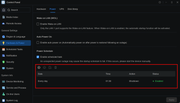
Don't know how old the issue is so probably is not new to 7.0.0517 but it is just now I encountered it so I report it here.
(it would be easier if the update notices will be posted as before)