Page 5 of 6

Re: TOS 7.0.0465 Beta (X86) is Released for Update

Posted: 29 Mar 2026, 11:49
by EriChan
vitosamin wrote: 28 Mar 2026, 18:57
Thanks for your active feedback. Regarding the frequent logout issue you've encountered on your Android 16 device, our lab has officially started an investigation and is currently attempting to reproduce the fault in a controlled environment.

We would like to inform you that, as of now, no backend fixes or silent updates have been implemented for version 3.5.053. Therefore, we recommend that you continue to observe whether the issue reoccurs. If possible, please help us identify if there were any network switches (such as switching between Wi-Fi and mobile data) or extended screen-off periods (device entering deep sleep) prior to the logouts. Based on the results of our reproduction, we will work towards a thorough resolution of this experience pain point in future software updates.

Re: TOS 7.0.0465 Beta (X86) is Released for Update

Posted: 29 Mar 2026, 15:18
by Joesh
mmick wrote: 27 Mar 2026, 14:39
Joesh wrote: 27 Mar 2026, 13:19
TMnight wrote: 27 Mar 2026, 12:16

The boot priority will not change on its own. After following the steps in the link, is the NAS currently functioning normally?
Can you read carefully??.... I'm not installed TOS on NVME, and I'm not changed my F2-423 boot order... I'm using HDD
I hope after this post, no one said about change boor priority again....

Clearly I wrote on the las post:
I'm not installed TOS on an M.2 NVMe SSD, I'm using HDD.
Is it possible the boot priority change it self?
My F4-423 failed to download this firmware like 6 times, then it did it and almost done updating and said the file was damaged. At this stage it took long to respond, meanwhile the page was not accessable... After like 10 minutes it came again back to life normally. Then I tried to updateit downloaded and updated well.
in my case, 1st attempt to update failed (download failed or error), 2nd attempt update success to download and install, but after reboot can't show the desktop, restart and shutdown then boot again not make my NAS normal again. On my TNAS PC said my drive not utilized.

Re: TOS 7.0.0465 Beta (X86) is Released for Update

Posted: 29 Mar 2026, 15:20
by Joesh
Phil wrote: 27 Mar 2026, 15:21
Joesh wrote: 27 Mar 2026, 13:19
TMnight wrote: 27 Mar 2026, 12:16

The boot priority will not change on its own. After following the steps in the link, is the NAS currently functioning normally?
Can you read carefully??.... I'm not installed TOS on NVME, and I'm not changed my F2-423 boot order... I'm using HDD
I hope after this post, no one said about change boor priority again....

Clearly I wrote on the las post:
I'm not installed TOS on an M.2 NVMe SSD, I'm using HDD.
Is it possible the boot priority change it self?
To accurately and efficiently locate and resolve your issue, I recommend you schedule a remote troubleshooting appointment. Please visit the Terramaster website (https://www.terra-master.com), find the "Online Customer Service" chat window on the homepage or support page, explain your situation to our customer service staff, and schedule a remote assistance appointment with one of our engineers.

Once you authorize, our engineers can remotely view your system status and perform targeted configuration checks and repairs. Thank you for your patience and continued feedback. We sincerely apologize for any inconvenience this may cause, and our technical support team will do its utmost to assist you in completely resolving this issue.
How can i give TM Team a remote troubleshooting ??? In my LAN the device can't find, can't access. I think my pictures from my 1st post to tell about the problem apear on my NAS clearly show it.

Re: TOS 7.0.0465 Beta (X86) is Released for Update

Posted: 29 Mar 2026, 17:36
by Gremlin
Joesh wrote: 27 Mar 2026, 13:19
Couple of things (it's up to you if you consider them "weird" or not):
Your original post on this thread - the first image maybe has an issue on the repository server; I get an error and it won't display. Other images are fine.
You state you have not installed on nvme. Fine. Do you have an nvme installed in the nas? Have you actually checked the Boot Order in the Bios? Have you been into the BIOS and changed ANYTHING? - even unintentionally? Maybe worth considering resetting bios to defaults???
Given that I cannot read that first post image, have you checked that the network IP address of the NAS has not changed?

Re: TOS 7.0.0465 Beta (X86) is Released for Update

Posted: 29 Mar 2026, 20:37
by Joesh
Gremlin wrote: 29 Mar 2026, 17:36
Joesh wrote: 27 Mar 2026, 13:19
Couple of things (it's up to you if you consider them "weird" or not):
Your original post on this thread - the first image maybe has an issue on the repository server; I get an error and it won't display. Other images are fine.
You state you have not installed on nvme. Fine. Do you have an nvme installed in the nas? Have you actually checked the Boot Order in the Bios? Have you been into the BIOS and changed ANYTHING? - even unintentionally? Maybe worth considering resetting bios to defaults???
Given that I cannot read that first post image, have you checked that the network IP address of the NAS has not changed?
Read my other posts carrefully.... I'm not changed my boot order, I'm using HDD not NVME (it means I don't have NVME). Before try to update, everything fine, problem appeared after try to update. IP address never change, but thanks for the reply. At least it provides more options for solving the problem I'm facing.
This is the IP address after update, can't access it, check my router, the IP still pointed to my NAS
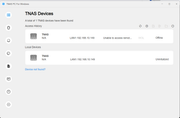
Image

This is my NAS IP when I had another problem when using TOS 7.0.0408
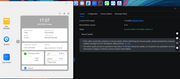
Image

Re: TOS 7.0.0465 Beta (X86) is Released for Update

Posted: 29 Mar 2026, 20:56
by Joesh
After trying to think logically, and seeing warning that said my NAS was not yet utilized, I chose to utilize it according to the TNAS PC application's instructions, risking data loss. However, I had previously backed up my data to another NAS when the error occurred.
At the beginning of the utilization process, the NAS downloaded the BOOT LOADER and then I'm manually installed the TOS firmware from the TOS 7.0.0403 file I had previously downloaded. My NAS then returned to normal, except that the old admin user couldn't be used. Fortunately, this didn't result in the loss of the old admin user's data; it was still accessible with the new admin user. Now, my NAS can be updated to TOS 7.0.0465.
In conclusion, during yesterday's update, the update process from TOS 7.0.0448 to TOS 7.0.0465 damaged my NAS's boot loader.
This is the IP of my device after update to 7.0.0465
Image

This is why I asked the TM Team to provide a link to the latest TOS for manual download so that users could perform the manual update. Please provide a download link for the latest TOS update in each thread. I'm sure it won't be a problem for the TM Team, especially @RyanYang. But in a situation like mine, it would certainly be very inconvenient for users.
Why am I asking for a manual download link? Because I'm a novice user, and even though there are options to just download or download and install when an update is available, I don't know which folder the TOS update file is in after I download it from the control panel.
I will continue to provide feedback with my limited expertise, but I ask for TM Team once again, provide a link to download the TOS update file so that novice users like me can download and update manually.
Image

Re: TOS 7.0.0465 Beta (X86) is Released for Update

Posted: 30 Mar 2026, 02:16
by Gremlin
Just a minor point:
The first image of TNAS-PC is only showing access history. It does not show currently found device(s). You would probably need to click on 'refresh' button to see a current accessibility display.
And, you might need to follow your own advice. Saying something like 'you are using HDD' does not mean you don't have an nvme drive installed - maybe not selected as system drive or in use as hypercache drive. Plus, stating that 'you have not changed anything' does not mean that something has not changed. Quite often, in the simplistic ways an new install may result in an IP change whether we want it to or not. It might be as simple as nas not immediately seeing dhcp server or the on-board controller mis-firing. It may just depend on your settings which outsiders may not know. Then, when one brushes off advice with bluster or otherwise, one may find further advice in short supply.

Re: TOS 7.0.0465 Beta (X86) is Released for Update

Posted: 30 Mar 2026, 02:49
by EriChan
Joesh wrote: 29 Mar 2026, 20:56
We appreciate your feedback, and your request has been shared with our product team. To help us identify the root cause and prevent this from happening again, could you please generate a system report via TOS Desktop > Support & Help > Issue Feedback and email it to our support team? Thank you!

Re: TOS 7.0.0465 Beta (X86) is Released for Update

Posted: 30 Mar 2026, 07:41
by Joesh
Gremlin wrote: 30 Mar 2026, 02:16 Just a minor point:
The first image of TNAS-PC is only showing access history. It does not show currently found device(s). You would probably need to click on 'refresh' button to see a current accessibility display.
And, you might need to follow your own advice. Saying something like 'you are using HDD' does not mean you don't have an nvme drive installed - maybe not selected as system drive or in use as hypercache drive. Plus, stating that 'you have not changed anything' does not mean that something has not changed. Quite often, in the simplistic ways an new install may result in an IP change whether we want it to or not. It might be as simple as nas not immediately seeing dhcp server or the on-board controller mis-firing. It may just depend on your settings which outsiders may not know. Then, when one brushes off advice with bluster or otherwise, one may find further advice in short supply.
First image is the result when i allready refresh, even power off the device, the PC and try to access the device again through browser or TNAS PC. OK, if you said "I'm using HDD' does not mean I don't have an nvme drive installed, but TMNight said :
TMnight wrote: 27 Mar 2026, 12:16 The boot priority will not change on its own. After following the steps in the link, is the NAS currently functioning normally?
So there's no reason for you to suspect that my boot priority device has changed to NVME. You have to go into the BIOS to change the boot priority, right? I don't have a keyboard on my device! Maybe you are more expert than me, but I know my device better than you. I'm not so stupied either, I allready tried all the basic troubleshot!
My device's IP?????
This is the IP address after update, can't access it, check my router, the IP still pointed to my NAS
Image

This is my NAS IP when I had another problem when using TOS 7.0.0408
Image
[/quote]

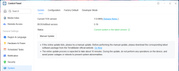
This is my IP's device now
Image

Come on, man, you seem to be forcing your sudgests, as if you know my device better than its owner. See the next post; the problem isn't with the boot priority, but rather an error in the boot loader. Okay, I already said thank you for your concern, but my problem was solved my way, before doing my way, I have done all your suggestions, but nothing has changed and the problem remains..
I'm a novice user, but I'm not so stupid after all!
There is no benefit for me to lie about the problem, about the device's condition, about the effort, about my device's IP, about my device booot priority, on the contrary, when I take the solution that I did, there is a risk of losing my data, even though I have backed up the data, but it takes effort to restore the data from the backup source and that takes time, I just want to share so that the TM Team can fix it for the latest update later.
Re: TOS 7.0.0465 Beta (X86) is Released for Update

Posted: 30 Mar 2026, 08:03
by Joesh
EriChan wrote: 30 Mar 2026, 02:49
Joesh wrote: 29 Mar 2026, 20:56
We appreciate your feedback, and your request has been shared with our product team. To help us identify the root cause and prevent this from happening again, could you please generate a system report via TOS Desktop > Support & Help > Issue Feedback and email it to our support team? Thank you!
Done, allready sent it with my other email ([email protected])