TOS 6.0.648 (X86) is Released for Update

Re: TOS 6.0.648 (X86) is Released for Update
Hello, I just updated to .648 from the previous build and I am unable to login to the terminal from the webui, or start plex from the app center. It seems to be python related, I did fix it in the previous update. I didn't record or remember to write down the solution. Also remote access outside the LAN doesn't work.

Re: TOS 6.0.648 (X86) is Released for Update
The Cloud Sync app now supports both cloud storage platforms you mentioned. In the future, we may add support for more cloud storage platforms as needed.
To contact our team, please send email to following addresses, remember to replace (at) with @:
Technical team: support(at)terra-master.com (for technical support)
Service team: service(at)terra-master.com (for purchasing, return, replacement, RMA service)
Technical team: support(at)terra-master.com (for technical support)
Service team: service(at)terra-master.com (for purchasing, return, replacement, RMA service)

Re: TOS 6.0.648 (X86) is Released for Update
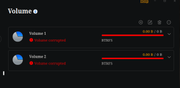
I think my TNAS is quite sick after that update. As well my still unsolved domain joining problems, there are a few other concerning things. The scariest of which is I have just noticed that TOS is reporting both of my volumes as corrupted.
However, they are both mounted as read/write and seem to be fully usable. Nor could I see any evidence in `dmesg` of any btrfs errors. It looks like it is incorrectly detected corruption.
The second thing is, the `ssh` command no longer works on the NAS itself if i `ssh` to it This always used to work, and is suggesting something else is wrong.
The final thing occurs when you try to launch any application from the web UI. Most of the time, it will immediately popup a dialog to say that the application has failed to launch, but it actually does launch.
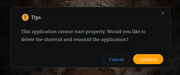
I tried to enable "Debug Mode", but it wont let me select any disk for the debug logs, presumably because it thinks the disks are corrupted.
EDIT: I have found the cause of the ssh command failing at least. This is happening because the LD_LIBRARY_PATH environment variable is set to :/Volume1/@apps/LogCenter/lib:/Volume1/@apps/MultimediaServer/lib:/Volume1/@apps/Surveillance/lib in a root shell (anyone know why?). However, there are libraries in Surveillance/lib that are of different versions to those in the main /usr/lib/x86_64-linux-gnu directory. There doesn't appear to be any updates to surveillance manager. So for now, the work-around is to use or uninstall the surveillance manager. This hasn't helped with any of the other problems.
However, they are both mounted as read/write and seem to be fully usable. Nor could I see any evidence in `dmesg` of any btrfs errors. It looks like it is incorrectly detected corruption.
The second thing is, the `ssh` command no longer works on the NAS itself if i `ssh` to it This always used to work, and is suggesting something else is wrong.
Code: Select all
superuser@terra:~# ssh
OpenSSL version mismatch. Built against 30000020, you have 30300000
superuser@terra:~#
I tried to enable "Debug Mode", but it wont let me select any disk for the debug logs, presumably because it thinks the disks are corrupted.
EDIT: I have found the cause of the ssh command failing at least. This is happening because the LD_LIBRARY_PATH environment variable is set to :/Volume1/@apps/LogCenter/lib:/Volume1/@apps/MultimediaServer/lib:/Volume1/@apps/Surveillance/lib in a root shell (anyone know why?). However, there are libraries in Surveillance/lib that are of different versions to those in the main /usr/lib/x86_64-linux-gnu directory. There doesn't appear to be any updates to surveillance manager. So for now, the work-around is to use
Code: Select all
LD_LIBRARY_PATH= ssh user@host
Last edited by tanktarta on 04 Mar 2025, 08:51, edited 1 time in total.


Re: TOS 6.0.648 (X86) is Released for Update
NAS work more than 1 day.
Also I can`t see on-line users.
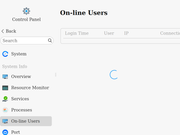
After that window does not respond. I need reload page, for use settings.
F4-423
-
plexjellyfin

- Posts: 30
- Joined: 25 Sep 2024, 08:49

Re: TOS 6.0.648 (X86) is Released for Update
this update broke Plex for me

Re: TOS 6.0.648 (X86) is Released for Update
Plex is working fine for me. You checked all your settings?
Current System:
F4-424 Pro
40TB storage.
TOS- 7.0.0746
F4-424 Pro
40TB storage.
TOS- 7.0.0746
-
sianderson

- Silver Member
- Posts: 457
- Joined: 02 Aug 2020, 03:42

Re: TOS 6.0.648 (X86) is Released for Update
i agree plex is fine for me after the update 610 to 648 also
F2-424 TOS 7.0.1341
F2-423 TOS 7.0.1341
F2-210 TOS 4.2.44
D4-320
C/O
F4-424 TOS 6.0.794
F2-423 TOS 7.0.1341
F2-210 TOS 4.2.44
D4-320
C/O
F4-424 TOS 6.0.794


Re: TOS 6.0.648 (X86) is Released for Update
"Try this method and see if it works for you: viewtopic.php?t=4772"
Re: TOS 6.0.648 (X86) is Released for Update
UPDATE: I made a backup of preferences, then reinstalled TOS from factory settings, That fixed my issues.
Note: my NAS had issues with python losing a symlink somewhere on the system, re linking the bin fixed Plex, Smb being unable to activate, and terminal issues within the webui,but those Issues existed on a prior TOS6 build, I didn't write down which one though
Note: my NAS had issues with python losing a symlink somewhere on the system, re linking the bin fixed Plex, Smb being unable to activate, and terminal issues within the webui,but those Issues existed on a prior TOS6 build, I didn't write down which one though
Re: TOS 6.0.648 (X86) is Released for Update
Is the update page working? The last few days when I login it says it couldn't check for update and to check my settings.
Current System:
F4-424 Pro
40TB storage.
TOS- 7.0.0746
F4-424 Pro
40TB storage.
TOS- 7.0.0746