TOS 6.0.648 (X86) is Released for Update

Re: TOS 6.0.648 (X86) is Released for Update
The update to version 648 went pretty smoothly overall, though I did run into a small issue the first time—the update package didn’t unpack properly. When the countdown ended, nothing happened, but it worked fine on the second try. Maybe the browser froze or something. Everything’s working perfectly now, though. This update feels solid and reliable—great job, Terramaster! Thanks!
F4-221 TOS 5.1.34 (SAMSUNG 250 SSD x1, WD Red 8TB x 1, Single drive)
F2-423 TOS 5.1.34 RAID1(12TB IronWolf x 2)
F2-423 TOS 5.1.34 RAID1(12TB IronWolf x 2)


Re: TOS 6.0.648 (X86) is Released for Update
Okay, I’ve been using TOS 6 for two weeks now, and honestly? It’s the first OS update that actually improved my daily grind instead of messing things up. I used to hate switching between apps on my old setup—it felt like dragging a sack of potatoes. With TOS 6, everything snaps open instantly. Even when I’m juggling 10 browser tabs, Slack, and a video edit, it doesn’t stutter. My laptop’s 3 years old, and it feels brand new.


Re: TOS 6.0.648 (X86) is Released for Update
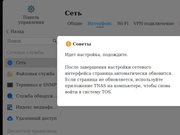
If I select "Network->interface", I see that window. "Please wait...."
How i can fix this?
F4-423

Re: TOS 6.0.648 (X86) is Released for Update
This prompt usually appears after modifying network interface information.
Are you referring to the situation where this prompt unexpectedly appears even if no changes were made, just by clicking 'Network->interface'?
If you confirm that this is an anomaly, it is recommended to contact the official website customer service or technical support email then we can schedule an engineer for inspection.
To contact our team, please send email to following addresses, remember to replace (at) with @:
Technical team: support(at)terra-master.com (for technical support)
Service team: service(at)terra-master.com (for purchasing, return, replacement, RMA service)
Technical team: support(at)terra-master.com (for technical support)
Service team: service(at)terra-master.com (for purchasing, return, replacement, RMA service)


Re: TOS 6.0.648 (X86) is Released for Update
It affects the apps that deal with media like photos for example that see no media file and always work like no media file is actually on the NAS when there are tens of thousands there.
It somehow fixed by itself after repeatedly uncheked media indexing, rebooting, checking again, rebooting, removing all the media folder from indexing, adding them back one by one, did this like 2-3 times in various order with no success and suddenly it started to index media files.
A good news: for a long long time nu mails were sent by the NAS but in this version mail notifications work again.


Re: TOS 6.0.648 (X86) is Released for Update
After a few mostly pain free updates, updating to this version has yet *again* left me unable to join my domain. This is the 3rd .. maybe 4th time there has been some domain joining regression.
I see there was entry in the changelog "Fixed the issue that some domains (including the 2025 AD domain) could not be joined normally.". For me, it broke it!
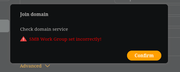
I am using a Samba backed AD domain, and while I seem to have to rejoin the domain after every upgrade (frustrating but not the end of the world), this time it refuses to do so showing the error "SMB Work Group set incorrectly".
For a start I am not using a workgroup, it's a full domain.
This time I can find no other logs to help identify the cause.
EDIT: Found this in syslog ...
Feb 28 19:23:34 terra TOSDaemon[4162]: domain_model.go:domain.(*Service).ConnectToAdServer.func1:241 value=domain joinAdDomain failed, dcerpc: invoke: /logon/v1/DsrGetDcName: provider_rejection: abstract syntax not supported
Feb 28 19:23:34 terra TOSDaemon[4162]: ERROR | 2025-02-28 19:23:34 | 200 | POST | 192.168.91.4 | /domain/DomainServiceDetection? | 2.609966482s | Mozilla/5.0 (X11; Linux x86_64; rv:135.0) Gecko/20100101 Firefox/135.0 | dcerpc: invoke: /logon/v1/DsrGetDcName: provider_rejection: abstract syntax not supported
I see there was entry in the changelog "Fixed the issue that some domains (including the 2025 AD domain) could not be joined normally.". For me, it broke it!
I am using a Samba backed AD domain, and while I seem to have to rejoin the domain after every upgrade (frustrating but not the end of the world), this time it refuses to do so showing the error "SMB Work Group set incorrectly".
For a start I am not using a workgroup, it's a full domain.
This time I can find no other logs to help identify the cause.
EDIT: Found this in syslog ...
Feb 28 19:23:34 terra TOSDaemon[4162]: domain_model.go:domain.(*Service).ConnectToAdServer.func1:241 value=domain joinAdDomain failed, dcerpc: invoke: /logon/v1/DsrGetDcName: provider_rejection: abstract syntax not supported
Feb 28 19:23:34 terra TOSDaemon[4162]: ERROR | 2025-02-28 19:23:34 | 200 | POST | 192.168.91.4 | /domain/DomainServiceDetection? | 2.609966482s | Mozilla/5.0 (X11; Linux x86_64; rv:135.0) Gecko/20100101 Firefox/135.0 | dcerpc: invoke: /logon/v1/DsrGetDcName: provider_rejection: abstract syntax not supported
Re: TOS 6.0.648 (X86) is Released for Update
I add more memory, turn on NAS. And click on "Interface". And i can plug network cable on other port, but them plug into right port.TMzethar wrote: ↑28 Feb 2025, 20:46This prompt usually appears after modifying network interface information.
Are you referring to the situation where this prompt unexpectedly appears even if no changes were made, just by clicking 'Network->interface'?
If you confirm that this is an anomaly, it is recommended to contact the official website customer service or technical support email then we can schedule an engineer for inspection.
"ip addr" - show 2 interfaces. And all work normal.
Code: Select all
NAS:~# ethtool eth0
Settings for eth0:
	Supported ports: [ TP ]
	Supported link modes:   10baseT/Half 10baseT/Full
	                        100baseT/Half 100baseT/Full
	                        1000baseT/Full
	                        2500baseT/Full
	Supported pause frame use: Symmetric
	Supports auto-negotiation: Yes
	Supported FEC modes: Not reported
	Advertised link modes:  10baseT/Half 10baseT/Full
	                        100baseT/Half 100baseT/Full
	                        1000baseT/Full
	                        2500baseT/Full
	Advertised pause frame use: Symmetric
	Advertised auto-negotiation: Yes
	Advertised FEC modes: Not reported
	Speed: Unknown!
	Duplex: Unknown! (255)
	Auto-negotiation: on
	Port: Twisted Pair
	PHYAD: 0
	Transceiver: internal
	MDI-X: off (auto)
	Supports Wake-on: pumbg
	Wake-on: g
        Current message level: 0x00000007 (7)
                               drv probe link
	Link detected: no
NAS:~# ethtool eth1
Settings for eth1:
	Supported ports: [ TP ]
	Supported link modes:   10baseT/Half 10baseT/Full
	                        100baseT/Half 100baseT/Full
	                        1000baseT/Full
	                        2500baseT/Full
	Supported pause frame use: Symmetric
	Supports auto-negotiation: Yes
	Supported FEC modes: Not reported
	Advertised link modes:  10baseT/Half 10baseT/Full
	                        100baseT/Half 100baseT/Full
	                        1000baseT/Full
	                        2500baseT/Full
	Advertised pause frame use: Symmetric
	Advertised auto-negotiation: Yes
	Advertised FEC modes: Not reported
	Speed: 1000Mb/s
	Duplex: Full
	Auto-negotiation: on
	Port: Twisted Pair
	PHYAD: 0
	Transceiver: internal
	MDI-X: off (auto)
	Supports Wake-on: pumbg
	Wake-on: g
        Current message level: 0x00000007 (7)
                               drv probe link
	Link detected: yes
F4-423

Re: TOS 6.0.648 (X86) is Released for Update
Experience tells me that the TOS network interface cannot be changed unless it is active. After modifying interface if the dialogue appears, wait a little then refresh the browser.
F5-221 TOS7.0.1278 - 4x4TB (Ironwolf) Traid
F2-424 TOS7.0.1278 - 2x500GB nvme (P3) Traid, 2x6TB HDD (HGST) Traid
F2-221 TOS7.0.1278 - 1x3TB Ext4, 1x4TB Btrfs
F2-425+ TOS7.0.1278 - 2x500GB nvme (P3) Traid, 2x6TB HDD (EXOS) Traid
F2-424 TOS7.0.1278 - 2x500GB nvme (P3) Traid, 2x6TB HDD (HGST) Traid
F2-221 TOS7.0.1278 - 1x3TB Ext4, 1x4TB Btrfs
F2-425+ TOS7.0.1278 - 2x500GB nvme (P3) Traid, 2x6TB HDD (EXOS) Traid
Re: TOS 6.0.648 (X86) is Released for Update
Regarding the issue you mentioned, it is suggested that you generate and download the log report package in TOS > Technical Support > Report Issues, and then send it to support(at)terra-master.com for inspection. Also, it would be better if you could provide an exception page related to this.usersky wrote: ↑28 Feb 2025, 21:47It affects the apps that deal with media like photos for example that see no media file and always work like no media file is actually on the NAS when there are tens of thousands there.
It somehow fixed by itself after repeatedly uncheked media indexing, rebooting, checking again, rebooting, removing all the media folder from indexing, adding them back one by one, did this like 2-3 times in various order with no success and suddenly it started to index media files.
A good news: for a long long time nu mails were sent by the NAS but in this version mail notifications work again.
To contact our team, please send email to following addresses, remember to replace (at) with @:
Technical team: support(at)terra-master.com (for technical support)
Service team: service(at)terra-master.com (for purchasing, return, replacement, RMA service)
Technical team: support(at)terra-master.com (for technical support)
Service team: service(at)terra-master.com (for purchasing, return, replacement, RMA service)
-
EthanBerg97

- Posts: 14
- Joined: 20 Feb 2025, 19:06

Re: TOS 6.0.648 (X86) is Released for Update
Can the new version add support for more cloud storage platforms (such as Google Drive, Dropbox, etc.)