Page 5 of 8

Re: Windows users cannot use SMB file service to access?

Posted: 19 Nov 2024, 20:47
by Gremlin
TMSupport wrote: 09 Dec 2021, 10:29
Some further odd (to me) clues I have found since my last post.
Performed a proper update from 6.0.519 to 6.0.535 (2 x nvme drives).
In tnas Network dialogue, device name was recorded in {lowercase}.
Back to the same issue - Windows Explorer identifies the device name in {lowercase} as being on network, but all attempts to access the device by name fail. No credentials requested.
Added Windows credentials (via Credential manager) but still no access.

Tried access via IP number = credentials requested automatically and access without issue. :idea:

Checked my router device list and cannot see the device. (the ip addresses in use have not changed although the name did)
(Which is odd because at least 1 nic is getting ip from dhcp although ALB Bond is fixed ip)

Another tnas is listed (5.1.145) with 2 connections - 1 is "Bond", 1 is "SMB"
with different IP and MAC addresses. :!: (ALB bond) :?:

other tnas device name is set in tnas in {UPPERCASE} and is seen by windows as {UPPERCASE}.
Also see residual entries for a previous name for this device, but offline.
(the ip addresses in use have not changed although the name did)
Modify device name in 6.0.535 to match residual entries in router and in {UPPERCASE}.
Windows now sees new device name in {lowercase} but allows access automatically requesting credentials.

Now the router entries exist as "???" and "Bond" (Possibly a separate subject but I will get it off my chest.)
The "???" gets the Bond IP address (fixed) and the MAC associated with the bond
The "Bond" does not show an IP but gets the 'other' mac

Also slightly disturbing is the identification (see previous post)
Justin Maggard
Windows Media Connect compatible (MiniDLNA)
Windows 7

Really :?: :?: Nothing more recent :!:

Note
this is despite in 'Network' dialogue (both tos versions) the "suggested" address use is in {lowercase}.
I have not noticed this behaviour in previous TOS6 versions.
Re: Windows users cannot use SMB file service to access?

Posted: 01 Feb 2025, 13:10
by dleonmag
Hola a todos. Les comparto que en mi caso, tengo un TM modelo F5-221, y utilizo una laptop con Windows 11 profesional (original de fábrica). Y me funcionaba muy bien ver el NAS en los equipos de red, podía ver archivos, editarlos, grabar y borrar datos. El incordio vino cuando el equipo de cómputo se actualizó a la versión 24H2, entonces ya no aparece el NAS como elemento sino como ''almacenamiento'', si doy clic en él, se abre el navegador web y la consola del NAS.

Después de esa actualización de Windows, en el explorador de archivos, en red, aparece mi NAS como almacenamiento, pero no aparece como "PC", que era la opción para acceder al contenido del NAS. Puedo acceder a él usando su dirección (192.168.xx.xx), pero ya no aparece como elemento.

He leído que esa actualización 24H2, ha puesto restricciones para utilizar recursos de la red local, entre ellas los NAS. Ya hice varios pasos (revisar la configuración de red, habilitar SMB1, otorgar permisos de red, los descritos en el primer post de este foro), pero aún así el NAS no es accesible como elemento sino a través de la dirección de red. ¿Alguna sugerencia?

Re: Windows users cannot use SMB file service to access?

Posted: 02 Feb 2025, 20:43
by artart
I just checked on 24H2 WIN 11 Pro. Everything is working as it should be

Re: Windows users cannot use SMB file service to access?

Posted: 14 Feb 2025, 05:23
by Jutu
Having this issue after updating an F5-221 from TOS 4 to TOS 5.167 (with a few different version in-between). I've literally tried everything to get it working again. I can connect from two Mac's - M4 and M1 - with Time Machine running from both. I cannot connect from ANY Windows based computer.
This only started after the initial upgrade away from TOS 4. I have reset ALL permissions and deleted and recreated EVERY SINGLE account related to accessing the NAS. I am a systems admin and I fully understand systems permissions.

Clearly TOS is faulty and Terra-master is not doing enough to address this issue. This thread was started 4yrs ago and the issue has not been resolved.

Re: Windows users cannot use SMB file service to access?

Posted: 14 Feb 2025, 15:22
by TMzethar
Jutu wrote: 14 Feb 2025, 05:23 Having this issue after updating an F5-221 from TOS 4 to TOS 5.167 (with a few different version in-between). I've literally tried everything to get it working again. I can connect from two Mac's - M4 and M1 - with Time Machine running from both. I cannot connect from ANY Windows based computer.
This only started after the initial upgrade away from TOS 4. I have reset ALL permissions and deleted and recreated EVERY SINGLE account related to accessing the NAS. I am a systems admin and I fully understand systems permissions.

Clearly TOS is faulty and Terra-master is not doing enough to address this issue. This thread was started 4yrs ago and the issue has not been resolved.
Since you updated from TOS4 to TOS5, considering the storage partition issues in TOS 4, we recommend that you install TOS 5.0.176. This version can avoid some known issues and ensure more stable operation.
https://forum.terra-master.com/cn/viewtopic.php?t=241
https://download2.terra-master.com/TOS_ ... 111430.ins

Additionally, you can try following the troubleshooting steps outlined on the first page of this forum thread.

Re: Windows users cannot use SMB file service to access?

Posted: 14 Feb 2025, 21:45
by Jutu
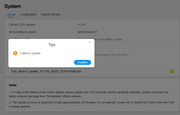
I gave this a shot and the fails.

Image

A few issues:
1. Fails with no real error other than failed to update. A prescriptive error would go a long way here
2. This update version was no where to be found by searching your site. A central repository would be helpful here.
3. The device itself checks for updates and thinks that it's running the latest version, so clearly this is also broken.

Re: Windows users cannot use SMB file service to access?

Posted: 14 Feb 2025, 21:55
by Gremlin
You cannot 'update' from 5.1.67 to 5.0.(whatever) since that is a backward step. It was suggested you INSTALL 5.0.176 which would require manual download of the relevant installation package (*.ins) and a re-installation of the operating system.

Re: Windows users cannot use SMB file service to access?

Posted: 15 Feb 2025, 05:15
by Jutu
Thanks for the suggestion but I upgraded from that version which also did not work.

Re: Windows users cannot use SMB file service to access?

Posted: 16 Feb 2025, 21:40
by Jutu
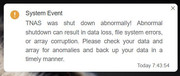
In the interest of coming full circle on this.....I started coping data from the device on Friday and didn't get a chance to check the progress over the weekend until today (Sunday). At some point between the system shutdown (not good, clearly) and as I am going through to see what was copied and where I needed to start from again I checked the shares I created and low and behold it works. I made no changes since Friday after I'd rebooted the system several times and I even shut it down at least twice since this debacle started (moved it from the server closet next to me). Now suddenly it started working again!?!?!?!?

While I'm happy that it's now working I am definitely migrating away from this brand never to return. I find it wholly unacceptable to have such a major issue for so long with no answers and zero support.

I'm reminded of the saying, you can pay up front or take your chances and pay on the back end. While this product was cheap compared to other manufactures it was not worth the headache and potential risk of losing data. I'd much rather spend money on another brand and eliminate these risks from the equation.


Image

Re: Windows users cannot use SMB file service to access?

Posted: 17 Feb 2025, 09:48
by TMzethar
Jutu wrote: 16 Feb 2025, 21:40
I apologize if I didn't explain it very precisely and in detail. I hope you can see it now.
The installation method you used previously was incorrect.
This is the method for (re)installing TOS: viewtopic.php?t=423