Page 5 of 7
Re: TOS 7.0.0612 Beta (X86) is Released for Update
Posted: 30 May 2026, 14:03
by snapsh0t
A couple of things I've reported before but still present:
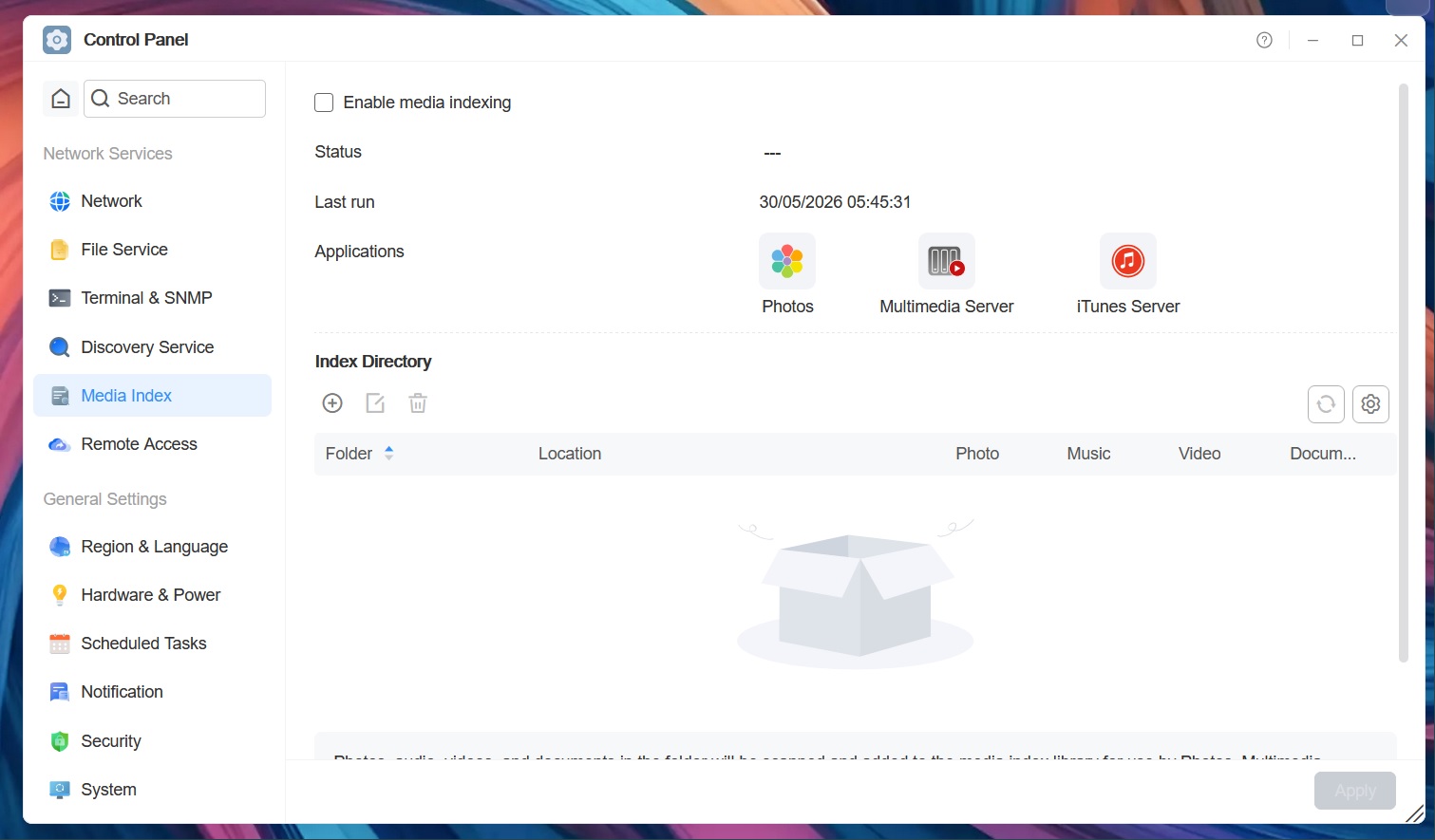
Why is there a last run time for media indexing when it's disabled? If the status is shown as --- then shouldn't the last run be the same?
The time shown is for the correct time zone of GMT but we're on British Summer Time so it was actually 06:45 which the system time shows correctly.
Re: TOS 7.0.0612 Beta (X86) is Released for Update
Posted: 30 May 2026, 16:58
by yxyx999
Hi, i am not sure if this a bug or a user error. I started with a fresh install of TOS 6 und upgraded to 7.
I am having like an other user the issue that a docker container is unable to move a file in the container directory. Creating the directory through the compose.yaml was working. Also I encountered an issue that I was unable to drag and drop a file into a shared folder from a pc. it just shows the calculation pop up but did nothing. When I copied the same files to the homes folder, it was uploading the files through smb instantly.
When I check the folder permissions of my docker folder it shows under user that the superuser is having read and write access to the folder. But under the user group it shows for the admin group no tick on deny or r/w, r/o or customize. When I tick the box and click Apply, it confirms that the settings saved. When I open in the control panel the user group and look there in the permissions of the admin group, it shows no tick on the docker folder. When I apply the r/w permission here, close the control panel and go back to the shared folder and there in the permissions of the docker folder, the user group admin is again having no tick on any permission.
Re: TOS 7.0.0612 Beta (X86) is Released for Update
Posted: 30 May 2026, 22:12
by EriChan
Thanks for your feedback! We have confirmed that this issue exists and plan to optimize it in future versions. Please stay tuned.
USB mount
Posted: 01 Jun 2026, 18:32
by philou669
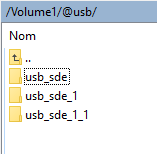
The name of my USB mount changes every time I reboot. It's annoying because I use an Rclone script for my backups. After each reboot, the mount adds a `_1` to the end of the name.
Re: TOS 7.0.0612 Beta (X86) is Released for Update
Posted: 01 Jun 2026, 21:51
by Tessi
An external USB drive (in the sense of a usb case with a SATA DRIVE), as a bootable one, works fine with TOS5\6. This frees up one slot, in F4-425\F2-212. As far as I know, this loophole does not work in TOS 7. Is it possible to leave this "functionality" in TOS7?
Re: TOS 7.0.0612 Beta (X86) is Released for Update
Posted: 02 Jun 2026, 12:38
by kndsk
After deleting the Hyper Cache in F6-424 and rebooting, the TNAS PC displays a “Uninitialized” message during startup and fails to boot normally.
Since then, no matter how many times I reboot, it keeps prompting me to go through the initialization process.
Is there a way to recover the NAS from this state without losing any data?
The system is configured as a RAID+ array with six HDDs, and I do not believe that two HDDs failed before or after the reboot.
Re: TOS 7.0.0612 Beta (X86) is Released for Update
Posted: 02 Jun 2026, 22:46
by CursaYang
kndsk wrote: ↑02 Jun 2026, 12:38
After deleting the Hyper Cache in F6-424 and rebooting, the TNAS PC displays a “Uninitialized” message during startup and fails to boot normally.
Since then, no matter how many times I reboot, it keeps prompting me to go through the initialization process.
Is there a way to recover the NAS from this state without losing any data?
The system is configured as a RAID+ array with six HDDs, and I do not believe that two HDDs failed before or after the reboot.
This may be related to a cache deletion anomaly. Please generate and download the log report in TOS > Technical Support > Issue Reporting, and then send it to our technical support email address (
[email protected]). We will analyze it.
Re: TOS 7.0.0612 Beta (X86) is Released for Update
Posted: 02 Jun 2026, 22:56
by kndsk
CursaYang wrote: ↑02 Jun 2026, 22:46
This may be related to a cache deletion anomaly. Please generate and download the log report in TOS > Technical Support > Issue Reporting, and then send it to our technical support email address (
[email protected]). We will analyze it.
If the installed TOS won't start, how can I download logs from it?
Re: TOS 7.0.0612 Beta (X86) is Released for Update
Posted: 02 Jun 2026, 23:43
by Nitrokalel
TMEmily wrote: ↑28 May 2026, 18:12
Nitrokalel wrote: ↑28 May 2026, 02:17
MikeZhang wrote: ↑27 May 2026, 15:08
While thin-provisioned virtual disks may initially consume much less physical storage space than their configured logical capacity, the VM application currently validates disk allocation against the configured virtual disk size to help avoid potential storage overcommit situations.
If a VM with a 25 TB virtual disk is imported into a storage pool with only 3 TB of available capacity, future guest writes could eventually exhaust the physical storage space. In such cases, this may lead to VM instability, write failures, or possible data integrity risks.
The recommended approach is:
1. Modify the virtual disk size to a reasonable value during import (e.g., reconfigure it to 2 TB).
2. Alternatively, expand the physical storage first before importing, instead of forcibly importing a 25 TB configuration into a 3 TB environment.
You're correct, but you're also wrong. This function is essential for migrating multiple machines. Indeed, it is oversized, but this should trigger an alert, not stop the process. There should be an alert about the oversizing, not a validation. Or, this validation should be used to indicate that the machine is oversized but should still be allowed to be installed for operational reasons. This is a test, but in reality, it's a very useful function that should be included.
Hello,The design logic of the VMs application is as follows: the virtual disk size declared in the virtual machine configuration file is treated by the system as the space that needs to be pre-allocated on the target storage (i.e., pre-allocated space). Therefore, when the available space on the target device (3TB) is less than the virtual disk size specified in the VM configuration (25TB), the system determines that there is insufficient space and blocks the import. This is the normal design behavior of the current version of VMs, not a system error.
pues ese comportamiento esta mal y debe ser corregido, simplemente por el hecho de poder trabajar con maquinas virtales grandes, el caso que planteo es un caso hipotetico, nadie usa una maquina virtual tangrande y dudo que alguien lo haga, lo que no dudo y mi objetivo de prueba es que en estos nases las personas tenemos el espacio jsto, pero, si losuficiente para trabajar, si no ponemos estafuncionalidad, limitan la capacidad de su nas, por lo que insisto, deben implementarla
This behavior is wrong and needs to be corrected, simply because of the ability to work with large virtual machines. The case I'm presenting is hypothetical; nobody uses such a large virtual machine, and I doubt anyone will. What I don't doubt, and what my test objective is, is that on these NAS devices, people have just enough space to work. If we don't implement this functionality, it limits the capacity of their NAS, so I insist, they must implement it.
Re: TOS 7.0.0612 Beta (X86) is Released for Update
Posted: 03 Jun 2026, 01:47
by Nitrokalel
MikeZhang wrote: ↑29 May 2026, 16:00
Do you mean from the first step you start to import to VMs, system should detect if there is enough space on the target device for your virtual disk size specified in the VM configuration, and then system should display a warning message such as "insufficient space"?
That's right, but the important thing is that it allows you to detect and set up the virtual machine.