

Can you give more details? Concessive locking is disabled. I checked the service several times and didn't see anything like that. Maybe I'm doing something wrong.Gremlin wrote: ↑13 Nov 2024, 19:10Further to @TMzethar I was just going to comment that I don't see this issue (Tos5.1.145 or Tos6.0.531 + Windows10 Pro). Maybe it could be something to do with the options enabled/disabled in SMB 'File Service' settings. Opportunistic Locking? Durable Handles? Or, even something in the advanced settings.
(Note: I don't use SMBv1, only SMBv3 - Windows and Nas with SMBv2 Lease enabled on Nas. I have no idea if that makes any difference.)
Failed to access the SMB file service (network drive) on Windows?
Re: Windows users cannot use SMB file service to access?


Re: Windows users cannot use SMB file service to access?
Advanced section is the little down arrow at bottom of main SMB dialogue {File Service > SMB > Advanced}
(or did you mean something different?)
F5-221 TOS7.0.1278 - 4x4TB (Ironwolf) Traid
F2-424 TOS7.0.1278 - 2x500GB nvme (P3) Traid, 2x6TB HDD (HGST) Traid
F2-221 TOS7.0.1278 - 1x3TB Ext4, 1x4TB Btrfs
F2-425+ TOS7.0.1278 - 2x500GB nvme (P3) Traid, 2x6TB HDD (EXOS) Traid
F2-424 TOS7.0.1278 - 2x500GB nvme (P3) Traid, 2x6TB HDD (HGST) Traid
F2-221 TOS7.0.1278 - 1x3TB Ext4, 1x4TB Btrfs
F2-425+ TOS7.0.1278 - 2x500GB nvme (P3) Traid, 2x6TB HDD (EXOS) Traid
Re: Windows users cannot use SMB file service to access?
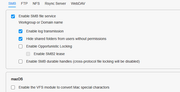
Re: Windows users cannot use SMB file service to access?
I'm no expert in SMB, but I don't see anything there that would cause the issue you are experiencing.
Except perhaps making sure the windows clients are matching protocols, etc.
Except perhaps making sure the windows clients are matching protocols, etc.
F5-221 TOS7.0.1278 - 4x4TB (Ironwolf) Traid
F2-424 TOS7.0.1278 - 2x500GB nvme (P3) Traid, 2x6TB HDD (HGST) Traid
F2-221 TOS7.0.1278 - 1x3TB Ext4, 1x4TB Btrfs
F2-425+ TOS7.0.1278 - 2x500GB nvme (P3) Traid, 2x6TB HDD (EXOS) Traid
F2-424 TOS7.0.1278 - 2x500GB nvme (P3) Traid, 2x6TB HDD (HGST) Traid
F2-221 TOS7.0.1278 - 1x3TB Ext4, 1x4TB Btrfs
F2-425+ TOS7.0.1278 - 2x500GB nvme (P3) Traid, 2x6TB HDD (EXOS) Traid

Re: Windows users cannot use SMB file service to access?
Hello, I ran into a problem with a shared folder. I created a shared folder for the database, it consists of the file data1.dbc and data1.dat. When opening data1.dbc, access to data1.dct is blocked and the database does not open. When working with the same shared folder in Synology, everything is fine. I tried all the SMB parameters - nothing helps. What do you recommend? (TOS 6.0, F8 SSD Plus NAS)


Re: Windows users cannot use SMB file service to access?
Hello! Currently, TOS does not support the direct opening of files in formats such as dbc and dct. To ensure that you can view and edit these files smoothly, we recommend using professional software for the operation. This will better safeguard the integrity and readability of the files.vlkn2 wrote: ↑16 Nov 2024, 23:11 Hello, I ran into a problem with a shared folder. I created a shared folder for the database, it consists of the file data1.dbc and data1.dat. When opening data1.dbc, access to data1.dct is blocked and the database does not open. When working with the same shared folder in Synology, everything is fine. I tried all the SMB parameters - nothing helps. What do you recommend? (TOS 6.0, F8 SSD Plus NAS)
To contact our team, please send email to following addresses, remember to replace (at) with @:
Technical team: support(at)terra-master.com(for technical support)
Service team: service(at)terra-master.com(for purchasing, return, replacement, RMA service)
Technical team: support(at)terra-master.com(for technical support)
Service team: service(at)terra-master.com(for purchasing, return, replacement, RMA service)
Re: Windows users cannot use SMB file service to access?
Hello, thanks for the quick response. Synology also initially had such a problem with smb, even called their hotline, and they solved it (it was 10 years ago). We are currently using Synology 723+ for the database. I was planning to use TM as a file server for a database in another office and then such a bummer. Apparently I will look towards installing xpenology.TMgevin wrote: ↑17 Nov 2024, 17:48Hello! Currently, TOS does not support the direct opening of files in formats such as dbc and dct. To ensure that you can view and edit these files smoothly, we recommend using professional software for the operation. This will better safeguard the integrity and readability of the files.vlkn2 wrote: ↑16 Nov 2024, 23:11 Hello, I ran into a problem with a shared folder. I created a shared folder for the database, it consists of the file data1.dbc and data1.dat. When opening data1.dbc, access to data1.dct is blocked and the database does not open. When working with the same shared folder in Synology, everything is fine. I tried all the SMB parameters - nothing helps. What do you recommend? (TOS 6.0, F8 SSD Plus NAS)
Re: Windows users cannot use SMB file service to access?
Interesting subject. This morning I performed a (non-approved) clean install of 6.0.535 on F2-424 with a single hdd Traid. I can access NAS via TNAS-PC and via browser direct, but SMB does not seem to function. WINDOWS (10Pro) explorer can see tnas on the network, but when trying to access it says it can't access, with no viable diagnostics. All permissions checked and double checked, reboots for both nas and pc. Nada.
F5-221 TOS7.0.1278 - 4x4TB (Ironwolf) Traid
F2-424 TOS7.0.1278 - 2x500GB nvme (P3) Traid, 2x6TB HDD (HGST) Traid
F2-221 TOS7.0.1278 - 1x3TB Ext4, 1x4TB Btrfs
F2-425+ TOS7.0.1278 - 2x500GB nvme (P3) Traid, 2x6TB HDD (EXOS) Traid
F2-424 TOS7.0.1278 - 2x500GB nvme (P3) Traid, 2x6TB HDD (HGST) Traid
F2-221 TOS7.0.1278 - 1x3TB Ext4, 1x4TB Btrfs
F2-425+ TOS7.0.1278 - 2x500GB nvme (P3) Traid, 2x6TB HDD (EXOS) Traid
Re: Windows users cannot use SMB file service to access?
Continued:
After numerous shutdown/restart/reboot (to test other stuff) and running for 24hrs+ Windows decided to ask for credentials and I could access nas folders (as superadmin).
Very Strange.
Update:
One of the items I modified was to turn on MultiMedia Server and Media Indexing on the folders I was wishing to actually see. This, of course enabled MiniDLNA Lightweight DLNA/UpNp-AV server. (Which I can see starting on terminal).
 Can you confirm if this is how Windows might now be able to access (I always turn off the main upnp function.)
After numerous shutdown/restart/reboot (to test other stuff) and running for 24hrs+ Windows decided to ask for credentials and I could access nas folders (as superadmin).
Very Strange.
Update:
One of the items I modified was to turn on MultiMedia Server and Media Indexing on the folders I was wishing to actually see. This, of course enabled MiniDLNA Lightweight DLNA/UpNp-AV server. (Which I can see starting on terminal).
Can you confirm if this is how Windows might now be able to access (I always turn off the main upnp function.)F5-221 TOS7.0.1278 - 4x4TB (Ironwolf) Traid
F2-424 TOS7.0.1278 - 2x500GB nvme (P3) Traid, 2x6TB HDD (HGST) Traid
F2-221 TOS7.0.1278 - 1x3TB Ext4, 1x4TB Btrfs
F2-425+ TOS7.0.1278 - 2x500GB nvme (P3) Traid, 2x6TB HDD (EXOS) Traid
F2-424 TOS7.0.1278 - 2x500GB nvme (P3) Traid, 2x6TB HDD (HGST) Traid
F2-221 TOS7.0.1278 - 1x3TB Ext4, 1x4TB Btrfs
F2-425+ TOS7.0.1278 - 2x500GB nvme (P3) Traid, 2x6TB HDD (EXOS) Traid