

F5-221 here, in perfect order before update. Updated online from previous version. At boot I get 3 e-mail messages like this:
The array in storage pool 1 has been corrupted due to missing required disks! Please check if any disk in your array has failed or been disconnected. For data security, promptly reinsert all required disks and attempt to mount the storage pool.
------------------------------------------------------------
Device name: TNAS
Model: F5-221
TOS version: TOS_X642.0_7.0.0616
Trying to go into the web interface I get:
502 Bad Gateway
nginx/1.18.0 (Ubuntu)
Only hard power down works (10seconds press on power button) and it does the same at the next boot.
TOS 7.0.0616 Beta (X86) is Released for Update


Re: TOS 7.0.0616 Beta (X86) is Released for Update
BTRS error (device dm-0): BTRS: failed to repair meta data on 1314107640000, mirror 1 it cycles through lots of these error codes with "on" number changing to other numbers and just beeps
Re: TOS 7.0.0616 Beta (X86) is Released for Update
thanks for the tips. I have been on TOS 7 for a while and the update was done through the TOS 7 menu system updates. I feel let down as I really only use the TNAS for storage this isn't the first time a update has broken the NASKanuki wrote: ↑03 Jun 2026, 22:09My F5-422 is also having exactly the same issue right now.Tom wrote: ↑03 Jun 2026, 06:16 just updated and the TNAS is just beeping every 1 or 2 secs I can't log in and using the windows PC app it shows the NAS ready but can't login. looks to me as if the update didn't work for me F5-221 was running TOS 7.0.612 I think . The constant beeping suggests to me that I need to reinstall the OS ?
I just reinstalled my TOS to 6.0.794 then upgraded to 7.0.0601.
My F5-422 will crashed immediately once I upgraded to 7.0.0616.
Update 1:
I received this message to my email.
"The array in storage pool 1 has been corrupted due to missing required disks! Please check if any disk in your array has failed or been disconnected. For data security, promptly reinsert all required disks and attempt to mount the storage pool."
Update 2:
After 2nd re-installation of TOS6.
I'm not able to see my existing volume and data anymore.
Possibly my data might be lost.
Performing 3rd re-installation at the moment.
Update 3:
After 3rd re-installation. I got back my data.
Lesson learn is "Do Not use the latest TOS offline installation package from other model".
The best way to re-install is to use the online method.
Re: TOS 7.0.0616 Beta (X86) is Released for Update
After the failed upgrade I described above I left the F5-221 on for over a day, it constantly works. I was eventually able to login into the web interface, no app displayed, just a button up and notifications about 3 missing disks (that by all means cannot be missing and were not touched before or after de upgrade). Clicking on View details does nothing.
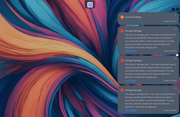
After dismissing the notifications the status of the unit show CPU fully loaded and an evidently wrong disk usage (reading at 15GB/s!).
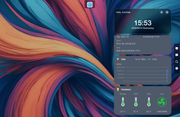
Is there any hope to recovery anything from this? Please advise, thank you!
After dismissing the notifications the status of the unit show CPU fully loaded and an evidently wrong disk usage (reading at 15GB/s!).
Is there any hope to recovery anything from this? Please advise, thank you!
Re: TOS 7.0.0616 Beta (X86) is Released for Update
I removed all the drives but the first one, booted and all went fast, logged in and checked for updates, there is an update with a red ominous message:
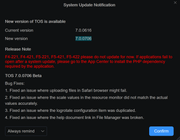
I'll stay away from that v.7.0.706 as instructed but really nervous about the data on the unit :\
PS: wouldn't it be wiser that if a version is known to have issues with some hardware, just to not be offered on that hardware instead of showing messages about not installing?
I'll stay away from that v.7.0.706 as instructed but really nervous about the data on the unit :\
PS: wouldn't it be wiser that if a version is known to have issues with some hardware, just to not be offered on that hardware instead of showing messages about not installing?


Re: TOS 7.0.0616 Beta (X86) is Released for Update
Currently, only some customers are experiencing this issue, and we are still investigating the exact cause. You can reinstall the system; staying on version 7.0.0612 should resolve the problem. Also, what is your BIOS version? This will help us troubleshoot the issue.
To contact our team, please send email to following addresses, remember to replace (at) with @
Technical team: support(at)terra-master.com(for technical support)
Service team: service(at)terra-master.com(for purchasing, return, replacement, RMA service)
Technical team: support(at)terra-master.com(for technical support)
Service team: service(at)terra-master.com(for purchasing, return, replacement, RMA service)
Re: TOS 7.0.0616 Beta (X86) is Released for Update
I tried to reboot adding hard drives one by one. The second one went well, detected and shown green as ok. All the rest three drives in bays 3, 4, 5 are not detected. They were all perfectly fine before the update. I cannot immagine they failed exactly while booting for the new version.
Is there a way to see the BIOS version without having to connect the NAS to a HDMI monitor?
Seen it: BIOS/InitBoot version MAPL0304V17
Is there a way to see the BIOS version without having to connect the NAS to a HDMI monitor?
Seen it: BIOS/InitBoot version MAPL0304V17
Re: TOS 7.0.0616 Beta (X86) is Released for Update
I'd like to fix it by miself and resort to remote session if nothing all works. It seems the issue is worse because no update is possible, one of the missing drives being also a system drive:

Re: TOS 7.0.0616 Beta (X86) is Released for Update
What version of your operating system are you currently running? Until our investigation results are available, we recommend that you reinstall version 7.0.0612.
To contact our team, please send email to following addresses, remember to replace (at) with @
Technical team: support(at)terra-master.com(for technical support)
Service team: service(at)terra-master.com(for purchasing, return, replacement, RMA service)
Technical team: support(at)terra-master.com(for technical support)
Service team: service(at)terra-master.com(for purchasing, return, replacement, RMA service)
Re: TOS 7.0.0616 Beta (X86) is Released for Update
I contacted support as instruncted and tell them you recommended installing 7.0.0612. They told me there is no way to downgrade, just to install TOS6. Was not able to do it since one of the missing drives is the one where home is located:
https://postimg.cc/SYkN9NGq
Please advise.
https://postimg.cc/SYkN9NGq
Please advise.