Page 22 of 30
Re: [ Jellyfin ] The Free Software Media System
Posted: 02 Dec 2024, 23:14
by jbalcitis
jgeorge1983 wrote: ↑01 Oct 2024, 17:37
forget the above, I found it under application user
Hi, new to Terramaster and trying to set up Jellyfin. I am running into a similar permission issue for folders. I have set up a shared folder called Media, created to subfolders called Movies and TV Shows. When I go into the Jellyfin's web interface to create the libraries, I get to the folder selection step and see Volume1/Media but neither of the folders I can created are visible.
From the searches I have been doing to resolve the issue, everything is pointing to user permissions. The Jellyfin user appears to not have permission to access the folders in Volume1/Media. I have checking the permissions on that folder and the only users I see are my admin user and guest. Jellyfin is not there to give permissions to.
Like I have said I am new to Terramaster, Jellyfin, and NAS in general. Can someone please explain where I can find application user or how to give the Jellyfin user the permissions it needs? Explaining it in interface navigation or terminal commands is fine. Any help in this matter would be greatly appreciated. Thank you in advance for the help!
For additional understanding. I am not using docker to run Jellyfin. I installed Jellyfin app directly using the .tpk file from the
community site. I have also installed the dependency apps: ModBase1, ffmpeg, and ffmpeg51. Below is the info of what NAS I am using, OS and version, as well as the version of all the apps.
Tech Info:
Terramaster - f6-424
OS - TOS 6.0.535
Jellyfin Version - 10.10.2
ModBase1 Version - 1.00.20
Ffmpeg Version - 4.4.3.3
Ffmpeg51 Version - 5.1.3.2
Re: [ Jellyfin ] The Free Software Media System
Posted: 03 Dec 2024, 00:07
by bugacha
jbalcitis wrote: ↑02 Dec 2024, 23:14
jgeorge1983 wrote: ↑01 Oct 2024, 17:37
forget the above, I found it under application user
Hi, new to Terramaster and trying to set up Jellyfin. I am running into a similar permission issue for folders. I have set up a shared folder called Media, created to subfolders called Movies and TV Shows. When I go into the Jellyfin's web interface to create the libraries, I get to the folder selection step and see Volume1/Media but neither of the folders I can created are visible.
From the searches I have been doing to resolve the issue, everything is pointing to user permissions. The Jellyfin user appears to not have permission to access the folders in Volume1/Media. I have checking the permissions on that folder and the only users I see are my admin user and guest. Jellyfin is not there to give permissions to.
Like I have said I am new to Terramaster, Jellyfin, and NAS in general. Can someone please explain where I can find application user or how to give the Jellyfin user the permissions it needs? Explaining it in interface navigation or terminal commands is fine. Any help in this matter would be greatly appreciated. Thank you in advance for the help!
For additional understanding. I am not using docker to run Jellyfin. I installed Jellyfin app directly using the .tpk file from the
community site. I have also installed the dependency apps: ModBase1, ffmpeg, and ffmpeg51. Below is the info of what NAS I am using, OS and version, as well as the version of all the apps.
Tech Info:
Terramaster - f6-424
OS - TOS 6.0.535
Jellyfin Version - 10.10.2
ModBase1 Version - 1.00.20
Ffmpeg Version - 4.4.3.3
Ffmpeg51 Version - 5.1.3.2
You need to Share folder first by going to Shared Folders. In there once you shared, in Properties find Permissions tab, select Application User from dropdown menu on the right and give read permissions
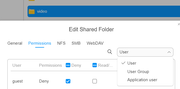
Don't forget to click Replace permissions on subdirectories in General tab
Re: [ Jellyfin ] The Free Software Media System
Posted: 03 Dec 2024, 00:20
by jbalcitis
bugacha wrote: ↑03 Dec 2024, 00:07
You need to Share folder first by going to Shared Folders. In there once you shared, in Properties find Permissions tab, select Application User from dropdown menu on the right and give read permissions
Don't forget to click Replace permissions on subdirectories in General tab
I don't have Application User in that drop down when editing the permissions of the folder. How do I enable that?
Re: [ Jellyfin ] The Free Software Media System
Posted: 03 Dec 2024, 00:24
by jbalcitis
bugacha wrote: ↑03 Dec 2024, 00:07
You need to Share folder first by going to Shared Folders. In there once you shared, in Properties find Permissions tab, select Application User from dropdown menu on the right and give read permissions
Don't forget to click Replace permissions on subdirectories in General tab
I think I am looking in the wrong place. I am in an file explorer and not shared folders under control panel. I feel so dumb, thank you so much for your help!
Re: [ Jellyfin ] The Free Software Media System
Posted: 03 Dec 2024, 03:55
by bugacha
jbalcitis wrote: ↑03 Dec 2024, 00:24
I think I am looking in the wrong place. I am in an file explorer and not shared folders under control panel. I feel so dumb, thank you so much for your help!
yea I'm not sure why they have implemented it like that, very confusing but it is what it is.
Glad it worked.
Re: [ Jellyfin ] The Free Software Media System
Posted: 03 Dec 2024, 14:39
by jameshope
Hi, I'm trying to set up Jellyfin and adding media doesn't have a folder for my section. I have read this forum. And there are two things I see: "Add permissions to media group" or "Add permissions to Jellyfin users" I don't have one of these accounts. Did I miss a step in setup?
Re: [ Jellyfin ] The Free Software Media System
Posted: 04 Dec 2024, 02:11
by outkastm
Which TOS version is running on your NAS?
Re: [ Jellyfin ] The Free Software Media System
Posted: 06 Dec 2024, 21:31
by ZioTibia
No update for tos5? the system tells me that I have to update otherwise I can't use the app
Re: [ Jellyfin ] The Free Software Media System
Posted: 11 Dec 2024, 01:23
by ZioTibia
please update jellyfin for tos 5... jellyfin app not working anymore
Re: [ Jellyfin ] The Free Software Media System
Posted: 12 Dec 2024, 01:55
by outkastm
I will see what I can do