Page 3 of 6
Re: TOS 7.0.0500 Beta (X86) is Released for Update
Posted: 09 Apr 2026, 21:17
by DCCentR
Storage Manager > Volume:
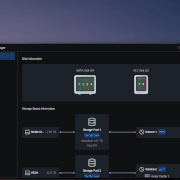
- When I click on “Volume 2 (Storage Pool 2),” I get a pop-up error message saying “Failed to retrieve data.”
- Also, in the properties of “Volume 2 (Storage Pool 2),” the status for “Hyper Cache” is “Not created,” even though in “Storage Manager > Hyper Cache” it shows that it is applied to “Volume 2.”
All of this can be seen in the GIF:
Re: TOS 7.0.0500 Beta (X86) is Released for Update
Posted: 10 Apr 2026, 05:34
by Felix
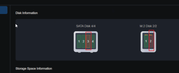
Based on your screenshot, your disk appears to be in an unhealthy state. This could be due to bad sectors, degraded performance, or other underlying issues. Any of these conditions can make it difficult for the system to read data. To ensure data safety, we recommend running a diagnostic check using the system’s built-in S.M.A.R.T. tool to determine if the disk is still fit for data storage.
Re: TOS 7.0.0500 Beta (X86) is Released for Update
Posted: 10 Apr 2026, 11:56
by TMroy
Obviously there are critical error shows on your drive and hyper cache, please check what happened there.
Re: TOS 7.0.0500 Beta (X86) is Released for Update
Posted: 10 Apr 2026, 18:11
by Joesh
Trying to update via the mobile app went smoothly, and so far, no issues have been encountered.
This might be a trivial question: when will the final version be released?
Re: TOS 7.0.0500 Beta (X86) is Released for Update
Posted: 10 Apr 2026, 21:44
by DBa
Update went more or less smoothly (had to power cycle the nas after it went down for a reboot), most things work so far.
Following things do NOT work:
- my ups (APC BE850G2-GR) is not recognized anymore on usb port. Since my F4-423 and a FRITZ!box and a raspi are the only devices powered by this ups, I am not overly worried about the battery time (all clients will die in a power outage scenario way before the ups goes down), but this is still an issue.
The UPS is being listed by lsusb:
Code: Select all
# lsusb
Bus 002 Device 001: ID 1d6b:0003 Linux Foundation 3.0 root hub
Bus 001 Device 003: ID 058f:6387 Alcor Micro Corp. Flash Drive
Bus 001 Device 002: ID 051d:0002 American Power Conversion Uninterruptible Power Supply
Bus 001 Device 001: ID 1d6b:0002 Linux Foundation 2.0 root hub
Cannot confirm the following on my PC, probably related to browser cache: - I am exposing TOS through traefik. This stopped working after upgrade to tos7 (other web services still work though). Needs further investigation, I will provide more specific data on this later tonight.
Re: TOS 7.0.0500 Beta (X86) is Released for Update
Posted: 10 Apr 2026, 22:55
by apfelnico
Update to TOS 7.0.0500 completed successfully. For the first time, I didn’t have to disable hard drive sleep afterward—the setting was preserved. Otherwise, everything is as uneventful as always; great system.
Re: TOS 7.0.0500 Beta (X86) is Released for Update
Posted: 11 Apr 2026, 07:57
by logicalx
I try to update it from NAS control panel but its failed all the time so how i can find the image for manual installation
F4-424 Pro 32GB
Re: TOS 7.0.0500 Beta (X86) is Released for Update
Posted: 11 Apr 2026, 11:54
by TMzethar
logicalx wrote: ↑11 Apr 2026, 07:57
I try to update it from NAS control panel but its failed all the time so how i can find the image for manual installation
F4-424 Pro 32GB
I have sent you a private message with the link to the update package. Please let us know how it goes.
Re: TOS 7.0.0500 Beta (X86) is Released for Update
Posted: 11 Apr 2026, 11:57
by TMzethar
Joesh wrote: ↑10 Apr 2026, 18:11
This might be a trivial question: when will the final version be released?
Sorry, there is currently no exact time.
Re: TOS 7.0.0500 Beta (X86) is Released for Update
Posted: 11 Apr 2026, 14:14
by TMzethar
DBa wrote: ↑10 Apr 2026, 21:44
- my ups (APC BE850G2-GR) is not recognized anymore on usb port. Since my F4-423 and a FRITZ!box and a raspi are the only devices powered by this ups, I am not overly worried about the battery time (all clients will die in a power outage scenario way before the ups goes down), but this is still an issue.
The UPS is being listed by lsusb:
Code: Select all
# lsusb
Bus 002 Device 001: ID 1d6b:0003 Linux Foundation 3.0 root hub
Bus 001 Device 003: ID 058f:6387 Alcor Micro Corp. Flash Drive
Bus 001 Device 002: ID 051d:0002 American Power Conversion Uninterruptible Power Supply
Bus 001 Device 001: ID 1d6b:0002 Linux Foundation 2.0 root hub
I'm sorry to hear that UPS isn't working with TNAS.
I recommend that you contact
www.terra-master.com Live Chat (Talk to an Agent) to schedule a remote inspection by an engineer.
Please include your forum username and a link to this forum post.
If you don't have time, you can try generating a system report and sending it to the technical support email address for analysis.
(Support and Help > Report Issues)