Page 3 of 5

Re: TOS 7.0.0448 Beta (X86) is Released for Update

Posted: 19 Mar 2026, 18:48
by rfbjr
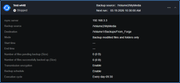
The issue when editing a rsync job, it would show a /mnt path instead of the actual source path has been fixed.
Other minor issues are still there.
Time is an issue since the time change. Note: it does run at the correct time, in this case at the value at the bottom of the screen.
Job start/end dates are not filled in at all (Again only for recurring tasks)
The number of file pending, I get it that it can't be calculated until the recurring task starts.
I will post the updated screen shot after today's first run occurrence.

Image

Re: TOS 7.0.0448 Beta (X86) is Released for Update

Posted: 19 Mar 2026, 22:07
by rfbjr
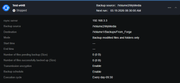
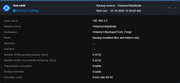
Screen shots from above while recurring job was running and then ended. Next run time is now correct.

Image


Image

Re: TOS 7.0.0448 Beta (X86) is Released for Update

Posted: 20 Mar 2026, 03:27
by Nitrokalel
RyanYang wrote: 17 Mar 2026, 10:59
:oops: :oops: :oops:
Estimado equipo de soporte,
Espero se encuentren bien.
Me dirijo a ustedes para expresar una situación urgente relacionada con el estado actual de TOS 7 (Beta) y sus capacidades de virtualización. Entiendo perfectamente que TOS 7 se encuentra en fase beta y que algunas aplicaciones dentro del sistema también están en desarrollo y pueden presentar errores o inestabilidad. Sin embargo, muchos usuarios —incluyéndome— ya estamos utilizando estas funcionalidades en entornos reales, por lo que es indispensable que estos problemas se atiendan con prioridad.
Soy usuario de TerraMaster desde la versión TOS 5, y durante todo este tiempo he utilizado la aplicación de VirtualBox sin mayores inconvenientes. En TOS 7, dicha aplicación ha sido eliminada, lo cual me lleva a mi primera solicitud:
1. Solicito que se restablezca la aplicación de VirtualBox en TOS 7.
Entiendo que puede existir conflicto con su nueva aplicación “VMs”, pero considerando que esta última aún se encuentra en fase beta y no es estable, eliminar una herramienta funcional afecta directamente la operatividad. Una posible solución sería implementar un interruptor o selector que permita utilizar VirtualBox o la aplicación VMs (una u otra, pero no ambas al mismo tiempo), brindando así flexibilidad al usuario.
Esto me lleva al segundo punto, que considero el más crítico:
2. La aplicación VMs presenta problemas graves de estabilidad:
La importación de máquinas virtuales en formato OVF (versión 1 o 2) frecuentemente se congela o deja de responder.
En ocasiones, el sistema no detecta correctamente el almacenamiento durante el proceso.
La importación de máquinas virtuales resulta inconsistente y prácticamente depende de la suerte.
Además, incluso cuando una máquina virtual logra importarse correctamente y funcionar:
No existe una forma confiable de respaldarla.
No hay soporte para snapshots.
La exportación nuevamente a formato OVF provoca que la aplicación se congele y no genere correctamente el archivo.
Esto representa un riesgo muy importante: una vez que las máquinas virtuales se migran (si es que se logra), quedan prácticamente “encerradas” en el sistema, sin posibilidad segura de respaldo o movilidad. Esto va en contra del objetivo principal de la virtualización, que es ofrecer portabilidad, redundancia y flexibilidad entre distintos hosts.
Para que la virtualización sea una funcionalidad realmente útil, debe incluir:
Importación y exportación confiable
Soporte para snapshots
Capacidades de respaldo
Movilidad entre distintos hosts
Sin estos elementos, la funcionalidad no solo pierde valor, sino que representa un riesgo para los usuarios que dependemos de ella.
Por lo anterior, les solicito de manera atenta pero urgente que estas problemáticas sean atendidas a la brevedad. Mejorar la estabilidad y funcionalidad de la virtualización en TOS 7 incrementará significativamente el valor de su hardware y la confianza de sus usuarios.
Agradezco mucho su atención y quedo en espera de su pronta respuesta.
Atentamente,
Ángel Gustavo Navarro Medrano


Dear Support Team,
I hope this message finds you well.
I am writing to express a matter of urgency regarding the current state of TOS 7 (Beta) and its virtualization capabilities. I fully understand that TOS 7 is still in a beta phase, and that certain applications within it are also under development and may contain bugs or instability. However, given that many users—myself included—are already relying on these features in real-world environments, it is critical that these issues are addressed as soon as possible.
I have been a TerraMaster user since TOS 5, and over the years I have consistently used the VirtualBox application without major issues. In TOS 7, however, this application has been completely removed. This leads me to my first request:
1. Please restore VirtualBox support in TOS 7.
I understand that it may conflict with your newer “VMs” application, but since the VMs app is still in beta and not yet stable, removing a working alternative significantly impacts usability. A possible solution would be to implement a toggle or switch that allows users to choose between VirtualBox or the native VMs application (but not both simultaneously). This would provide flexibility while maintaining system integrity.
This brings me to my second and most critical concern:
2. The current VMs application is not stable and presents serious issues:
Importing virtual machines in OVF format (version 1 or 2) frequently freezes or becomes unresponsive.
In some cases, the system fails to detect storage properly during import.
The success of importing a VM appears to be inconsistent and largely dependent on chance.
Furthermore, even when a virtual machine is successfully imported and running:
There is no reliable way to back up the VM.
Snapshot functionality is unavailable.
Exporting the VM again to OVF often causes the application to freeze and fail to generate a valid file.
This creates a very serious risk: once a VM is migrated into the system (if successful), it becomes effectively locked in, with no safe way to back it up or move it elsewhere. This contradicts the core purpose of virtualization, which is to provide mobility, redundancy, and flexibility across multiple hosts.
For virtualization to be a viable feature, it must include:
Reliable import/export functionality
Snapshot support
Backup capabilities
The ability to migrate workloads between hosts
Without these, the feature not only lacks value but also introduces risk for users who depend on it.
I respectfully but urgently request that these issues be addressed as a top priority. Improving the virtualization capabilities of TOS 7 will significantly enhance the value of your hardware and strengthen user confidence in your platform.
Thank you for your attention and support. I look forward to your response and to seeing these improvements implemented soon.
Kind regards,
Ángel Gustavo Navarro Medrano

尊敬的技术支持团队:

您好!

我写此邮件是为了反映目前 TOS 7(测试版)在虚拟化功能方面存在的紧急问题。我完全理解 TOS 7 仍处于测试阶段,系统中的部分应用也可能存在缺陷和不稳定情况。然而,目前包括我在内的许多用户已经在实际环境中使用这些功能,因此这些问题需要尽快得到解决。

自 TOS 5 版本以来,我一直是 TerraMaster 的用户,并且长期使用 VirtualBox 应用,整体表现稳定可靠。但在 TOS 7 中,该应用已被移除,这带来了较大影响。因此,我的第一个请求是:

1. 请求在 TOS 7 中恢复 VirtualBox 应用。
我理解该应用可能与当前的 “VMs” 应用存在冲突,但考虑到 VMs 仍处于测试阶段且尚不稳定,移除一个已稳定运行的工具会影响用户体验。建议增加一个切换机制,使用户可以选择使用 VirtualBox 或 VMs(两者不可同时运行,但可自由选择其一)。

接下来是我认为最关键的问题:

2. 当前 VMs 应用存在严重稳定性问题:

导入 OVF 格式(版本 1 或 2)的虚拟机时,经常出现卡顿或无响应;

在某些情况下,系统无法正确识别存储;

虚拟机导入过程不稳定,成功与否具有较大的随机性。

此外,即使虚拟机成功导入并正常运行,仍然存在以下问题:

无法可靠地进行备份;

不支持快照(Snapshot)功能;

再次导出为 OVF 时,应用会卡死,且无法正确生成文件。

这带来了严重风险:一旦虚拟机被迁移(如果能够成功),将很难安全地进行备份或迁移到其他主机。这与虚拟化技术的核心目标(可迁移性、冗余性和灵活性)相违背。

一个成熟的虚拟化平台应具备以下基本能力:

稳定可靠的导入与导出功能

快照支持

完整的备份能力

跨主机迁移能力

在缺乏这些功能的情况下,该功能不仅价值有限,还可能对用户造成风险。

基于以上情况,我在此郑重且紧急地请求贵团队尽快修复相关问题。提升 TOS 7 虚拟化功能的稳定性,将显著提高产品价值,并增强用户信任。

感谢您的关注与支持,期待您的尽快回复。

此致
敬礼!

Ángel Gustavo Navarro Medrano
Re: TOS 7.0.0448 Beta (X86) is Released for Update

Posted: 20 Mar 2026, 03:51
by Nitrokalel
RyanYang wrote: 17 Mar 2026, 10:59 Target Users:
Users currently running TOS 7.0.0299 beta or later versions.

Note:
If your TOS version is TOS 6, please refer to the TOS 7 beta update instructions first

Here, we sincerely thank user @snapsh0t, @Gremlin, @jpeckinp, @rfbjr, @Joesh, @bartmans99, @danx, @OttO1916 and others, for their sharing and feedback. It is your support that has enabled us to quickly identify and resolve some issues.

Update Notes
Bugs fixed:
1. Fixed an issue where some applications could not be uninstalled via the navigation bar.
2. Fixed an issue where unmounted virtual disk directories could be selected when choosing an rsync directory.
3. Fixed an issue where modifying the IP might cause TNAS.online to fail to automatically reconnect.
4. Fixed an issue where some pop-up prompts displayed empty content.
5. Fixed an issue where the firewall could not be disabled.
6. Fixed an issue where an incorrect prompt appeared when editing permissions for a shared folder that has used up its quota.
7. Fixed an issue where the USB capacity usage threshold notification could not be set properly.
8. Fixed an issue where newly authorized directories for Time Machine did not take effect immediately.
9. Fixed an issue where switching to an LDAP domain after joining an AD domain did not provide any prompt.
10. Fixed other known issues.
11. Optimized the display of some pages in the App Center.

Warning:
1. If the first update prompts a decompression failure, please click update again.
2. To reduce interruptions caused by system notifications, we have readjusted the triggering rules for notifications at various levels and simultaneously modified the default system notification settings. After the update, you will need to reconfigure your personal notification preferences.
3. In the current version, the auto-mount function for USBCopy devices is temporarily unavailable. To ensure the normal use of this feature, please refrain from updating to this version for now and wait until the next version is released and the issue is resolved before upgrading.
4. Due to the kernel architecture upgrade in TOS 7, the VirtualBox application will no longer be compatible with subsequent versions and will be removed from the App Center.
We recommend that users who still rely on this feature migrate their existing virtual machines to the officially supported VMs (Virtual Machines) application to ensure continued functionality.
For migration instructions, please refer to the technical documentation: https://toshelp.terra-master.com/faq/TO ... Box-to-VMs


Important Information:
1.Updating the system theoretically will not affect the data on your hard drives, but for safety, please make sure to back up your data in advance.
2.Before updating, ensure that your primary volume (usually volume1) has at least 3GB of available space. Insufficient storage space may cause the update to fail.
3.After the update, the IP address of your TNAS may change. Please use the TNAS PC desktop client to search for and reconnect to the device.

Update Procedure:
1.Go to TOS > Control Panel > General Settings > System > Update, and click "Check for updates."
2.Follow the prompts to update the system.
3.After the system update is complete, you may need to refresh your browser.
4.The TNAS IP address may change after the update. If you cannot connect to your TNAS using the previous IP address, use the TNAS PC client to search for the new IP address.

Client Downloads:
1. Download TNAS PC 5.2.520 for Windows OS.
2. Download TNAS PC 5.2.520 for macOS (x86 and ARM architectures).
3. Download TNAS PC 5.2.520 for macOS (ARM architecture).
4. Download TNAS PC for Linux.
5. Download TNAS Mobile 3.X for Android.
6. For iOS, experience TNAS Mobile 3.X via: https://testflight.apple.com/join/wFWYABJS.
considero importante señalar que la actualización del kernel no es un argumento suficiente para eliminar VirtualBox. Esta herramienta ha demostrado ser compatible tanto con sistemas antiguos como con arquitecturas modernas, por lo que técnicamente es posible mantener su soporte.

Obligar a los usuarios a migrar a una única herramienta no es una buena práctica, y va en contra de la flexibilidad que ha caracterizado a TerraMaster. Los usuarios deben tener la posibilidad de elegir la solución que mejor funcione para sus necesidades.

Por lo tanto, solicito nuevamente que se habilite VirtualBox, o al menos se ofrezca como una opción alternativa.

Adicionalmente, es fundamental que la aplicación VMs funcione de manera estable antes de sustituir completamente a VirtualBox. Actualmente, presenta fallas críticas, especialmente en la importación y exportación de máquinas virtuales en formato OVF.

Es indispensable que:

La importación y exportación en OVF funcione correctamente

No existan bloqueos o congelamientos durante los procesos

Se garantice la estabilidad general de la aplicación

Quiero dejar claro que no me opongo a la migración hacia una nueva plataforma. Sin embargo, esta transición debe ser progresiva, controlada y basada en una herramienta completamente funcional, no en una aplicación en estado beta con fallas críticas como la actual.

Quedo atento a sus comentarios y a una pronta solución.

However, I would like to point out that the kernel upgrade is not a sufficient justification for removing VirtualBox. This software has proven to be compatible with both legacy and modern systems, so maintaining its availability should be technically feasible.

Forcing users to adopt a single tool is not a good practice and goes against the flexibility that has characterized TerraMaster. Users should be allowed to choose the solution that best fits their needs.

Therefore, I respectfully request that VirtualBox be reinstated, or at least offered as an alternative option.

Additionally, it is critical that the VMs application reaches a stable and reliable state before replacing VirtualBox entirely. At present, it has serious issues, particularly with importing and exporting virtual machines in OVF format.

It is essential that:

OVF import and export work reliably

The application does not freeze or become unresponsive

Overall system stability is ensured

I want to be clear that I am not opposed to migration toward a new platform. However, this transition must be gradual, controlled, and based on a fully functional solution—not on a beta application with critical flaws as it currently stands.

I look forward to your response and a prompt resolution.

然而,我认为仅以内核架构升级作为移除 VirtualBox 的理由是不充分的。VirtualBox 已被证明能够在新旧系统环境中稳定运行,从技术角度来看,继续支持该应用是可行的。

强制用户使用单一工具并不是良好的做法,这也违背了 TerraMaster 一直以来所强调的灵活性。用户应当有权选择最适合自身需求的解决方案。

因此,我再次请求恢复 VirtualBox,或至少将其作为可选方案提供给用户。

此外,在完全替代 VirtualBox 之前,必须确保 VMs 应用具备足够的稳定性。目前该应用存在严重问题,尤其是在 OVF 格式虚拟机的导入与导出方面。

必须确保以下几点:

OVF 的导入与导出功能稳定可靠

操作过程中不会出现卡顿或无响应

应用整体运行稳定

我想明确说明,我并不反对向新平台迁移。但这一过程必须是渐进的、可控的,并基于一个完全成熟、稳定的解决方案,而不是当前这样一个存在严重缺陷的测试版应用。

期待您的回复以及问题的尽快解决。

Re: TOS 7.0.0448 Beta (X86) is Released for Update

Posted: 20 Mar 2026, 03:54
by Nitrokalel
samius wrote: 18 Mar 2026, 00:36 For me -virtualBox regression. None of the machines will start. The error is as follows:

Code: Select all

Exception Object
(
    [message:protected] => The virtual machine 'Guacamole' has terminated unexpectedly during startup with exit code 1 (0x1)
    [string:Exception:private] => 
    [code:protected] => 0
    [file:protected] => /Volume1/@apps/virtualbox/webui/endpoints/lib/vboxconnector.php
    [line:protected] => 3272
    [trace:Exception:private] => Array
        (
            [0] => Array
                (
                    [file] => /Volume1/@apps/virtualbox/webui/endpoints/lib/vboxconnector.php
                    [line] => 952
                    [function] => remote_machineSetState
                    [class] => vboxconnector
                    [type] => ->
                )

            [1] => Array
                (
                    [file] => /Volume1/@apps/virtualbox/webui/endpoints/api.php
                    [line] => 316
                    [function] => __call
                    [class] => vboxconnector
                    [type] => ->
                )

        )

    [previous:Exception:private] => 
)
PARA RECTIVAR TUS MAQUINAS VIRTUALES TIENES QUE VAJAR ALA VERSION 6 Y RESPALDARLAS NO TE RECOMIENDO ACTUALIZES ESTA VERSION O LAS MIGRES YA QUE TUS MAQUINAS QUEDARAN ENCERRADAS Y NO PODRAS MIGRARLAS A NINGUN OTRO SISTEMA

Re: TOS 7.0.0448 Beta (X86) is Released for Update

Posted: 20 Mar 2026, 18:18
by Phil
Nitrokalel wrote: 20 Mar 2026, 03:27
RyanYang wrote: 17 Mar 2026, 10:59
:oops: :oops: :oops:
Estimado equipo de soporte,
Espero se encuentren bien.
Me dirijo a ustedes para expresar una situación urgente relacionada con el estado actual de TOS 7 (Beta) y sus capacidades de virtualización. Entiendo perfectamente que TOS 7 se encuentra en fase beta y que algunas aplicaciones dentro del sistema también están en desarrollo y pueden presentar errores o inestabilidad. Sin embargo, muchos usuarios —incluyéndome— ya estamos utilizando estas funcionalidades en entornos reales, por lo que es indispensable que estos problemas se atiendan con prioridad.
Soy usuario de TerraMaster desde la versión TOS 5, y durante todo este tiempo he utilizado la aplicación de VirtualBox sin mayores inconvenientes. En TOS 7, dicha aplicación ha sido eliminada, lo cual me lleva a mi primera solicitud:
1. Solicito que se restablezca la aplicación de VirtualBox en TOS 7.
Entiendo que puede existir conflicto con su nueva aplicación “VMs”, pero considerando que esta última aún se encuentra en fase beta y no es estable, eliminar una herramienta funcional afecta directamente la operatividad. Una posible solución sería implementar un interruptor o selector que permita utilizar VirtualBox o la aplicación VMs (una u otra, pero no ambas al mismo tiempo), brindando así flexibilidad al usuario.
Esto me lleva al segundo punto, que considero el más crítico:
2. La aplicación VMs presenta problemas graves de estabilidad:
La importación de máquinas virtuales en formato OVF (versión 1 o 2) frecuentemente se congela o deja de responder.
En ocasiones, el sistema no detecta correctamente el almacenamiento durante el proceso.
La importación de máquinas virtuales resulta inconsistente y prácticamente depende de la suerte.
Además, incluso cuando una máquina virtual logra importarse correctamente y funcionar:
No existe una forma confiable de respaldarla.
No hay soporte para snapshots.
La exportación nuevamente a formato OVF provoca que la aplicación se congele y no genere correctamente el archivo.
Esto representa un riesgo muy importante: una vez que las máquinas virtuales se migran (si es que se logra), quedan prácticamente “encerradas” en el sistema, sin posibilidad segura de respaldo o movilidad. Esto va en contra del objetivo principal de la virtualización, que es ofrecer portabilidad, redundancia y flexibilidad entre distintos hosts.
Para que la virtualización sea una funcionalidad realmente útil, debe incluir:
Importación y exportación confiable
Soporte para snapshots
Capacidades de respaldo
Movilidad entre distintos hosts
Sin estos elementos, la funcionalidad no solo pierde valor, sino que representa un riesgo para los usuarios que dependemos de ella.
Por lo anterior, les solicito de manera atenta pero urgente que estas problemáticas sean atendidas a la brevedad. Mejorar la estabilidad y funcionalidad de la virtualización en TOS 7 incrementará significativamente el valor de su hardware y la confianza de sus usuarios.
Agradezco mucho su atención y quedo en espera de su pronta respuesta.
Atentamente,
Ángel Gustavo Navarro Medrano


Dear Support Team,
I hope this message finds you well.
I am writing to express a matter of urgency regarding the current state of TOS 7 (Beta) and its virtualization capabilities. I fully understand that TOS 7 is still in a beta phase, and that certain applications within it are also under development and may contain bugs or instability. However, given that many users—myself included—are already relying on these features in real-world environments, it is critical that these issues are addressed as soon as possible.
I have been a TerraMaster user since TOS 5, and over the years I have consistently used the VirtualBox application without major issues. In TOS 7, however, this application has been completely removed. This leads me to my first request:
1. Please restore VirtualBox support in TOS 7.
I understand that it may conflict with your newer “VMs” application, but since the VMs app is still in beta and not yet stable, removing a working alternative significantly impacts usability. A possible solution would be to implement a toggle or switch that allows users to choose between VirtualBox or the native VMs application (but not both simultaneously). This would provide flexibility while maintaining system integrity.
This brings me to my second and most critical concern:
2. The current VMs application is not stable and presents serious issues:
Importing virtual machines in OVF format (version 1 or 2) frequently freezes or becomes unresponsive.
In some cases, the system fails to detect storage properly during import.
The success of importing a VM appears to be inconsistent and largely dependent on chance.
Furthermore, even when a virtual machine is successfully imported and running:
There is no reliable way to back up the VM.
Snapshot functionality is unavailable.
Exporting the VM again to OVF often causes the application to freeze and fail to generate a valid file.
This creates a very serious risk: once a VM is migrated into the system (if successful), it becomes effectively locked in, with no safe way to back it up or move it elsewhere. This contradicts the core purpose of virtualization, which is to provide mobility, redundancy, and flexibility across multiple hosts.
For virtualization to be a viable feature, it must include:
Reliable import/export functionality
Snapshot support
Backup capabilities
The ability to migrate workloads between hosts
Without these, the feature not only lacks value but also introduces risk for users who depend on it.
I respectfully but urgently request that these issues be addressed as a top priority. Improving the virtualization capabilities of TOS 7 will significantly enhance the value of your hardware and strengthen user confidence in your platform.
Thank you for your attention and support. I look forward to your response and to seeing these improvements implemented soon.
Kind regards,
Ángel Gustavo Navarro Medrano

尊敬的技术支持团队:

您好!

我写此邮件是为了反映目前 TOS 7(测试版)在虚拟化功能方面存在的紧急问题。我完全理解 TOS 7 仍处于测试阶段,系统中的部分应用也可能存在缺陷和不稳定情况。然而,目前包括我在内的许多用户已经在实际环境中使用这些功能,因此这些问题需要尽快得到解决。

自 TOS 5 版本以来,我一直是 TerraMaster 的用户,并且长期使用 VirtualBox 应用,整体表现稳定可靠。但在 TOS 7 中,该应用已被移除,这带来了较大影响。因此,我的第一个请求是:

1. 请求在 TOS 7 中恢复 VirtualBox 应用。
我理解该应用可能与当前的 “VMs” 应用存在冲突,但考虑到 VMs 仍处于测试阶段且尚不稳定,移除一个已稳定运行的工具会影响用户体验。建议增加一个切换机制,使用户可以选择使用 VirtualBox 或 VMs(两者不可同时运行,但可自由选择其一)。

接下来是我认为最关键的问题:

2. 当前 VMs 应用存在严重稳定性问题:

导入 OVF 格式(版本 1 或 2)的虚拟机时,经常出现卡顿或无响应;

在某些情况下,系统无法正确识别存储;

虚拟机导入过程不稳定,成功与否具有较大的随机性。

此外,即使虚拟机成功导入并正常运行,仍然存在以下问题:

无法可靠地进行备份;

不支持快照(Snapshot)功能;

再次导出为 OVF 时,应用会卡死,且无法正确生成文件。

这带来了严重风险:一旦虚拟机被迁移(如果能够成功),将很难安全地进行备份或迁移到其他主机。这与虚拟化技术的核心目标(可迁移性、冗余性和灵活性)相违背。

一个成熟的虚拟化平台应具备以下基本能力:

稳定可靠的导入与导出功能

快照支持

完整的备份能力

跨主机迁移能力

在缺乏这些功能的情况下,该功能不仅价值有限,还可能对用户造成风险。

基于以上情况,我在此郑重且紧急地请求贵团队尽快修复相关问题。提升 TOS 7 虚拟化功能的稳定性,将显著提高产品价值,并增强用户信任。

感谢您的关注与支持,期待您的尽快回复。

此致
敬礼!

Ángel Gustavo Navarro Medrano
Muchas gracias por tomarse el tiempo de escribir comentarios tan detallados. Hemos recibido sus dos solicitudes principales:

1. Respecto a la solicitud de restaurar la aplicación VirtualBox, nuestra estrategia actual se centra en optimizar y mejorar completamente la nueva aplicación "VMs", no en restaurar la arquitectura anterior de VirtualBox. Hemos registrado y transmitido su importante solicitud, y realizaremos una evaluación exhaustiva en una próxima reunión de estrategia de producto.

2. La aplicación VMs presenta graves problemas de estabilidad: La versión actual tiene algunos problemas, y ya estamos trabajando para solucionarlos. Esperamos seguir solucionándolos en versiones posteriores.

Si vuelve a experimentar fallos de importación, bloqueos de exportación o cualquier comportamiento anómalo, genere un informe completo del sistema a través de la sección "Soporte y ayuda" del menú de los Términos de Servicio y envíelo a nuestra dirección de correo electrónico [email protected]. ¡Gracias de nuevo por sus comentarios!


Thank you very much for taking the time to write such detailed feedback. We have received your two core requests:

1. Regarding the request to restore the VirtualBox application, our current strategic focus is on fully optimizing and improving the new "VMs" application, not restoring the old VirtualBox architecture. We have recorded and forwarded your strong request, and will conduct an in-depth evaluation at a subsequent product strategy meeting.

2. The VMs application has serious stability issues: The current version does indeed have some problems, and we are already working on fixing them. We expect to continue fixing these issues in subsequent versions.

If you encounter import failures, export freezes, or any abnormal behavior again, please be sure to generate a complete system report log through the "Support and Help" section of the TOS menu and send it to our email address [email protected]. Thank you again for your feedback!

Re: TOS 7.0.0448 Beta (X86) is Released for Update

Posted: 20 Mar 2026, 21:13
by DanB
Phil wrote: 19 Mar 2026, 15:56
DanB wrote: 18 Mar 2026, 23:21 Running 7.0.0448 on my F8 SSD Plus. Trying to add Cloudflare R2 storage - in CloudSync. The configuration seems to be ok (access + secret key + URL) - but I get the error "failed to connect". Is there any Log?
What is your CloudSync application version number? If it's not the latest version, we recommend updating to the latest version. After updating, be sure to restart the CloudSync service in the Application Center.

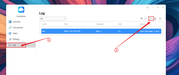
Regarding logs: You can create and export logs in the CloudSync interface for analysis.Please refer to the image.
Image
The version is 3.2.035


Image

Re: TOS 7.0.0448 Beta (X86) is Released for Update

Posted: 20 Mar 2026, 22:04
by DanB
Did some research. Testing credentials with CURL works -> Problem is that the CloudDrive App (3.2.035) does not send "x-amz-content-sha256" header -> which is required for R2.

Any plans to add R2?

Re: TOS 7.0.0448 Beta (X86) is Released for Update

Posted: 21 Mar 2026, 10:04
by CursaYang
DanB wrote: 20 Mar 2026, 22:04 Did some research. Testing credentials with CURL works -> Problem is that the CloudDrive App (3.2.035) does not send "x-amz-content-sha256" header -> which is required for R2.

Any plans to add R2?
Thank you for your test. I will forward this requirement to the product team for their evaluation.

Re: TOS 7.0.0448 Beta (X86) is Released for Update

Posted: 21 Mar 2026, 21:23
by mmalchuk
Updated to 7.0.0448. NAS rebooted silently, web show an error something about connect, F5 in browser didn't help, after NAS booted its looks like all is ok.