Page 3 of 7
Re: TOS 7.0.0408 Beta (X86) is Released for Update
Posted: 06 Mar 2026, 02:05
by luismartin
A question for those of you who have installed TOS7.
Is the transition from hibernation to wake-up faster with TOS7?
I ask because I don't understand why, with TOS6 and RAID5, wake-up takes almost as long during a cold boot—in my case, more than 3 minutes.
When I asked about it a while ago, someone told me it was to reduce power consumption and that I had to start the drives one by one.
However, I've measured the cold boot, and all 12 drives start simultaneously with a peak power consumption of 280W.
That's why I don't understand the explanation for why the drives have to wake up one by one with the wake-up mode and not as a cold boot.
Re: TOS 7.0.0408 Beta (X86) is Released for Update
Posted: 06 Mar 2026, 05:12
by OttO1916
Update of my F2-221 to 7.0.0408:
Update: Operation Failed, Started update again: continued where it left off, with system restart
After reboot/ end of update: 2 Errors (/v2/storage/CheckCapacity and /v2/extstoragedevice/CheckUsbCapacity)
StoragePools/Volumes/Shares survived
After manual Reboot: USB SingleDisk "Raid Corrupted" !!
Mounted StoragePool
Volume corrupted, but OK after few secs
After manual Reboot: USB SingleDisk Raid Corrupted !!
Mounted StoragePool
Volume corrupted, but OK after few secs
Since it is a USB single Disk (SATA in USB-enclosure), RAID Corrupted is utterly nonsense?
I will just delete the StoragePool and build a new one.
Update of my F5-221 to 7.0.0408:
Update: Went fine without errors
After reboot/ end of update: Same 2 Errors (/v2/storage/CheckCapacity and /v2/extstoragedevice/CheckUsbCapacity)
StoragePools/Volumes/Shares survived
After manual Reboot: StoragePools/Volumes/Shares survived
After manual Reboot: StoragePools/Volumes/Shares survived
On this NAS there is an identical USB single Disk (SATA in USB-enclosure) connected, but no issue there.
One observation: After the update storage manager need 5mins to be become responsive. Lots of disk acivity
Update/New Findings:
When I delete the volume and storage pool, after a reboot storage manager STILL tells me that the RAID (it's SingleDisk, ext4, One 4TB HDD in an USB enclosure) in the storage pool is corrupted.
So I connected the disk to a PC, removed all partitions, create a basic one and deleted that.
After connecting it to my NAS, storage manager saw an empty disk and let me create a smaller storage pool and volume.
After the reboot again: RAID is corrupted, and it expects a large size of the storage pool again.
Is there some residual info on my NAS that persists the disk configuration?
How/What should I whack where to make my NAS forget so I can reinstall my HDD?
Re: TOS 7.0.0408 Beta (X86) is Released for Update
Posted: 06 Mar 2026, 11:21
by AlexanderSO
Обновление до .408 прошло успешно. Явных проблем не выявлено.
Однако, начиная с первого обновления до TOS 7 было замечено такое неудобство: при открытии веб-интерфейса в браузере мобильного телефона верхняя панель и иконки на рабочем столе не корректно реагируют на нажатие. При обычном "клике" по иконке появляется её маленькая копия, как-будто её зажали и пытаются перетащить в другое место. При убирании пальца маленькая иконка пропадает. Приложение при этом не запускается. Если иконку зажать, то приложение можно запустить через всплывающее меню, пункт "выполнить". Яндекс и Хуавей браузеры ведут себя одинаково. Чистка кеша не помогает.
Re: TOS 7.0.0408 Beta (X86) is Released for Update
Posted: 06 Mar 2026, 16:05
by Joesh
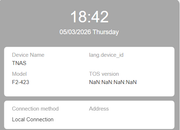
Found something weird
When I open TNAS PC, the version of TOS change.
Re: TOS 7.0.0408 Beta (X86) is Released for Update
Posted: 06 Mar 2026, 17:58
by MikeZhang
Joesh wrote: ↑06 Mar 2026, 16:05
Looks like browser compatibility issue, please test some other browsers to verify it.
Re: TOS 7.0.0408 Beta (X86) is Released for Update
Posted: 06 Mar 2026, 18:07
by MikeZhang
Please record a short video for us to troubleshoot and verify in our lab. for you.
Re: TOS 7.0.0408 Beta (X86) is Released for Update
Posted: 06 Mar 2026, 21:07
by mnewland
T6-423 - Updated fine, no obvious issues after updating.
Re: TOS 7.0.0408 Beta (X86) is Released for Update
Posted: 07 Mar 2026, 05:22
by ARThornicroft
Have completed the update, TNAS PC says it's up, but then sign in to TOS 7.0 via correct IP and nothing loads. I get the background, but nothing else. I've tried for about an hour with nothing loading. Plex is not working.
Re: TOS 7.0.0408 Beta (X86) is Released for Update
Posted: 07 Mar 2026, 08:41
by bypc100
F4-424 的硬盘睡眠模式无法使用
Re: TOS 7.0.0408 Beta (X86) is Released for Update
Posted: 07 Mar 2026, 12:05
by TMzethar
luismartin wrote: ↑06 Mar 2026, 02:05
A question for those of you who have installed TOS7.
Is the transition from hibernation to wake-up faster with TOS7?
I ask because I don't understand why, with TOS6 and RAID5, wake-up takes almost as long during a cold boot—in my case, more than 3 minutes.
When I asked about it a while ago, someone told me it was to reduce power consumption and that I had to start the drives one by one.
However, I've measured the cold boot, and all 12 drives start simultaneously with a peak power consumption of 280W.
That's why I don't understand the explanation for why the drives have to wake up one by one with the wake-up mode and not as a cold boot.
During cold boot, HDDs are controlled by the BIOS/hardware and need to be started up as quickly as possible. When the system is running, HDD wake-up is controlled by the system. Excessively high instantaneous current can affect system stability and data security, so HDDs need to be awakened one by one.