A question for those of you who have installed TOS7.
Is the transition from hibernation to wake-up faster with TOS7?
I ask because I don't understand why, with TOS6 and RAID5, wake-up takes almost as long during a cold boot—in my case, more than 3 minutes.
When I asked about it a while ago, someone told me it was to reduce power consumption and that I had to start the drives one by one.
However, I've measured the cold boot, and all 12 drives start simultaneously with a peak power consumption of 280W.
That's why I don't understand the explanation for why the drives have to wake up one by one with the wake-up mode and not as a cold boot.
TOS 7.0.0408 Beta (X86) is Released for Update
-
luismartin

- Posts: 58
- Joined: 14 Jan 2025, 01:56


Re: TOS 7.0.0408 Beta (X86) is Released for Update
Update of my F2-221 to 7.0.0408:
Update: Operation Failed, Started update again: continued where it left off, with system restart
After reboot/ end of update: 2 Errors (/v2/storage/CheckCapacity and /v2/extstoragedevice/CheckUsbCapacity)
StoragePools/Volumes/Shares survived
After manual Reboot: USB SingleDisk "Raid Corrupted" !!
Mounted StoragePool
Volume corrupted, but OK after few secs
After manual Reboot: USB SingleDisk Raid Corrupted !!
Mounted StoragePool
Volume corrupted, but OK after few secs
Since it is a USB single Disk (SATA in USB-enclosure), RAID Corrupted is utterly nonsense?
I will just delete the StoragePool and build a new one.
Update of my F5-221 to 7.0.0408:
Update: Went fine without errors
After reboot/ end of update: Same 2 Errors (/v2/storage/CheckCapacity and /v2/extstoragedevice/CheckUsbCapacity)
StoragePools/Volumes/Shares survived
After manual Reboot: StoragePools/Volumes/Shares survived
After manual Reboot: StoragePools/Volumes/Shares survived
On this NAS there is an identical USB single Disk (SATA in USB-enclosure) connected, but no issue there.
One observation: After the update storage manager need 5mins to be become responsive. Lots of disk acivity
Update/New Findings:
When I delete the volume and storage pool, after a reboot storage manager STILL tells me that the RAID (it's SingleDisk, ext4, One 4TB HDD in an USB enclosure) in the storage pool is corrupted.
So I connected the disk to a PC, removed all partitions, create a basic one and deleted that.
After connecting it to my NAS, storage manager saw an empty disk and let me create a smaller storage pool and volume.
After the reboot again: RAID is corrupted, and it expects a large size of the storage pool again.
Is there some residual info on my NAS that persists the disk configuration?
How/What should I whack where to make my NAS forget so I can reinstall my HDD?
Update: Operation Failed, Started update again: continued where it left off, with system restart
After reboot/ end of update: 2 Errors (/v2/storage/CheckCapacity and /v2/extstoragedevice/CheckUsbCapacity)
StoragePools/Volumes/Shares survived
After manual Reboot: USB SingleDisk "Raid Corrupted" !!
Mounted StoragePool
Volume corrupted, but OK after few secs
After manual Reboot: USB SingleDisk Raid Corrupted !!
Mounted StoragePool
Volume corrupted, but OK after few secs
Since it is a USB single Disk (SATA in USB-enclosure), RAID Corrupted is utterly nonsense?
I will just delete the StoragePool and build a new one.
Update of my F5-221 to 7.0.0408:
Update: Went fine without errors
After reboot/ end of update: Same 2 Errors (/v2/storage/CheckCapacity and /v2/extstoragedevice/CheckUsbCapacity)
StoragePools/Volumes/Shares survived
After manual Reboot: StoragePools/Volumes/Shares survived
After manual Reboot: StoragePools/Volumes/Shares survived
On this NAS there is an identical USB single Disk (SATA in USB-enclosure) connected, but no issue there.
One observation: After the update storage manager need 5mins to be become responsive. Lots of disk acivity
Update/New Findings:
When I delete the volume and storage pool, after a reboot storage manager STILL tells me that the RAID (it's SingleDisk, ext4, One 4TB HDD in an USB enclosure) in the storage pool is corrupted.
So I connected the disk to a PC, removed all partitions, create a basic one and deleted that.
After connecting it to my NAS, storage manager saw an empty disk and let me create a smaller storage pool and volume.
After the reboot again: RAID is corrupted, and it expects a large size of the storage pool again.
Is there some residual info on my NAS that persists the disk configuration?
How/What should I whack where to make my NAS forget so I can reinstall my HDD?
Last edited by OttO1916 on 07 Mar 2026, 02:07, edited 5 times in total.
F5-221 - TOS7.0.1298 - 5x4TB TRAID - 1x4TB Single USB - 2x4TB HwRAID1 USB
F2-221 - TOS7.0.1298 - 2x3TB JBOD - 1x4TB Single USB
F2-221 - TOS7.0.1298 - 2x3TB JBOD - 1x4TB Single USB
-
AlexanderSO

- Posts: 4
- Joined: 11 May 2024, 13:47

Re: TOS 7.0.0408 Beta (X86) is Released for Update
Обновление до .408 прошло успешно. Явных проблем не выявлено.
Однако, начиная с первого обновления до TOS 7 было замечено такое неудобство: при открытии веб-интерфейса в браузере мобильного телефона верхняя панель и иконки на рабочем столе не корректно реагируют на нажатие. При обычном "клике" по иконке появляется её маленькая копия, как-будто её зажали и пытаются перетащить в другое место. При убирании пальца маленькая иконка пропадает. Приложение при этом не запускается. Если иконку зажать, то приложение можно запустить через всплывающее меню, пункт "выполнить". Яндекс и Хуавей браузеры ведут себя одинаково. Чистка кеша не помогает.
Однако, начиная с первого обновления до TOS 7 было замечено такое неудобство: при открытии веб-интерфейса в браузере мобильного телефона верхняя панель и иконки на рабочем столе не корректно реагируют на нажатие. При обычном "клике" по иконке появляется её маленькая копия, как-будто её зажали и пытаются перетащить в другое место. При убирании пальца маленькая иконка пропадает. Приложение при этом не запускается. Если иконку зажать, то приложение можно запустить через всплывающее меню, пункт "выполнить". Яндекс и Хуавей браузеры ведут себя одинаково. Чистка кеша не помогает.


Re: TOS 7.0.0408 Beta (X86) is Released for Update
Found something weird
When I open TNAS PC, the version of TOS change.
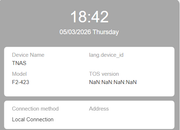
When I open TNAS PC, the version of TOS change.

Re: TOS 7.0.0408 Beta (X86) is Released for Update
Looks like browser compatibility issue, please test some other browsers to verify it.
To contact our team, please send email to following addresses, remember to replace (at) with @
Technical team: support(at)terra-master.com(for technical support)
Service team: service(at)terra-master.com(for purchasing, return, replacement, RMA service)
Technical team: support(at)terra-master.com(for technical support)
Service team: service(at)terra-master.com(for purchasing, return, replacement, RMA service)
Re: TOS 7.0.0408 Beta (X86) is Released for Update
Please record a short video for us to troubleshoot and verify in our lab. for you.
To contact our team, please send email to following addresses, remember to replace (at) with @
Technical team: support(at)terra-master.com(for technical support)
Service team: service(at)terra-master.com(for purchasing, return, replacement, RMA service)
Technical team: support(at)terra-master.com(for technical support)
Service team: service(at)terra-master.com(for purchasing, return, replacement, RMA service)


Re: TOS 7.0.0408 Beta (X86) is Released for Update
T6-423 - Updated fine, no obvious issues after updating.
My TNAS
- Device = T6-423
- RAM = 32gb official Terramaster ram
- Disks = 3 x Seagate IronWolf ST400VN006 4TB
- TOS = 7.0.1225
- BIOS = 5.19
- Mobile App = 3.5.0.81
-
ARThornicroft

- Posts: 13
- Joined: 01 Feb 2026, 22:47

Re: TOS 7.0.0408 Beta (X86) is Released for Update
Have completed the update, TNAS PC says it's up, but then sign in to TOS 7.0 via correct IP and nothing loads. I get the background, but nothing else. I've tried for about an hour with nothing loading. Plex is not working.


Re: TOS 7.0.0408 Beta (X86) is Released for Update
F4-424 的硬盘睡眠模式无法使用

Re: TOS 7.0.0408 Beta (X86) is Released for Update
During cold boot, HDDs are controlled by the BIOS/hardware and need to be started up as quickly as possible. When the system is running, HDD wake-up is controlled by the system. Excessively high instantaneous current can affect system stability and data security, so HDDs need to be awakened one by one.luismartin wrote: ↑06 Mar 2026, 02:05 A question for those of you who have installed TOS7.
Is the transition from hibernation to wake-up faster with TOS7?
I ask because I don't understand why, with TOS6 and RAID5, wake-up takes almost as long during a cold boot—in my case, more than 3 minutes.
When I asked about it a while ago, someone told me it was to reduce power consumption and that I had to start the drives one by one.
However, I've measured the cold boot, and all 12 drives start simultaneously with a peak power consumption of 280W.
That's why I don't understand the explanation for why the drives have to wake up one by one with the wake-up mode and not as a cold boot.
To contact our team, please send email to following addresses, remember to replace (at) with @:
Technical team: support(at)terra-master.com (for technical support)
Service team: service(at)terra-master.com (for purchasing, return, replacement, RMA service)
Technical team: support(at)terra-master.com (for technical support)
Service team: service(at)terra-master.com (for purchasing, return, replacement, RMA service)